
Shopify vs WooCommerce for Dropshipping in 2026: Which Should You Pick?
Comparison · Store platforms
Shopify vs WooCommerce is the first big decision for many new dropshippers. Shopify is a hosted platform: sign up, pick a theme, add apps and start selling. WooCommerce is free, open-source software for WordPress: more control and flexibility, but you run the hosting and upkeep. This guide compares setup, costs to check, apps, control and maintenance for dropshipping, and shows how your ads and landing pages fit either one.
Updated October 2026 · By the CreaX team
Key takeaways
- ✓Shopify is the simpler start: hosting, security, checkout and updates are handled for you, and its App Store covers most dropshipping needs. You pay a monthly plan plus any apps.
- ✓WooCommerce is free, open-source and runs on WordPress: full control of code, data, payments and hosting, but you (or your host) handle setup, updates and security.
- ✓For a first dropshipping store, most beginners find Shopify faster. WooCommerce suits people who already run WordPress or want full ownership.
- ✓Either way, the creatives decide your tests. CreaX makes studio ads, UGC-style video ads and a landing page from a product link, and works in front of either store.
In this guide
TL;DRThe short answer: Shopify vs WooCommerce
If you want to launch a dropshipping store quickly and would rather not think about servers, plugins and updates, start with Shopify. If you already run a WordPress site, enjoy technical control, or want to own every part of your stack, WooCommerce is a strong choice.
Neither platform makes a product sell on its own. Both can import supplier products, take payments and send orders to a supplier through apps or extensions. What decides most dropshipping tests is the product, the offer, the ads and the page shoppers land on. Pick the platform you will actually maintain, then spend your energy on testing.
⚖How we wrote this
Platform 1What Shopify is best at
Shopify is a hosted commerce platform. You sign up, choose a theme and add products, and Shopify runs the hosting, security, checkout and software updates. For dropshippers, the parts that matter most are:
- Speed to launch. No hosting to buy or software to install; a store can be set up in a day.
- The Shopify App Store. Shopify calls it the largest commerce ecosystem. Supplier and dropshipping apps, reviews, upsells and email tools are a few clicks away.
- Built-in checkout and payments. Shopify's own checkout, with Shopify Payments in supported countries and other payment providers.
- A dropshipping flow described on its site: the customer orders, the store sends the order to the supplier, the supplier ships directly to the customer.
- Built-in AI help. Shopify includes Sidekick, its AI assistant, and AI features across the admin.
The trade-off is a monthly subscription, plus paid apps and payment fees that vary by plan and country. You also work within Shopify's rules and its theme and app system. If you are unsure whether you even need Shopify, read do you need Shopify to dropship?.
Platform 2What WooCommerce is best at
WooCommerce describes itself as the open-source commerce platform for WordPress that gives you full control of your checkout, your data and your costs, with any payments, any features and any host. For dropshippers, that means:
- Free core software. The WooCommerce plugin itself is free; you pay for hosting, a domain, and any paid extensions or themes you choose.
- Full control. You own the code and the data, can edit anything, and can move hosts whenever you like.
- Flexible payments. WooCommerce says it comes with card payments, bank transfers, checks and cash on delivery, with many region-specific gateways available, including WooPayments, Stripe and PayPal.
- Hundreds of extensions on the Woo Marketplace, free and paid, plus the wider WordPress plugin world.
- Content and SEO on WordPress. If you plan to grow with blog content, WordPress is built for it.
The trade-off is responsibility. Hosting quality, speed, updates, security, backups and plugin compatibility are on you or your host. More freedom also means more decisions, which can slow a beginner down.
ComparisonSide-by-side: setup, costs, apps and upkeep
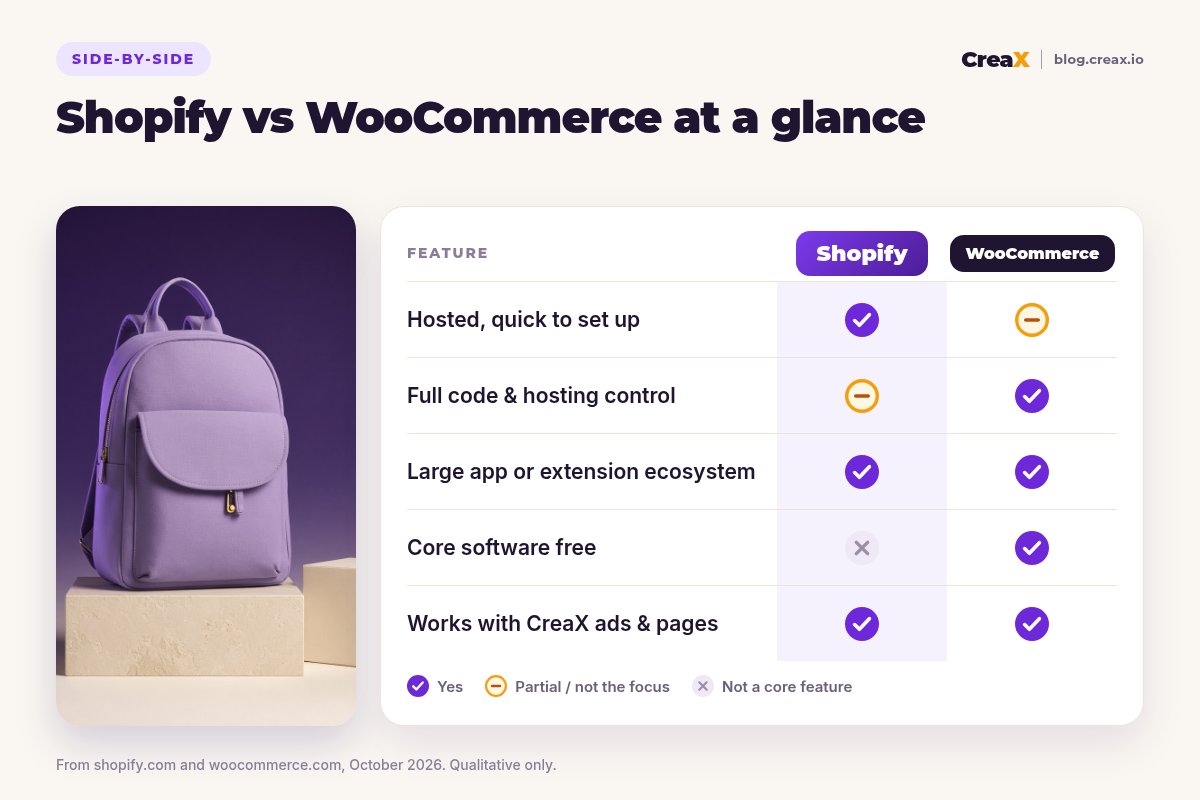
| Shopify | WooCommerce | |
|---|---|---|
| What it is | Hosted commerce platform | Free open-source plugin for WordPress |
| Setup | Sign up, pick a theme, add apps | Get hosting and WordPress, install WooCommerce, configure |
| Hosting and security | Handled by Shopify | You or your host |
| Costs to check | Monthly plan, paid apps, payment fees | Hosting, domain, paid extensions, payment fees |
| Apps and extensions | Shopify App Store | Woo Marketplace and WordPress plugins |
| Control of code and data | Within Shopify's platform | Full |
| Cash on delivery | Available as a manual payment method | Bundled payment option |
| Upkeep | Low: Shopify updates the platform | Higher: updates, backups, plugin conflicts |
| Ads and landing pages from CreaX | Work in front of the store | Work in front of the store |
Summarised from shopify.com and woocommerce.com, October 2026. Confirm current plans, fees and features on each site.
★Compare the total monthly cost, not the headline price
Platform 1 winsWhere Shopify is the better pick
Shopify
Strengths
- +Fastest path from idea to live store
- +No hosting, security or software updates to manage
- +Large app ecosystem for dropshipping tools
- +Built-in checkout and AI assistant
- +Easy to hand over to staff or a VA
Trade-offs
- −Monthly subscription plus paid apps
- −Payment fees vary by plan and provider
- −Less low-level control than self-hosted
WooCommerce
Strengths
- +Free core software
- +Full control of code, data and hosting
- +Flexible payments, including cash on delivery
- +Great for content-led stores on WordPress
Trade-offs
- −You manage hosting, updates and backups
- −More set-up decisions for beginners
- −Plugin conflicts can break things
Shopify is usually the better pick for a first dropshipping store, for people who want to test many products quickly, and for anyone who does not want to be the store's IT department.
Platform 2 winsWhere WooCommerce is the better pick
WooCommerce is the better pick when:
- You already run a WordPress site with traffic and want to add products to it.
- You want full ownership of your code, data and hosting, with no platform lock-in.
- You need custom features or checkout changes that a hosted platform would limit.
- You are comfortable with WordPress, or have a developer you trust.
- Your market relies on payment methods that WooCommerce's gateways cover well, such as cash on delivery.
⚖Honest take
Ads and pagesWhat creatives each one needs (and where CreaX fits)
The store platform handles products, checkout and orders. It does not make your ads. Whichever you pick, each product test needs the same things:
- Two or three ad angles (reasons someone would buy).
- Static ads in the sizes your channels use, such as 1:1, 4:5 and 9:16.
- A short vertical video for TikTok, Reels and Shorts.
- A product page or landing page that repeats the ad's promise.
This is where CreaX fits, on top of either platform. Paste a product link or upload a product image and, in about 60–120 seconds, you get studio ad creatives in five ad styles (Classic, Humble Orbit, Punch, Luxe and Meta Feed) and four sizes (1:1, 3:4, 4:5 and 9:16), UGC-style video ads of 18, 30 or 45 seconds, and a publish-ready landing page at Simple, Detailed or Advanced level. CreaX also includes a multi-tenant store if you want to test without setting up either platform first.
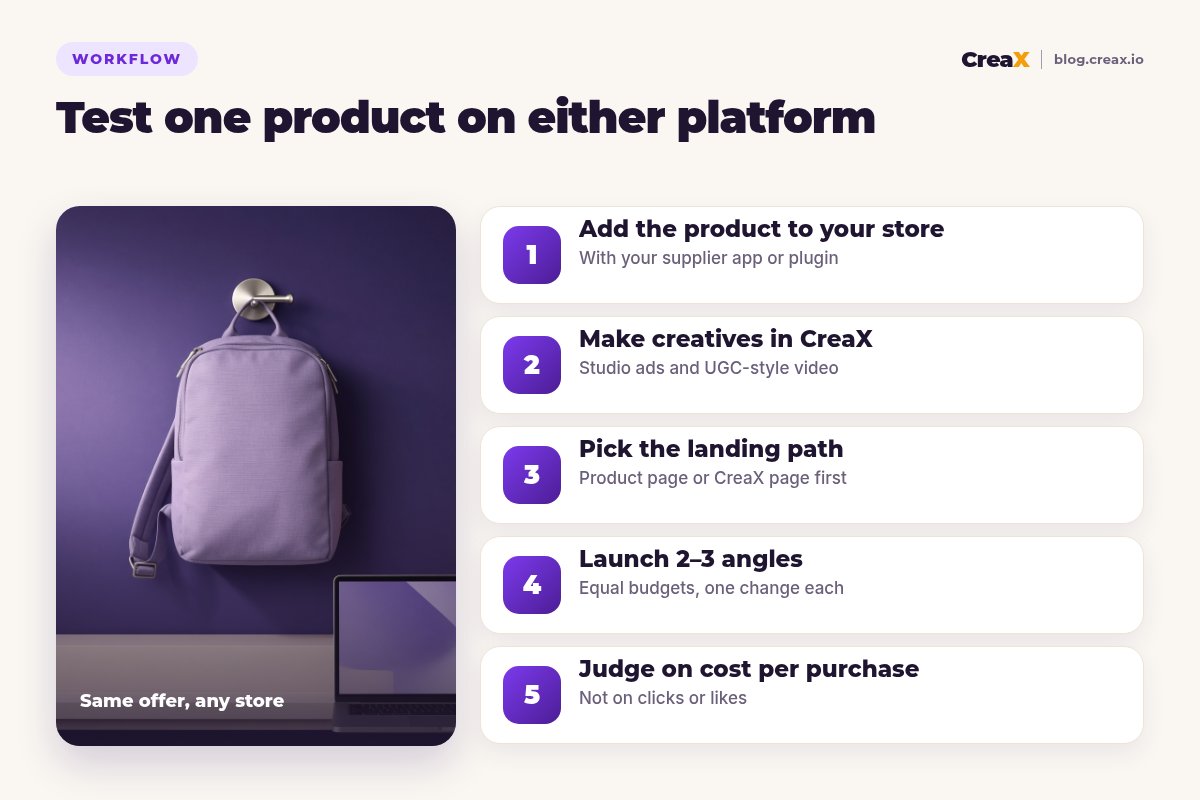
Most sellers keep their store for checkout and use CreaX for the creative work in front of it. See CreaX for Shopify sellers and CreaX for WooCommerce stores for each workflow, and check in the app for any specific integration before relying on it.
Make the ads for your next dropshipping test
Paste a product link and get studio ads, UGC-style video ads and a landing page that work with Shopify or WooCommerce.
ExampleWorked example: one product on both
Say you want to test a compact canvas backpack with three angles: “fits a laptop, still looks small”, “one bag for work and weekends” and “a simple gift for a student”.
| Step | On Shopify | On WooCommerce |
|---|---|---|
| Add the product | Import with a supplier app from the App Store | Import with a supplier plugin or add it manually |
| Product page | Theme product template, edited in the theme editor | WooCommerce product page in your WordPress theme |
| Creatives | CreaX: statics and 18s videos per angle | Same CreaX creatives |
| Landing path | Shopify product page, or a CreaX page first | WooCommerce product page, or a CreaX page first |
| Checkout | Shopify checkout | WooCommerce checkout with your gateway |
| What you judge | Cost per purchase per angle | Cost per purchase per angle |
An illustrative plan, not a result.
Notice that only the first two rows really change. The test itself, the angles, creatives and decision rule, is identical. That is why the platform matters less than most beginners think. Our guide to launching a dropshipping product test in 24 hours walks through the rest.
Run the same test on any store
One product link, about 60–120 seconds: studio ads, UGC-style video and a landing page for Shopify or WooCommerce.
Choose with confidenceDecision checklist
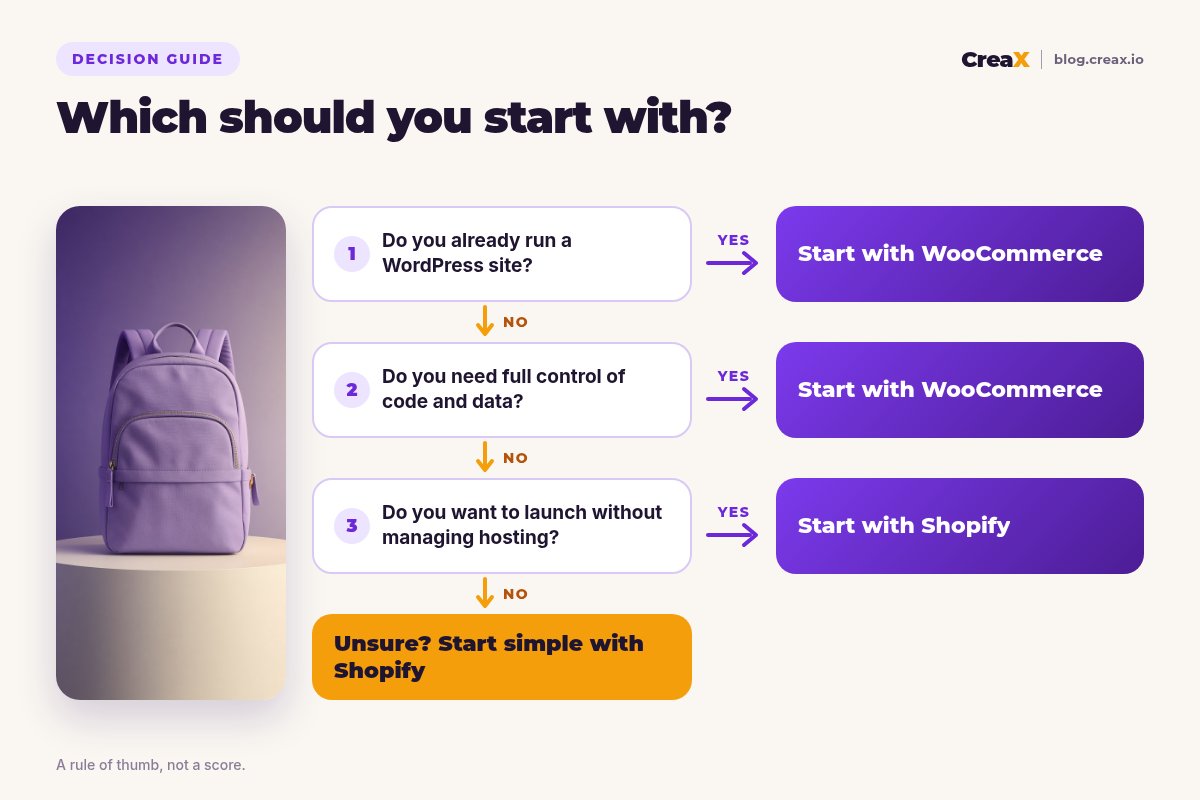
Answer these before you build
- ✓Do you want to avoid managing hosting and updates? Shopify.
- ✓Do you already have a WordPress site? WooCommerce adds a store to it.
- ✓Do you need full control of code and data? WooCommerce.
- ✓Do you want the quickest first launch? Shopify.
- ✓Is cash on delivery central to your market? Check both; WooCommerce bundles it.
- ✓Have you priced the full stack? Plan or hosting, apps, theme and fees.
Still choosing tools around the store? Our list of the best dropshipping tools covers suppliers, research and more.
FAQFrequently asked questions
Q.Is Shopify or WooCommerce better for dropshipping beginners?
Q.Is WooCommerce really free?
Q.Can I switch from WooCommerce to Shopify later, or the other way?
Q.Do I need a store platform to test a product?
Q.Do CreaX ads work with both platforms?
Q.Which platform is better for SEO?
Ready to test your first product?
Paste a product link and get the studio ads, UGC-style video ads and landing page for your first test, on any store.
This guide is published by CreaX. We describe Shopify and WooCommerce from their own public websites as of October 2026, avoid invented benchmarks or prices, and recommend checking each platform's site for current plans, fees and features.