
Google Shopping vs Meta Ads: Where Should a New Store Spend First?
Comparison · Ad platforms
Google Shopping vs Facebook ads (Meta Ads) is the first big budget decision most new stores face. One shows your product to people who are already searching for it; the other puts it in front of people who did not know they wanted it yet. This guide explains how each works, what creatives each one needs, and how to decide where your first ad dollars should go.
Updated October 2026 · By the CreaX team
Key takeaways
- ✓Google Shopping (Shopping and Performance Max campaigns) uses your Merchant Center product feed to show your product photo, title, price and store name to people searching on Google.
- ✓Meta Ads shows your video and image ads in Facebook, Instagram and other Meta placements to people who are not searching, so the creative does most of the selling.
- ✓Start with Google Shopping when people already search for your product type. Start with Meta Ads when the product needs a demo, a story or an impulse moment to sell.
- ✓Whichever you pick, the product page and the creatives decide whether the clicks turn into sales. Fix those before you add budget.
In this guide
TL;DRThe short answer: Google Shopping vs Meta Ads
Both platforms can sell products profitably. They just work on a different moment in the buyer's day. On Google, the buyer types something like “linen bedding set” or “stainless steel water bottle”, and your Shopping ad appears with a photo and a price. The demand already exists; you compete to catch it. On Meta, the buyer is scrolling Reels or a feed, and your ad interrupts them. There is no search, so the ad has to create the want from nothing.
That gives a simple rule. If your product is something people already look for, Google Shopping usually lets a new store reach ready buyers with a clean feed and good photos. If your product is new, unusual or needs to be shown working, Meta Ads is usually the better first step, because a good video can explain it in a few seconds. Many stores end up running both, but a small first budget is easier to read on one platform.
⚖No platform is “better” in general
Search intentWhat Google Shopping is best at
Google Shopping ads are built from your product data, not keywords. You upload products to Google Merchant Center (by feed, by connecting your store platform, or from structured data on your site), then promote them in Google Ads with a Shopping campaign or a Performance Max campaign. Google matches searches to your products using the titles, descriptions, categories and other attributes in that feed.
According to Google's help pages, a Shopping ad shows a product photo, title, price, shop name and more, so the shopper sees what they are getting before they click. That is the main strength: the click is already qualified on price and look.
- It catches existing demand. People who search a product type are often comparing options and close to buying.
- It runs on a feed. Once your Merchant Center data is clean, you are not writing new ads for each product.
- Free listings come with it. Google says eligible products can also appear at no cost in free listings across surfaces like the Shopping tab, Search, Images and YouTube.
- Performance Max widens reach. Google describes Performance Max as one campaign that can serve across Search, YouTube, Display, Discover, Gmail and Maps, using your feed plus the image and video assets you give it.
The weakness is the other side of the same coin: if nobody searches for your product, there is little to catch. And because shoppers see your price next to other stores, a weak price or a generic supplier photo is visible in the first second. For help pricing, see our guide on how to price a dropshipping product.
DiscoveryWhat Meta Ads is best at
Meta Ads places your ads across Facebook, Instagram, Messenger, Threads, WhatsApp and Audience Network, depending on your objective and settings. For online sales, Meta recommends Advantage+ sales campaigns, where its AI handles audience, placements and budget across the available inventory. In practice, that means targeting is mostly automatic and the creative is your main lever.
- It creates demand. A short video can show a problem and the product solving it to people who never searched for it.
- It rewards creative testing. New hooks, angles and formats can change results without touching the product or price.
- It suits visual and impulse products. Gadgets, beauty, home and gift products that look great in motion often do well here.
- A feed is optional. You can run catalog ads from a product catalog, but most new stores start with a few hand-made video and image ads.
The weakness: you need a steady supply of good creatives. Ads tire, and a single static image rarely carries a new product on its own. If your ads get views but no sales, our guide on why Facebook ads are not converting walks through the creative fixes.
CompareSide-by-side: audience, formats, creative needs and costs
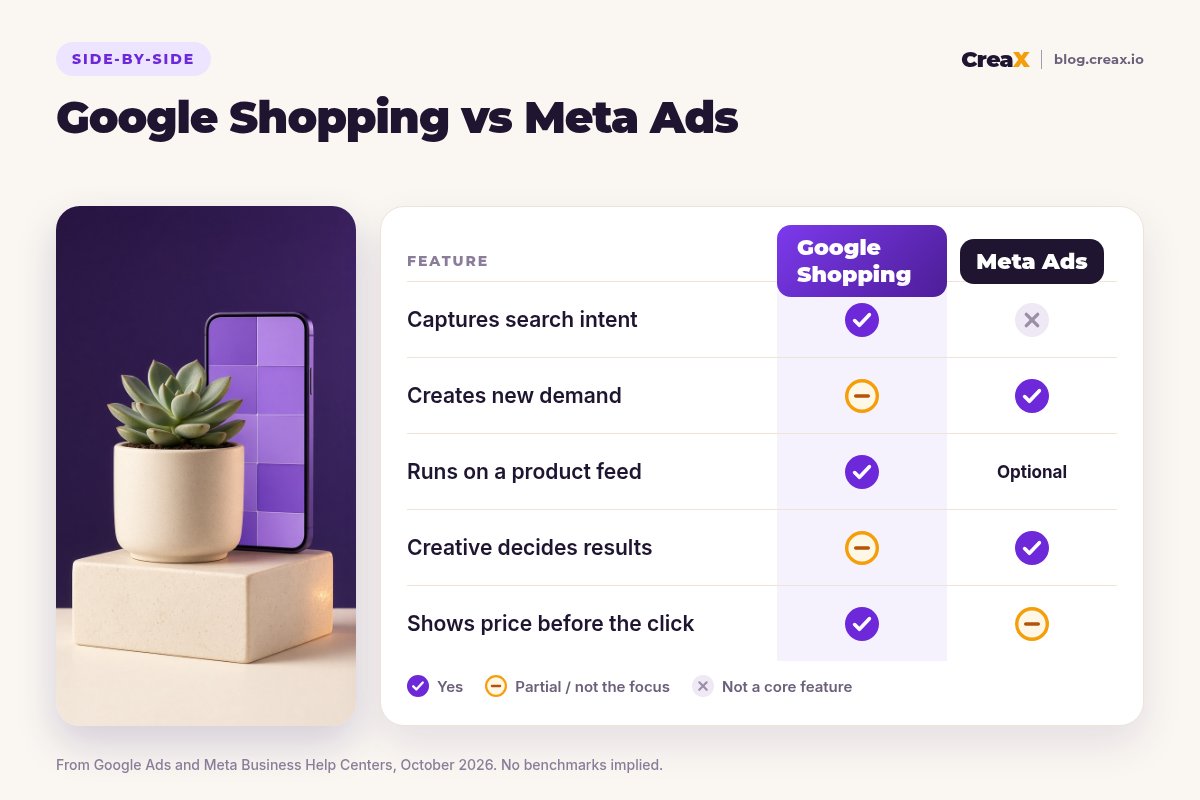
| Google Shopping | Meta Ads | |
|---|---|---|
| Buyer's moment | Searching for a product type | Scrolling feeds, Reels and Stories |
| What you upload | Product feed in Merchant Center (+ assets for Performance Max) | Video and image ads, copy, optional catalog |
| Main lever | Feed quality, price, photos, bids | Creative: hook, angle, format |
| Shows price before the click | Yes, in the ad | Only if you add it or use catalog ads |
| Best for | Products people already search for | New, visual or demo-friendly products |
| Ongoing work | Keep the feed accurate, refine product titles | Make fresh creatives as ads tire |
| Cost | Auction-based, varies by niche and country | Auction-based, varies by niche and country |
A qualitative comparison from Google Ads and Meta Business Help Center pages, October 2026. No benchmark numbers implied.
Notice what is missing from the table: a winner. The platforms reward different strengths. A store with competitive prices and a searchable product has an edge on Google. A store with a product that looks amazing in a ten-second video has an edge on Meta. Both need a product page that does not leak buyers; our guide to what makes a high-converting product page covers that.
Need the creatives for either platform?
Paste a product link into CreaX and get studio product photos, static ads and UGC-style video ads, plus a landing page, in one pass.
Fair playWhere Google Shopping is the better pick
Pick Google Shopping first if most of these are true:
- People search for the product category. Think replacement parts, everyday home goods, branded items, or anything with a clear name.
- Your price is competitive. Shoppers see prices from several stores at once, so being much more expensive is hard to hide.
- You have clean product photos. The main image is most of the ad. A clear product on a plain or simple background usually reads best in a grid.
- You sell many SKUs. A feed scales across a catalog far more easily than hand-made ads for each product.
- You do not want to make video every week. Standard Shopping campaigns run on the feed; you still need good images.
Google is also a good second channel once a product proves itself on Meta: people who saw your video may later search for the product type, and a Shopping listing helps you show up then.
Fair playWhere Meta Ads is the better pick
Pick Meta Ads first if most of these are true:
- Nobody knows the product exists yet. New inventions, clever gadgets and trend products have little search volume to catch.
- It needs to be shown working. If a five-second demo explains it better than a title ever could, video is your advantage.
- Your margin comes from the offer, not the lowest price. Bundles, gifts and story-led products sell on value, not price comparison.
- You can produce creatives regularly. Meta results depend on testing several hooks and angles; see how many creatives to test per product.
- You want fast learning. A handful of creatives can show you which angle people respond to, which then informs your page and your Google titles.
★Use what you learn on one platform on the other
CreativesWhat creatives each one needs (and where CreaX fits)
Here is the practical difference in workload. Google Shopping needs a great main product image, accurate product data and a product page that matches the feed (Google checks things like price and availability against your landing page). If you run Performance Max, Google also asks for image and video assets so it can build ads for YouTube, Display and Discover.
Meta Ads needs a steady stream of creatives: short UGC-style videos, product demos, static ads, in the right sizes for feeds, Stories and Reels. Our guide to ecommerce ad creative sizes lists the formats to prepare, and static vs video ads helps you decide which to make first.
This is where CreaX fits. CreaX is an AI ecommerce creative OS: paste a product link or upload a product image, and in about 60–120 seconds it produces a publish-ready landing page, studio ad creatives (product photos and static ads) and UGC-style video ads, plus a multi-tenant store if you need one. For each platform that means:
| Need | Google Shopping / Performance Max | Meta Ads |
|---|---|---|
| Clean product images | Studio product photos for the feed's main and extra images | Product photos as the base for static ads |
| Static ads | Image assets for Performance Max | Ads in 1:1, 3:4, 4:5 and 9:16 sizes, in styles like Classic, Punch or Meta Feed |
| Video | Video assets for YouTube placements in Performance Max | UGC-style video ads in 18s, 30s or 45s lengths |
| Landing page | Your store's product page must match the feed | A landing page from the same link, so the ad and page tell one story |
How one CreaX kit maps to each platform. Check each platform's current asset specs before you upload.
CreaX does not run or optimize your campaigns, and it does not replace Merchant Center or Ads Manager. It gives you the creatives and the page, so you can spend your time on the test itself.
Get both platforms' creatives from one product link
Studio photos for your feed, static and UGC-style video ads for Meta, and a matching landing page, generated together in about 60–120 seconds.
ExampleWorked example: one product on both
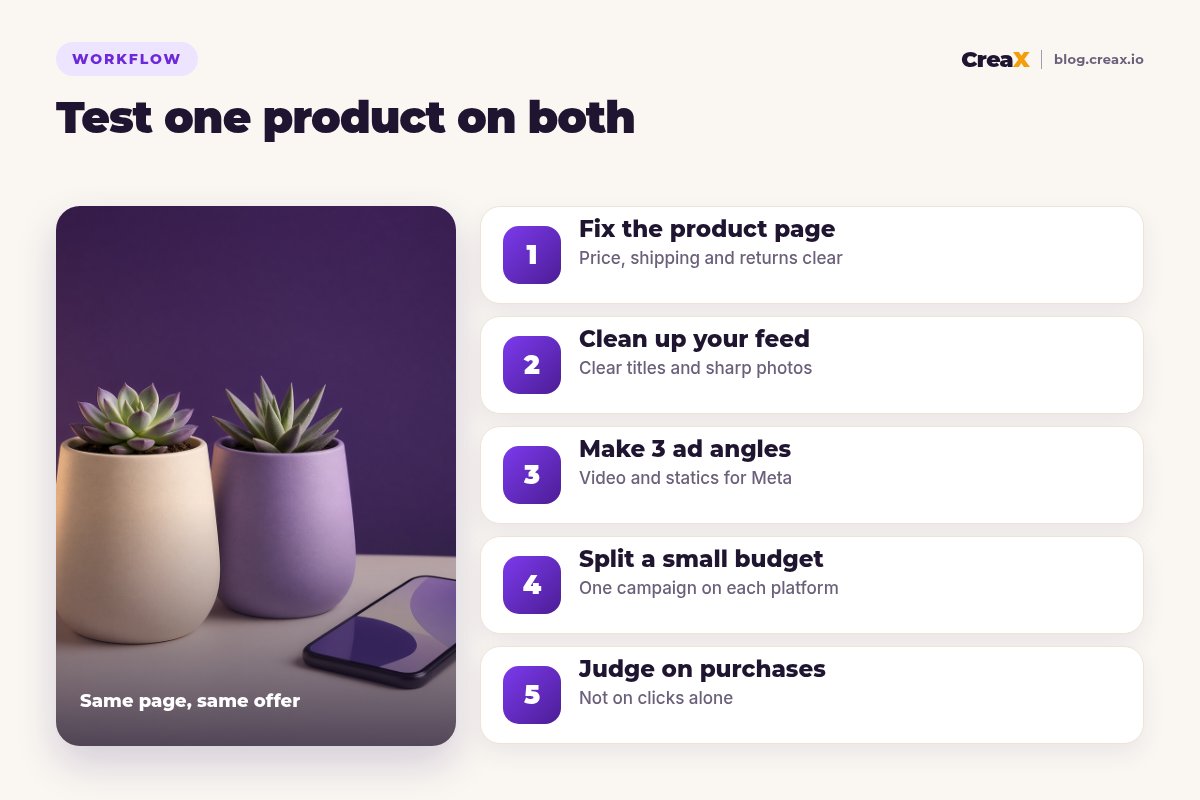
Say you sell a self-watering ceramic plant pot. It is a known product type (people do search for “self-watering planter”), but the self-watering part is much clearer when shown than described. Here is how a first test could look on each platform with the same product page and offer:
| Step | Google Shopping | Meta Ads |
|---|---|---|
| Setup | Add the product to Merchant Center with a clear title such as “Self-watering ceramic planter, 6-inch, cream” | Create a sales campaign pointing to the same page |
| Creative | One clean studio main image, plus a lifestyle image as an extra image | Three angles: “never overwater again”, “for people who travel”, “a gift for plant lovers” |
| Formats | Product photo, title and price in the Shopping ad | One UGC-style video and one static ad per angle, in 4:5 and 9:16 |
| What you learn | Whether searchers click and buy at your price | Which angle makes people stop, click and buy |
| Next move | Improve titles with the winning Meta angle | Make fresh variations of the winning angle |
An illustration of the workflow, not a prediction of results.
If budget allows only one test, this product leans slightly toward Meta first, because the self-watering demo is the selling point. The winning angle then becomes the headline on the page and the wording in the Shopping title, and Google can catch the people who search later.
Before launch, run a quick check of your page: price, shipping time, return policy and photos should all match the ads. If you get add-to-carts but few purchases, the fix is usually on the page, not the platform. Our 24-hour product test guide walks through a full launch.
!Keep claims provable on both platforms
Choose with confidenceDecision checklist
Answer these before you spend
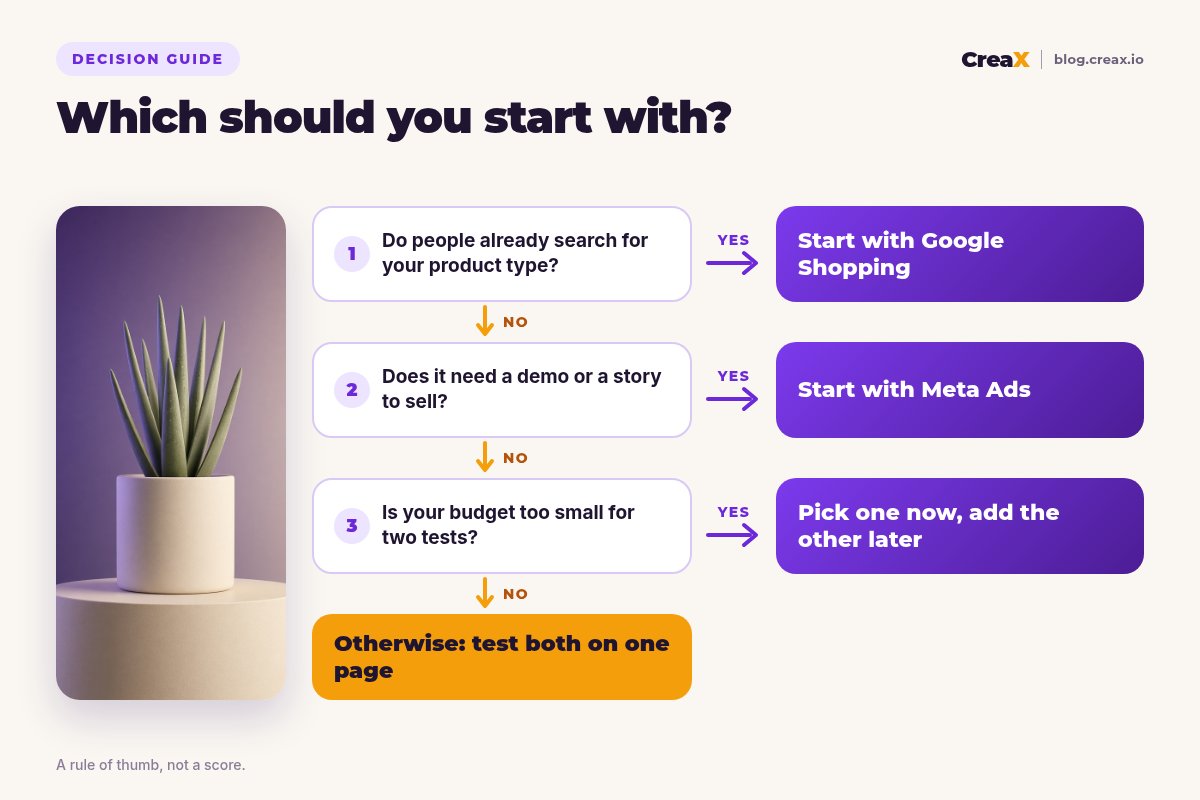
- ✓Do people search for this product type? If yes, Google Shopping is a strong first channel.
- ✓Does it sell better when shown in action? If yes, lean Meta Ads.
- ✓Is your price competitive next to other stores? If not, Google Shopping will expose it; sell on value with Meta instead.
- ✓Can you produce new creatives every week or two? Meta needs it; Google needs it less.
- ✓Do you have a clean, accurate product feed? Google needs it; Meta can work without one.
- ✓Is your product page ready? Neither platform can fix a page that does not convert.
Running both is a fair answer once you have budget. A common pattern is Meta to discover which angle sells, and Google Shopping to catch the searches that follow, with the same product page and creatives behind both.
FAQFrequently asked questions
Q.Is Google Shopping or Facebook ads better for a new store?
Q.Do I need a website to run Google Shopping ads?
Q.Is Performance Max the same as Google Shopping?
Q.Do I need video for Google Shopping?
Q.How much should I spend on each platform?
Q.Can CreaX run my Google or Meta campaigns?
Ready to test your next product?
One product link, about 60–120 seconds, and you have the product photos, ads, videos and landing page for your first test on Google or Meta.
This guide is published by CreaX. We describe Google Shopping, Performance Max and Meta Ads from their own help centers as of October 2026, avoid invented costs or benchmarks, and recommend checking each platform's current policies and specs.