
CreaX vs Zeely: AI Ads for Small Online Sellers Compared
Comparison · AI ads for small sellers
CreaX vs Zeely is a choice between two ways of helping small online sellers advertise. Zeely is an AI ad platform that creates UGC-style videos and image ads and can launch Meta campaigns for you. CreaX is an AI ecommerce creative OS that turns one product link into studio ads, UGC-style video ads, a landing page and a store. Here is what each one does, who should pick which, and when they work well together.
Updated October 2026 · By the CreaX team
Key takeaways
- ✓Zeely covers the ad cycle: AI avatar and UGC-style video ads, image ads and variations, launching Meta campaigns from the app, performance dashboards, an ad library and social posting.
- ✓CreaX covers the creative kit: one product link or image in, studio ad creatives, UGC-style video ads, a publish-ready landing page and a multi-tenant store out, in about 60–120 seconds.
- ✓Pick Zeely if you want to create and run Meta ads from one app and already have somewhere to send the traffic.
- ✓Pick CreaX if you need the page and store as well as the ads, or you test several new products a month.
In this guide
TL;DRThe short answer: CreaX vs Zeely
Both tools aim at the same person: a small seller without a design team who wants ads that look professional. They solve different halves of the problem. Zeely is built around the ad itself and the campaign around it. It makes the creative, helps launch it on Meta and tracks how it performs. CreaX is built around the product launch. It makes the creatives and also the landing page and store the ads send people to.
So ask yourself where you get stuck. If you have a store that converts and struggle to make and run ads, Zeely covers more of that loop. If you have a product but no page, no matching creatives and no time, CreaX builds more of the launch in one pass. If you want both, they can work side by side.
⚖Our bias, stated upfront
The competitorWhat Zeely is (and who it's built for)
Zeely presents itself as an AI ad creative platform to create, launch and scale ads, aimed at small businesses and independent sellers. It runs on the web and as a mobile app. Its public feature list includes:
- Video ads with AI avatars: talking-head and UGC-style videos from a product photo, plus custom avatars or an “AI twin” of yourself.
- Image ads in batches, ad variations to test messages and layouts, and tools to recreate winning ads (your own or references) for your brand.
- Generate from link: paste a product page URL and Zeely pulls in the title, images, price and description.
- Meta campaign launching: Zeely is a Meta Business Partner, and you can launch Meta ads in bulk from the app with templates and automation rules.
- Performance tracking: dashboards that rank ads by spend, CTR, CPA and ROAS and flag creative fatigue.
- Inspiration and organic tools: a library of live ads from other brands, trend-based TikTok and Reels videos, carousel posts and social scheduling.
Its app listing also mentions a simple AI sales page for sellers who don't have an online store yet, plus payment connections. In short, Zeely tries to be the small seller's ad department: creative, launch and reporting in one place.
Our approachWhat CreaX is: the AI ecommerce creative OS
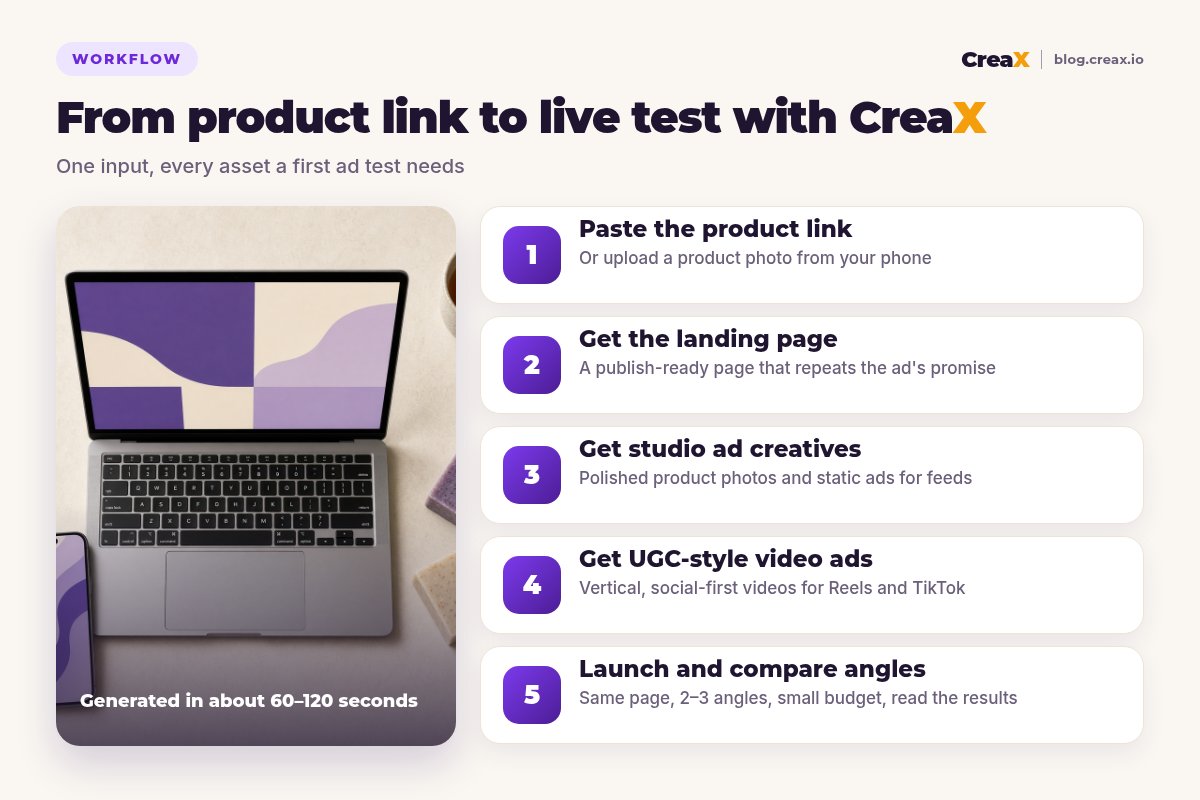
CreaX focuses on everything a product needs before and after the click. Paste a product link or upload a product image, and in about 60–120 seconds CreaX generates:
- Studio ad creatives: polished product photos and static ads for feeds and stories.
- UGC-style video ads: vertical, social-first videos that show and sell the product.
- A publish-ready landing page that repeats the ads' promise, so the click lands on the same message (see how to turn a product link into a landing page).
- A multi-tenant store, so you can run separate stores for different niches or clients (explained in our multi-tenant store builder guide).
It is built for dropshippers, media buyers, affiliates, coaches, ecommerce brands and agencies. CreaX does not launch or manage your ad campaigns; you run the ads in Meta, TikTok or your usual ad tool.
ComparisonSide-by-side: features, outputs and workflow
Here is how the two tools line up on the jobs a small seller has to get done. “Partial” means the tool can help, but it is not what the product is built around.
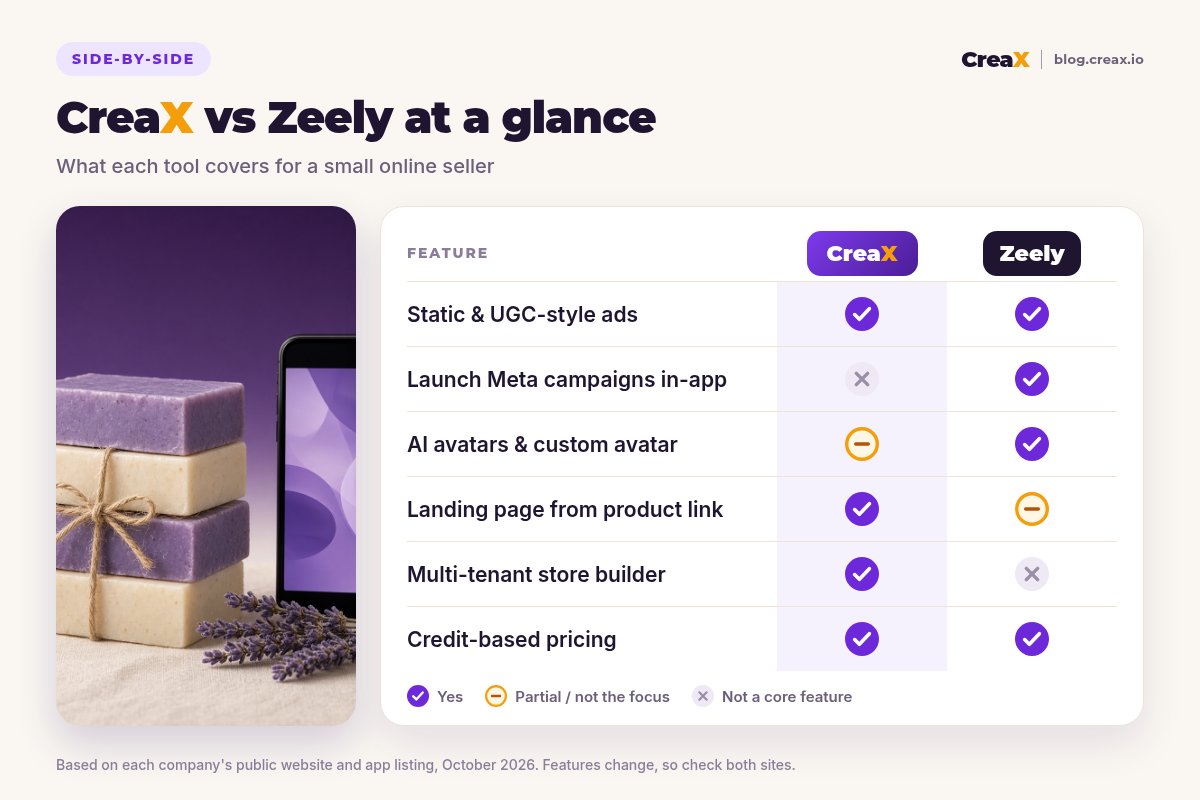
| CreaX | Zeely | |
|---|---|---|
| Core idea | One product link or image → a complete launch kit | Create, launch and scale ads from one app |
| Static ads | Studio ad creatives in the same generation | Image ads, batches and variations |
| Video ads | UGC-style video ads from the product | AI avatar, talking-head and UGC-style videos, custom avatars |
| Campaign launching | Not included; run ads in your ad manager | Launch Meta campaigns from the app, with rules |
| Performance dashboards | Not included | Ranks ads by spend, CTR, CPA, ROAS |
| Landing page | Publish-ready page from the same link | Simple AI sales page for sellers without a store (per its app listing) |
| Store | Multi-tenant store builder | No store builder listed |
| Pricing | Credit plans $4.99–$49.99/month, top-ups $1 per 500 credits | Credit-based plans; check zeely.ai/pricing |
Zeely details summarised from its public website and app listing, October 2026. Always confirm current features and plans on each vendor's site.
Get the ads and the page from one link
Paste a product link and get studio ads, UGC-style video ads and a landing page you can send traffic to today.
What the workflow feels like
With Zeely, you add your product (often from a link), generate video and image ads, choose the ones you like, and launch a Meta campaign from the app. Afterwards you watch the dashboard and make new variations of what works. Where the traffic lands is your store or Zeely's simple sales page.
With CreaX, you paste the product link and review a kit: the page, the static ads and the videos. Then you launch the ads in Meta or TikTok Ads Manager yourself, pointing them at the page CreaX generated or at your own store.
BudgetPricing: CreaX plans vs Zeely
CreaX uses simple monthly credit plans. Credits are spent when you generate assets, and you can top up at any time:
| CreaX plan | Price / month | Credits | Good fit |
|---|---|---|---|
| Free | $0 | 0 | Look around the app before buying credits |
| Basic | $4.99 | 2,000 | Your first product tests |
| Standard | $14.99 | 6,500 | Testing new products every week |
| Pro | $29.99 | 14,000 | Several products or stores at once |
| Premium | $49.99 | 25,000 | Agencies and high-volume media buyers |
| Top-up | $1 | 500 | Extra credits when a test takes off |
Current plans on creax.io/pricing. The credit cost of each generation is shown in the app before you generate.
Zeely also uses credit-based plans. It notes that plans and durations can differ between its website and its app, so we won't quote numbers here. Check zeely.ai/pricing and the app store listing for current offers.
★Remember your ad spend is separate
Fair playWhere Zeely is the better pick
Zeely is a capable product for small sellers, and in several situations it is the better choice:
Zeely
Strengths
- +Launch Meta campaigns without leaving the app
- +AI avatars, talking-head videos and custom avatars
- +Dashboards that rank ads and flag fatigue
- +Library of live ads for inspiration
- +Organic tools: trends, carousels, scheduling
Trade-offs
- −No store builder listed
- −Landing page support is basic compared with a dedicated page
- −Many features to learn if you only need creatives
CreaX
Strengths
- +Studio ads, UGC-style video, landing page and store from one link
- +Ads and page share one message
- +About 60–120 seconds per kit
- +Low entry price: $4.99/month, top-ups $1 per 500 credits
- +Separate stores for niches or clients
Trade-offs
- −Does not launch or manage ad campaigns
- −No performance dashboards
- −No avatar library or AI twin
⚖Honest take
Our recommendationWhere CreaX is the better pick
Small sellers often lose sales after the click, not before it. The ad works, but the page is a generic store page, the photos look like supplier images, or there is no page at all. CreaX is built for that gap:
- You need a page that matches the ad. The landing page comes from the same product link as the creatives.
- You test new products often. You get a complete kit per product, not just more ad variations. Our guide to how many ad creatives to test per product helps you size each test.
- You want to keep your ad manager. Many sellers prefer Meta Ads Manager or Advantage+ directly; CreaX hands you the assets. See creatives for Meta Advantage+.
- You run more than one store. The multi-tenant store keeps niches or client brands separate.
Looking at more options? Our roundups of AI UGC video ad generators and AI ad creative generators for ecommerce compare other tools in this space.
Build your next launch in one pass
Paste a product link and get the landing page, studio ads and UGC-style video ads together, ready for your ad manager.
ExampleWorked example: one product, both workflows
Say you make handmade natural soap bars and sell them online. You want to test two angles on Meta: “gentle on sensitive skin” (only if you can back it up) and “a small handmade gift that smells amazing”.
| Task | Zeely setup | CreaX setup |
|---|---|---|
| Product input | Add the product, for example from its link | Paste the product link or upload a photo |
| Video ads | AI avatar or UGC-style videos per angle | UGC-style video ads from the product |
| Static ads | Image ads and variations per angle | Studio ad creatives generated with the kit |
| Where traffic lands | Your store or Zeely's simple sales page | The generated landing page, the CreaX store or your own store |
| Launching and tracking | From the Zeely app, with dashboards | In Meta Ads Manager, with Meta's reporting |
A qualitative comparison of the work involved, not a speed or performance benchmark.
A combined setup can make sense: generate the landing page and studio creatives in CreaX, then upload the creatives you like to Zeely to launch and monitor the campaign, pointing the ads at the CreaX page. Zeely's site says you can generate or upload creatives when launching.
!Keep claims honest
Choose with confidenceDecision checklist
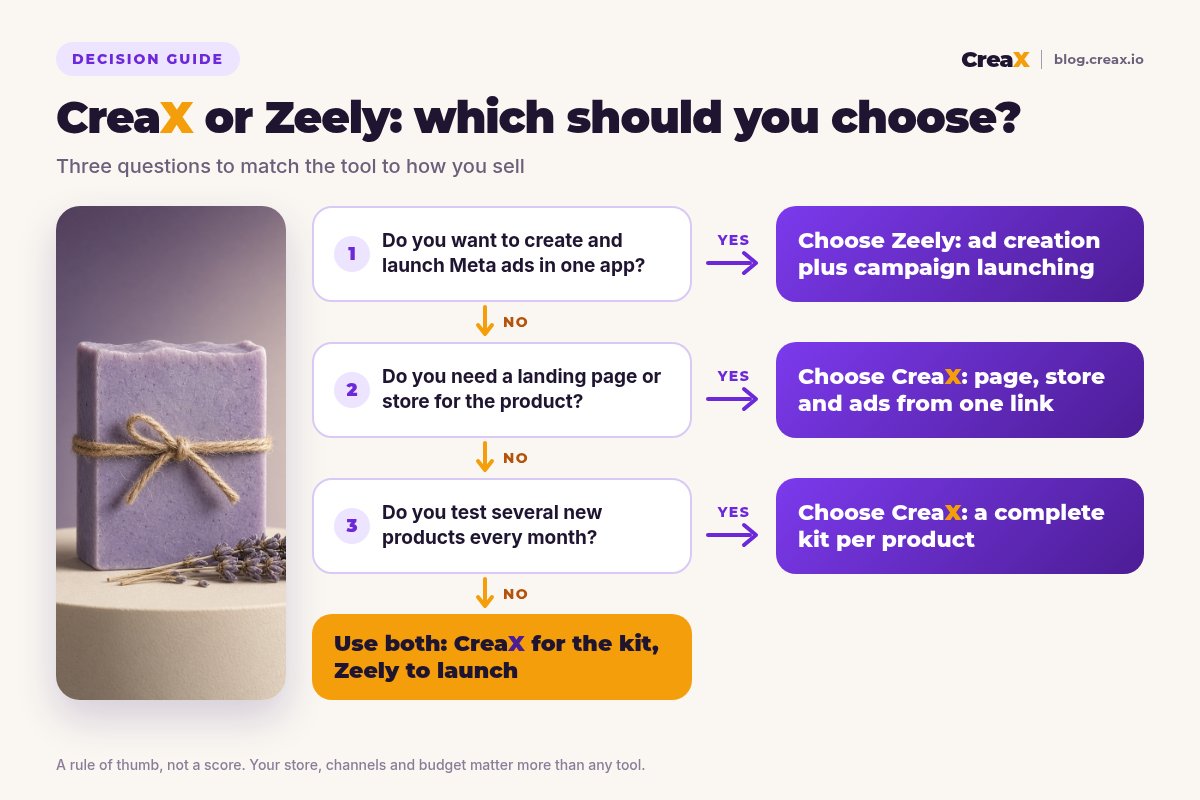
Answer these before you pay
- ✓Do you want to launch and manage Meta ads from the same app? Lean Zeely.
- ✓Do you want AI avatars or a custom AI twin presenting your product? Lean Zeely.
- ✓Do you have a landing page that matches your ads? If not, lean CreaX.
- ✓Do you need a store, or separate stores per niche? Lean CreaX.
- ✓Do you test several new products every month? A kit per product favours CreaX.
- ✓Are you happy running ads in Meta Ads Manager yourself? Then CreaX's assets slot straight in.
Using both is a legitimate answer. CreaX for the launch kit (page, statics, video, store), Zeely for launching and tracking Meta campaigns if you prefer its interface.
FAQFrequently asked questions
Q.Is CreaX a good Zeely alternative?
Q.Does Zeely launch Facebook and Instagram ads?
Q.Does CreaX run my ads for me?
Q.Which is cheaper, CreaX or Zeely?
Q.Can I use CreaX and Zeely together?
Q.Do I need a Shopify store for either tool?
Ready to launch your next product?
One product link, about 60–120 seconds: studio creatives, UGC-style video ads and a landing page that tell the same story.
This guide is published by CreaX. We describe other tools from their own public websites as of October 2026, avoid invented scores or prices, and recommend checking each vendor's site for current features and plans.