
CreaX vs Wix for Selling Products Online: Website Builder or Ad Kit?
Comparison · Selling online
CreaX vs Wix is really a question about which job you need done. Wix is a full website and ecommerce platform: you build a site, run a store, take payments and manage orders in one dashboard. CreaX turns one product link or image into the ad creatives, UGC-style video ads and landing page a paid-traffic test needs. Here is an honest guide to which one fits how you sell, and when to use both.
Updated October 2026 · By the CreaX team
Key takeaways
- ✓Wix is a website builder with ecommerce built in: AI site creation, templates, a store with payments and shipping, marketplaces, email, SEO, a blog and an AI agent called Aria.
- ✓CreaX is an AI ecommerce creative OS: paste a product link or image and get studio ad creatives, UGC-style video ads, a publish-ready landing page and a multi-tenant store in about 60–120 seconds.
- ✓Pick Wix if you need a complete website for your brand: many pages, a blog, bookings, catalog management and order handling in one place.
- ✓Pick CreaX if your growth comes from paid ads and you need fresh creatives and a matching page for each product you test. Many Wix stores can use both.
In this guide
TL;DRThe short answer
Wix and CreaX overlap less than their names in a search bar suggest. Wix builds and runs your website. It is where your brand lives: home page, about page, blog, product catalog, cart, checkout, shipping rules and customer emails. CreaX builds what you advertise. It takes one product and produces the creatives you put in front of cold traffic, plus a focused landing page that repeats the promise of the ad.
So the useful question is not which tool is better. It is where your sales get stuck. If you do not have a proper website yet, or your catalog and orders are a mess, that is a Wix-type job. If your site exists but your ads look like supplier photos, you run out of new angles every week, or each new product takes days to get a page, that is a CreaX-type job.
⚖Our bias, stated upfront
The competitorWhat Wix is (and who it is built for)
Wix is one of the best-known website builders, and its ecommerce product sits on top of that foundation. Its public pages describe an AI-powered ecommerce platform for building, running and growing a business. The main pieces it lists:
- AI website builder. Describe the site you want in a prompt, then refine it with Aria, Wix's built-in AI agent, or by hand with drag-and-drop editing. Hundreds of free ecommerce templates are also available.
- A full online store. Physical products with variants, digital products, subscriptions, dropshipping and print on demand, with CSV import and export.
- Payments, shipping and taxes. Wix Payments plus third-party providers such as PayPal and Stripe, shipping labels from the dashboard and automated tax calculation.
- Selling in more places. In-person POS and connections to marketplaces and social channels, managed from one dashboard.
- Built-in marketing. SEO tools, email marketing with AI-generated emails, social posts, a blog, and paid ad campaigns on Google and Facebook created from the Wix dashboard.
- AI helpers for the store. An AI image editor for removing objects and backgrounds, AI product descriptions and product recommendations.
Wix is built for people who want one platform for the whole business: small brands, service businesses that also sell products, creators with a shop, and stores that want a branded multi-page website rather than a single funnel. You can build for free, and you need a paid premium plan to accept payments; check wix.com for current plans.
Our productWhat CreaX is: the AI ecommerce creative OS
CreaX starts from the product, not the website. Paste a product link (from Alibaba, AliExpress, Amazon, Etsy or any product page) or upload a product image, and in about 60–120 seconds you get:
- Studio ad creatives. Product photos and static ads in five styles (Classic, Humble Orbit, Punch, Luxe and Meta Feed) and four sizes (1:1, 3:4, 4:5 and 9:16).
- UGC-style video ads. Short videos in 18, 30 or 45-second lengths, made for TikTok, Reels and Meta feeds.
- A publish-ready landing page. Simple, Detailed or Advanced levels, built from the same product understanding as the ads, so the message matches. Pages support right-to-left languages like Arabic.
- A multi-tenant store. Keep different niches or client brands apart without a separate platform for each.
CreaX supports 40+ languages and 160+ target countries. It is built for dropshippers, media buyers, affiliates, coaches, ecommerce brands and agencies who test products with paid traffic. It is not a website builder for a 20-page brand site with a blog, and it does not try to be. Our explainer on what an AI ecommerce creative OS is goes deeper.
CompareSide-by-side: features, outputs and workflow
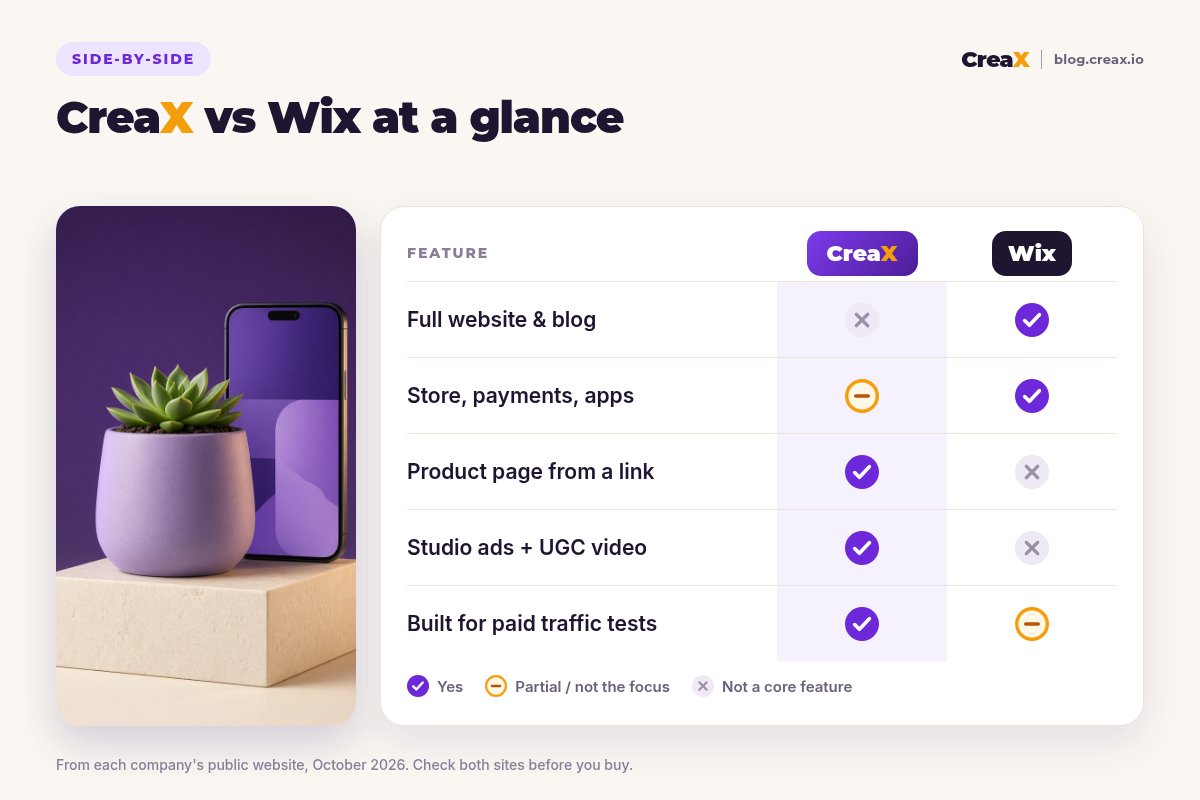
| Wix | CreaX | |
|---|---|---|
| Main job | Build and run your website and store | Make ads and a landing page for a product |
| Starting point | A prompt, a template or a blank canvas | A product link or product image |
| Output | Multi-page website, store, blog, checkout | Static ads, UGC-style video, landing page, store |
| Ad creatives | Social post templates, AI captions, ad campaigns from the dashboard | Studio statics in 5 styles and 4 sizes, plus video ads |
| Video ads | Not a core feature | UGC-style video in 18s, 30s or 45s |
| Orders, shipping, taxes | Yes, built in | Not the focus |
| SEO, blog, email marketing | Yes, built in | Not the focus |
| Best fit | Brands that need one full platform | Sellers who test products with paid ads |
From each company's public website, October 2026. A summary of focus, not a full feature list.
The workflows differ just as much. With Wix you set up a site once and keep adding to it: products, collections, policies, emails. With CreaX you run the same short loop for every product you want to test: link in, review the kit, launch, keep what works. One is a home; the other is a production line for campaigns.
Need ads and a page for your next product?
Paste a product link and get studio ads, UGC-style video and a landing page you can review in minutes.
BudgetPricing: CreaX plans vs Wix
CreaX uses monthly credit plans. Credits are spent when you generate, and you can top up any time:
| CreaX plan | Price / month | Credits | Good fit |
|---|---|---|---|
| Free | $0 | 0 | Look around the app before buying credits |
| Basic | $4.99 | 2,000 | Your first product tests |
| Standard | $14.99 | 6,500 | Testing new products every week |
| Pro | $29.99 | 14,000 | Several products or stores at once |
| Premium | $49.99 | 25,000 | Agencies and high-volume media buyers |
| Top-up | $1 | 500 | Extra credits when a test takes off |
Current plans on creax.io/pricing. The app shows the credit cost before you generate.
Wix lets you build a site for free and asks you to move to a paid premium plan to accept payments, connect a custom domain and unlock more features. Its plans vary by region and change over time, so we do not quote them here; check wix.com for current pricing. Remember that apps, paid ads and payment processing are separate costs on any platform.
★Price the whole job, not the subscription
Fair playWhere Wix is the better pick
A fair comparison has to say where the other tool is stronger. Wix is a mature platform, and for many businesses it is clearly the right foundation:
Wix
Strengths
- +Full multi-page website with blog and SEO tools
- +Store with payments, shipping, taxes and subscriptions
- +Sell on marketplaces and in person from one dashboard
- +Email marketing and social tools built in
- +AI site builder plus pixel-level drag-and-drop editing
- +Bookings and service features for mixed businesses
Trade-offs
- −Not built to produce video ads or studio statics per product
- −Each campaign page is designed by you
- −Lots of features to learn if you only need ad tests
CreaX
Strengths
- +Studio ads, UGC-style video and a landing page from one link
- +Ad and page share one message
- +About 60–120 seconds per kit
- +Plans from $4.99/month, top-ups $1 per 500 credits
- +Multi-tenant store for niches or clients
Trade-offs
- −Not a full website builder with a blog and many pages
- −No built-in email marketing or SEO suite
- −Order handling, taxes and shipping are not the focus
⚖Honest take
Our recommendationWhere CreaX is the better pick
Most product tests do not fail because the website is missing an about page. They fail because the ad does not stop the scroll, the page does not repeat the ad's promise, or the next product's creatives are still on someone's to-do list. That is where CreaX fits:
- You test products often. Dropshippers and media buyers launching new products every week need a full creative kit for each one, not another website.
- Your ads are the bottleneck. If you are still running supplier images, studio statics and UGC-style video from the same link are the fastest upgrade.
- You want message match. A focused landing page built from the same product understanding as the ad keeps the click on the same promise. See landing page vs product page.
- You run several niches or clients. The multi-tenant store keeps them apart without a separate site build for each.
If you are still choosing a website platform, our roundup of the best AI website builders for small stores compares more options. If you sell on Shopify instead, read CreaX vs Shopify Magic.
Build your next product test in one pass
One product link becomes the landing page, studio ads and UGC-style video ads, so your test can go live today.
ExampleWorked example: one product, both workflows
Say you sell handmade ceramic planters and want to test them with paid social ads using three angles: “a calm desk for working from home”, “a gift for a new home” and “plants that look good in small apartments”. Only make claims about materials, drainage or handmade production that you can stand behind.
With Wix
- Build the store from a template or the AI builder, then add the planter with photos, variants and a description.
- Set up payments, shipping and tax rules, then write your policies.
- Design graphics for the three angles yourself or in another tool, and find someone to film video.
- Run campaigns from the Wix dashboard or in Meta Ads Manager, sending traffic to the product page.
With CreaX
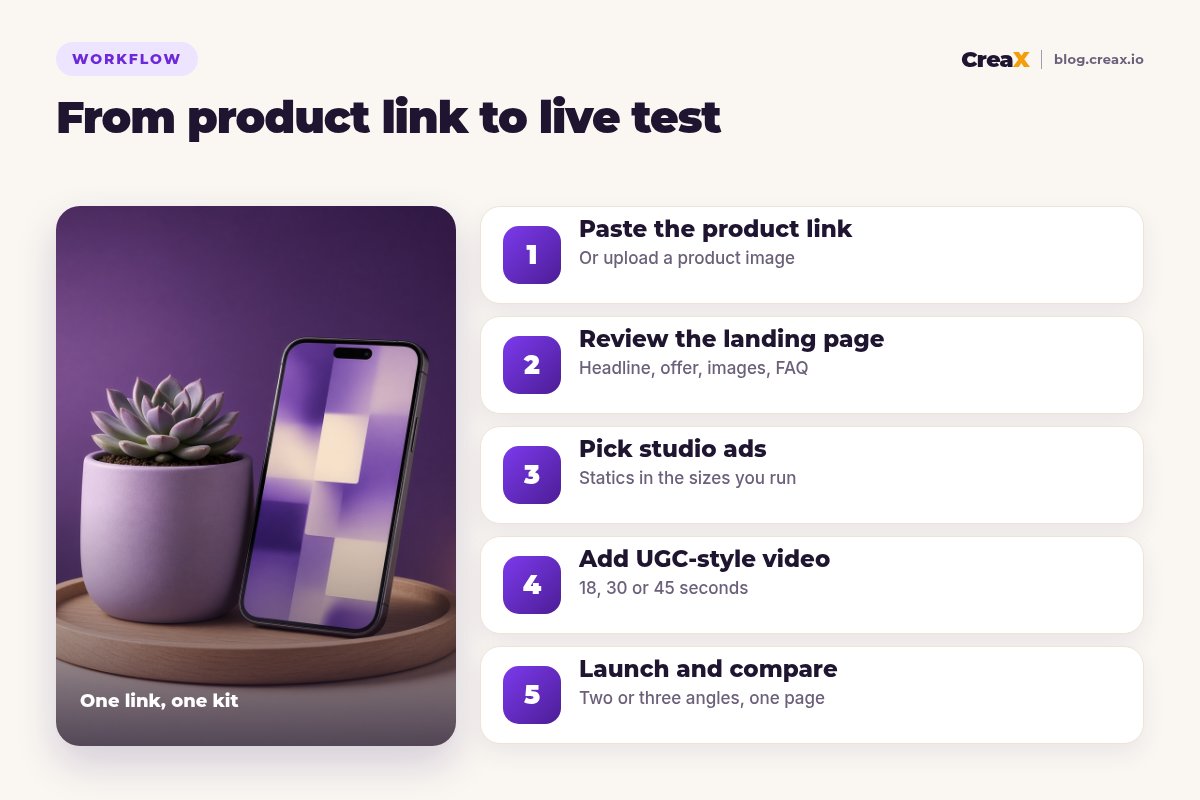
Paste the product link
Review the landing page
Pick studio ads
Add UGC-style video
Launch and compare
| Task | Wix setup | CreaX setup |
|---|---|---|
| Website and catalog | Strong: full store, policies and checkout | Landing page plus the CreaX store |
| Static ads for 3 angles | You design them or use templates | Generated with the kit, then edited |
| Video ads | Filmed or made in another tool | UGC-style video from the product link |
| Blog and SEO content | Built in | Not included |
| Hand-offs between tools | At least one (design or video tool) | None for the first test |
A qualitative comparison of the work involved, not a speed or performance benchmark.
The common setup for an established brand is both: Wix as the main store, and CreaX making the ads and focused landing pages for each campaign. For the first three seconds of your videos, see UGC ad hooks that stop the scroll.
!Keep claims honest in any tool
Choose with confidenceDecision checklist
Answer these before you pay
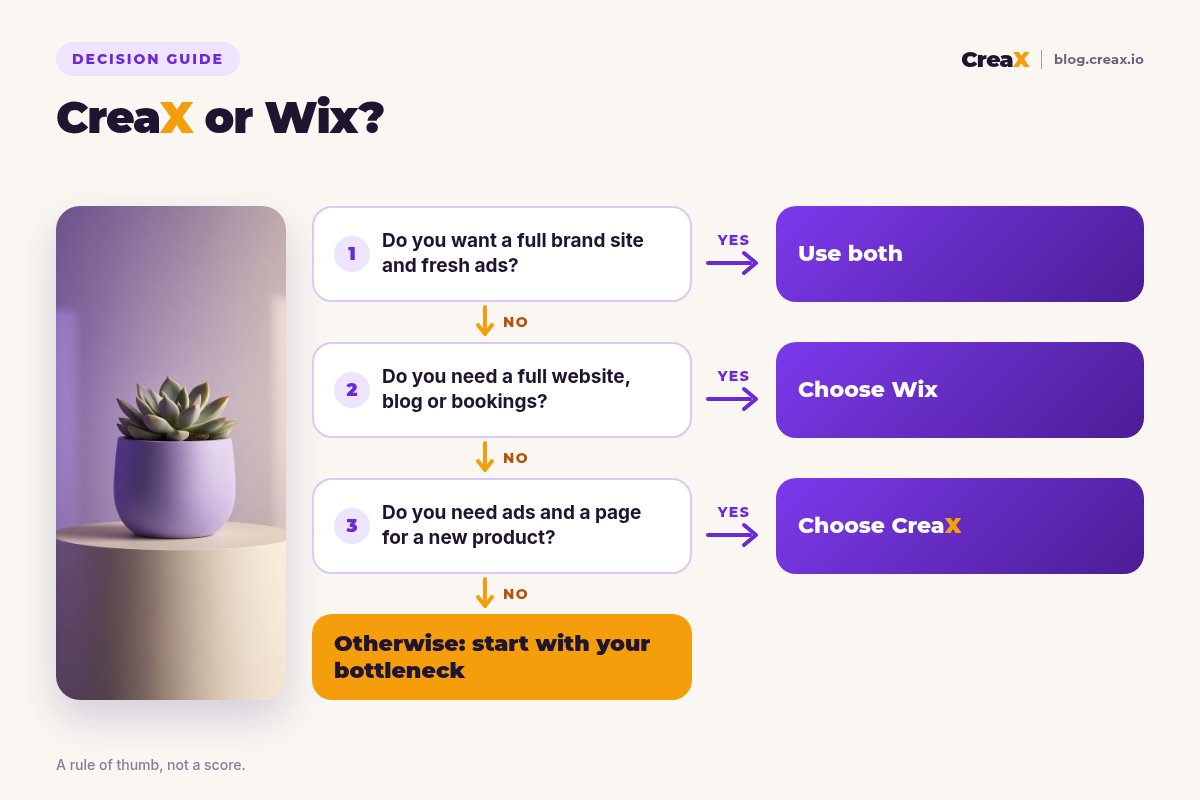
- ✓Do you have a website you are happy with? If not, start there. Lean Wix.
- ✓Do you need a blog, bookings or many pages? That is website-builder work. Lean Wix.
- ✓Are your ads the weak point? Supplier photos and one tired video point to CreaX.
- ✓How many products do you test each month? Many products favours a kit-per-product tool.
- ✓Do you need video ads? CreaX makes UGC-style video from the product link.
- ✓Do you run campaigns for clients or several niches? The CreaX multi-tenant store helps.
Using both is often the best answer. Keep Wix for your brand site, catalog and orders, and use CreaX to make the creatives and campaign pages that bring paid traffic in.
FAQFrequently asked questions
Q.Is CreaX a Wix alternative?
Q.Can Wix make video ads for my products?
Q.Can I use CreaX with a Wix store?
Q.Which is cheaper, CreaX or Wix?
Q.Do I need a website to use CreaX?
Q.Which is better for dropshipping?
Ready to test your next product?
One product link, about 60–120 seconds, and you have the studio ads, UGC-style video and landing page for your first test.
This guide is published by CreaX. We describe other tools from their own public websites as of October 2026, avoid invented scores or prices, and recommend checking each vendor's site for current features and plans.