
CreaX vs VEED: Online Video Editor vs AI Ecommerce Creative OS
Comparison · Video editor vs ad kit
CreaX vs VEED is really a question about where your work starts. VEED is a browser-based video creation platform: an editor with AI tools for subtitles, avatars, voices, translation and AI-generated ads. CreaX starts from a product link or image and generates the whole test kit: UGC-style video ads, studio static ads, a landing page and a store. Here is an honest guide to which one fits your ecommerce business.
Updated October 2026 · By the CreaX team
Key takeaways
- ✓VEED is an online video creation platform: a browser editor with auto subtitles, translation and dubbing, brand kits, AI avatars, AI voices and an AI ad generator that works from text, product images or footage.
- ✓CreaX is an AI ecommerce creative OS: paste a product link or image and get UGC-style video ads, studio ad creatives, a publish-ready landing page and a multi-tenant store in about 60–120 seconds.
- ✓Pick VEED if you edit your own footage, need subtitles or translations at volume, or make lots of non-ad video content.
- ✓Pick CreaX if you test products often and need the ads and the page they click to, built in one pass, on plans from $4.99 a month.
In this guide
TL;DRThe short answer: CreaX vs VEED
Both tools can help you make video ads. The difference is the starting point and what comes out. VEED is built around editing and producing video: you bring footage, a script, an idea or product images, and its editor and AI tools help you turn that into polished, branded, subtitled video. CreaX is built around selling one product: you bring a product link or image, and it generates the creatives and the landing page a first test needs.
So the useful question is not which tool is better, but what is missing from your next launch. If you have footage and need it edited, subtitled and translated, VEED is built for that. If you have a product and need ads, videos and a page by tonight, CreaX covers more of that in one pass.
⚖Our bias, stated upfront
The competitorWhat VEED is (and who it's built for)
VEED describes itself as an AI video creation platform made for social. It runs in the browser, and its public pages describe a broad set of tools:
- A browser video editor for cutting, trimming, adding text, music and images, plus templates for ads, intros and social formats.
- Subtitles and translation. Automatic subtitles and captions, transcription, a video translator and AI dubbing.
- Brand tools. Apply your colors, fonts, logos and voice across videos.
- AI avatars and voices. Stock or custom AI avatars, lip sync, eye contact correction, text to speech and voice cloning.
- AI ad generator. Create video ads from text, product images or footage, choosing from several AI video models, then finish them in the editor.
- Recording and teams. Screen and webcam recording, a teleprompter, team workspaces and APIs.
In short, VEED is a flexible video studio in the browser, built for marketers, creators and teams who make a lot of video and want AI to speed up editing and production.
Our approachWhat CreaX is: the AI ecommerce creative OS
CreaX starts from the product and stops at a live test. Paste a product link or upload a product image, and in about 60–120 seconds you get:
- UGC-style video ads of 18, 30 or 45 seconds (3, 5 or 7 scenes), vertical and social-first. See how CreaX UGC-style video ads work.
- Studio ad creatives: product photos and static ads in five styles (Classic, Humble Orbit, Punch, Luxe and Meta Feed) and four sizes (1:1, 3:4, 4:5 and 9:16).
- A publish-ready landing page at Simple, Detailed or Advanced level that repeats the promise of the ads.
- A multi-tenant store for testing several niches or running client stores.
creax.io lists 40+ languages and 160+ target countries, and CreaX is built for dropshippers, media buyers, affiliates, coaches, ecommerce brands and agencies. If the page side is new to you, see how to turn a product link into a landing page without a designer.
ComparisonCreaX vs VEED: side-by-side
Here is how the two line up on the jobs an ecommerce seller actually has to get done.
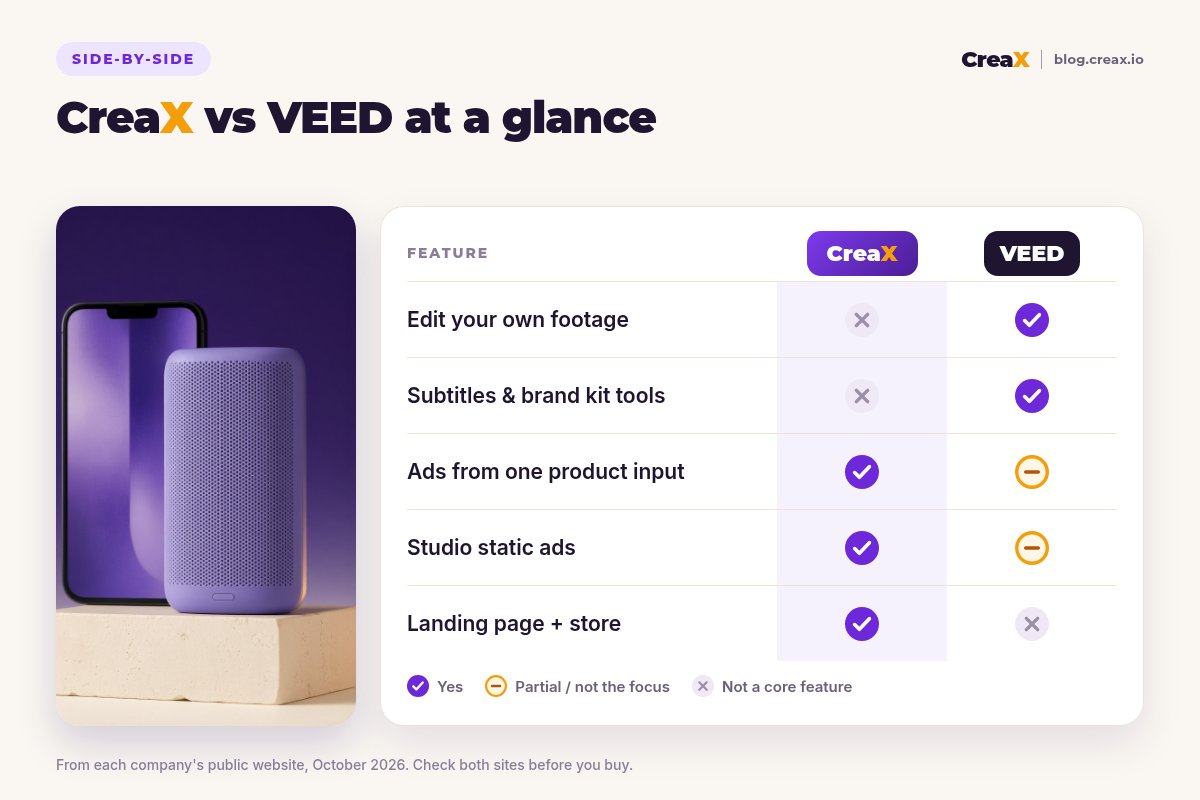
| CreaX | VEED | |
|---|---|---|
| Starting point | A product link or product image | Footage, a script, a prompt or product images |
| Video ads | UGC-style video ads generated from the product, 18/30/45 seconds | AI ad generator plus a full editor, avatars and templates |
| Editing your own footage | Not a video editor | Core strength: browser editor with AI tools |
| Subtitles, translation, dubbing | Not a focus | Auto subtitles, translator and AI dubbing |
| Static ads | Studio creatives in 5 ad styles and 4 sizes | AI image tools and banner templates |
| Landing page and store | Publish-ready page and multi-tenant store | Not listed as a feature |
| Pricing | $4.99–$49.99/month credit plans, top-ups $1 per 500 credits | Free to try; paid plans on veed.io |
VEED details summarised from its public website, October 2026. Confirm current features and plans on each vendor's site.
See what CreaX builds from your product link
Paste one product link and get UGC-style video ads, studio creatives and a landing page you can test today.
BudgetPricing: CreaX plans vs VEED
CreaX uses simple monthly credit plans. Credits are spent when you generate, and you can top up any time:
| CreaX plan | Price / month | Credits | Good fit |
|---|---|---|---|
| Free | $0 | 0 | Look around the app before buying credits |
| Basic | $4.99 | 2,000 | Your first product tests |
| Standard | $14.99 | 6,500 | Testing new products every week |
| Pro | $29.99 | 14,000 | Several products or stores at once |
| Premium | $49.99 | 25,000 | Agencies and high-volume media buyers |
| Top-up | $1 | 500 | Extra credits when a test takes off |
Current plans on creax.io/pricing. The app shows the credit cost before you generate.
VEED says its tools are free to try and sells paid plans for individuals, teams and enterprises. We do not quote its prices because they change; check veed.io/pricing for current plans and what each includes.
★Compare the cost of a complete test
Fair playWhere VEED is the better pick
A fair comparison has to say where the other tool is stronger. VEED is a mature, capable product, and for many teams it is the right choice:
VEED
Strengths
- +Full browser editor for your own footage
- +Auto subtitles, translation and AI dubbing
- +Brand kits applied across videos
- +AI avatars, voices and eye contact correction
- +AI ad generator with several video models
- +Also covers webinars, tutorials and social content
Trade-offs
- −No landing page or store
- −You still direct and edit each video
- −Static ad design is not its main focus
CreaX
Strengths
- +Video ads, static ads, landing page and store from one input
- +Page and ads share one message
- +About 60–120 seconds per kit
- +Plans from $4.99/month, top-ups $1 per 500 credits
- +No editing skills needed
Trade-offs
- −Not a video editor for your own footage
- −No subtitle, dubbing or recording tools
- −Teams that only need video editing may not use the page and store
⚖Honest take
Our recommendationWhere CreaX is the better pick
Many ecommerce tests stall before any editing happens: there is no footage, no static ads and no page yet. CreaX is built around that problem:
- You test lots of products. Dropshippers and media buyers launching often need a full kit per product, not an editing session per video.
- You have no footage. CreaX generates UGC-style video ads from the product itself, so there is nothing to film first.
- You want message match. The ads and the landing page come from the same product understanding, so the click lands on the same promise.
- You run several stores or clients. The multi-tenant store keeps niches and client brands apart.
If editing is the part you care about most, our roundup of the best AI video editors for ad creatives compares more options.
Build your next product test in one pass
Paste a product link and get the landing page, studio ads and UGC-style video ads together, so your test can go live today.
ExampleWorked example: one product, both workflows
Say you want to test a portable bluetooth speaker with three angles: "a speaker for the beach", "room-filling sound for small spaces" and "a gift for music lovers". Only use claims like waterproofing or battery life if your supplier can prove them.
With VEED
- Film or source product footage, or generate clips from product images with the AI ad generator.
- Edit three versions in the browser editor, one per angle, and apply your brand kit.
- Add auto subtitles, and translate or dub them if you sell in several markets.
- Make static ads with its image tools or a design tool.
- Build the product page in your store or a page builder, then launch.
With CreaX
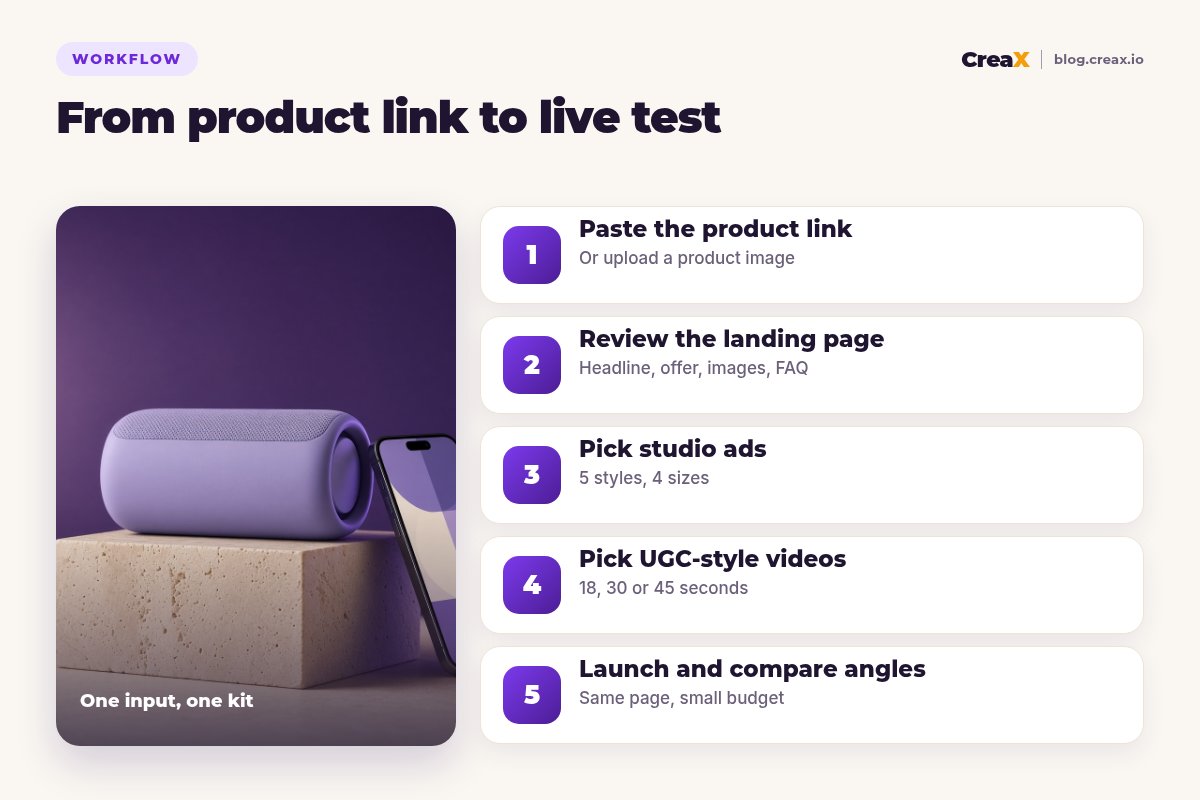
Paste the product link
Review the landing page
Pick studio ads
Pick UGC-style videos
Launch and compare angles
With VEED you spend your time editing and polishing, which pays off if you have footage and video craft is your edge. With CreaX you spend it reviewing one kit and choosing which angle to fund, which pays off when speed and volume matter most.
Choose with confidenceDecision checklist
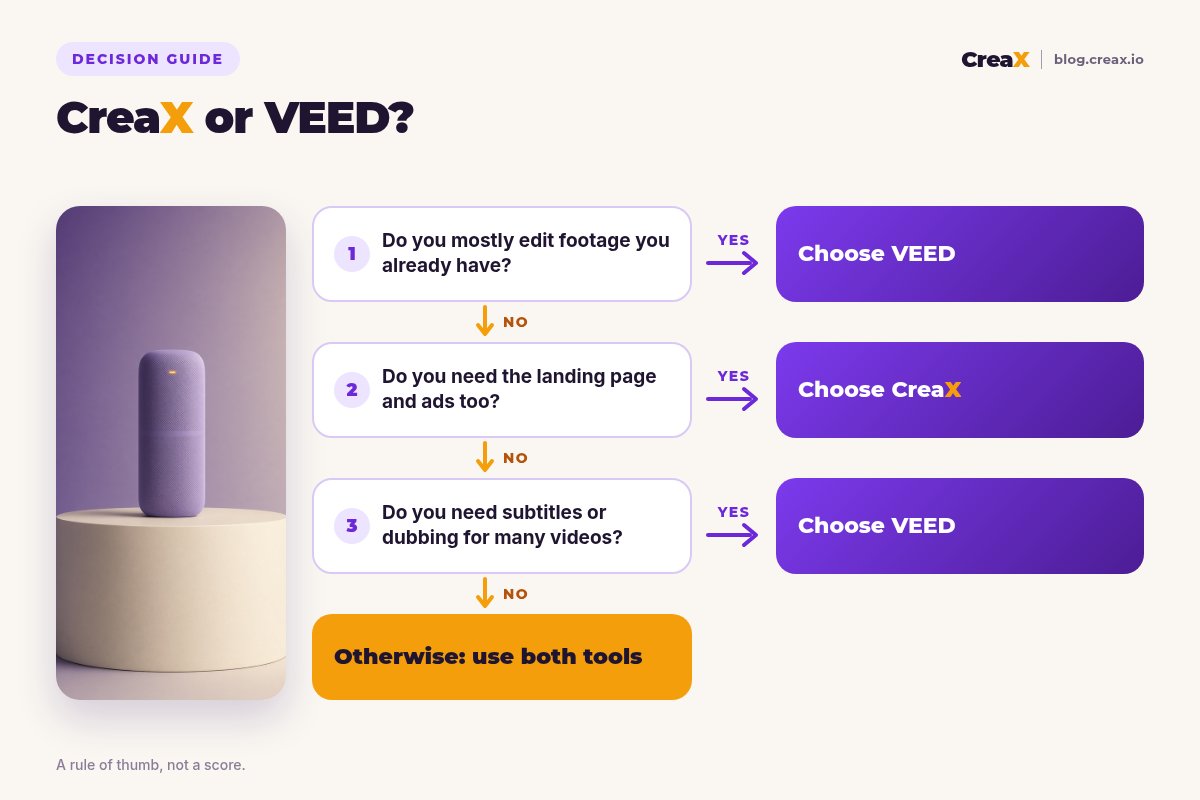
Answer these before you pay
- ✓Do you already have footage? If yes, an editor like VEED gets more out of it.
- ✓Do you need a landing page too? If yes, lean CreaX: the page comes from the same input.
- ✓Do you need subtitles or dubbing at volume? That is a VEED strength.
- ✓Do you need static ads as well as video? CreaX makes them in the same pass.
- ✓How many products do you test each month? Many products favours a kit-per-product tool.
- ✓Do you make non-ad video too? Tutorials, webinars and social series point to VEED.
Using both is a fair answer. A common setup is CreaX to launch new products with ads and a page, and VEED to edit creator footage, add subtitles and translate winning videos for new markets.
FAQFrequently asked questions
Q.Is CreaX a good VEED alternative?
Q.Can VEED make a landing page or store?
Q.Can VEED make ads from product images?
Q.Which is cheaper, CreaX or VEED?
Q.Can I use CreaX and VEED together?
Ready to test your next product?
One product link, about 60–120 seconds, and you have the video ads, studio creatives and landing page for your first test.
This guide is published by CreaX. We describe other tools from their own public websites as of October 2026, avoid invented scores or prices, and recommend checking each vendor's site for current features and plans.