
CreaX vs Simplified: All-in-One Content App vs Ecommerce Creative OS
Comparison · AI marketing tools
CreaX vs Simplified is a choice between breadth and focus. Simplified is an all-in-one AI marketing app with design, video, copywriting, social scheduling and now AI agents that plan and publish campaigns. CreaX does one job end to end: it turns a product link into the ads and the landing page you need to test that product. Here is an honest guide to which one fits your store.
Updated October 2026 · By the CreaX team
Key takeaways
- ✓Simplified is a broad AI marketing workspace: AI writer, image and video tools, an AI ads generator, social scheduling and inbox, client approvals, a Shopify app and an AI agent called Riley.
- ✓CreaX is an AI ecommerce creative OS: paste a product link or image and get UGC-style video ads, studio ad creatives, a publish-ready landing page and a multi-tenant store in about 60–120 seconds.
- ✓Pick Simplified if you run your brand's whole content calendar, post on social every week or manage several clients' social accounts.
- ✓Pick CreaX if you launch and test products often and need the ads and the page they click to, built in one pass, on plans from $4.99 a month.
In this guide
TL;DRThe short answer: CreaX vs Simplified
Both tools can make ad creatives with AI, so on the surface they overlap. Underneath they are built for different jobs. Simplified wants to be the place where your marketing team works every day: writing, designing, editing video, planning the calendar, getting approvals and publishing to social channels, with an AI agent that can run parts of that loop. CreaX is built for one moment that matters a lot in ecommerce: you have a product, and you need everything to test it, including the landing page, right now.
So the question is not which AI is better. Ask what your bottleneck is. If it is keeping social channels fed and organised, Simplified covers more ground. If it is getting new products from idea to a live, consistent ad test, CreaX covers that path in one step.
⚖Our bias, stated upfront
The competitorWhat Simplified is (and who it's built for)
Simplified describes itself as an AI agent platform for marketing teams, with an agent called Riley that plans, creates and publishes campaigns while your team approves the work. Around that agent sits a large toolbox. Its public pages describe:
- Creative suite: an AI writer, AI image generator, AI photo editor, graphic design templates and a brand kit.
- Video suite: an AI video generator, image-to-video, a browser video editor, subtitles, video translation and short-clip repurposing.
- AI ads generator: ad variations based on your brand and product, with an option to push ads to Meta.
- Social suite: a social media planner and scheduler, social inbox, analytics, link in bio and client approvals.
- Ecommerce tools: product descriptions, product images and ads from your product details or a photo, plus a Shopify app that can write and update titles, descriptions and SEO meta.
- For developers and agencies: workflows, an MCP server, a CLI, an API and separate client workspaces.
In short, Simplified is built for founders, marketing teams, social media managers and agencies who want one subscription for most day-to-day content work.
CreaXWhat CreaX is: the AI ecommerce creative OS
CreaX starts from a product, not a blank canvas. Paste a product link, from Alibaba, AliExpress, Amazon, Etsy or any product page, or upload a product image. In about 60–120 seconds you get:
- A publish-ready landing page built around the product, at three levels: Simple, Detailed or Advanced.
- Studio ad creatives in five styles (Classic, Humble Orbit, Punch, Luxe and Meta Feed) and four sizes (1:1, 3:4, 4:5 and 9:16).
- UGC-style video ads of 18, 30 or 45 seconds.
- A multi-tenant store to keep different niches or client brands apart.
CreaX is built for dropshippers, media buyers, affiliates, coaches, ecommerce brands and agencies who test products often and want the ad and the page to tell the same story. Pages support right-to-left languages such as Arabic, and CreaX covers 40+ languages and 160+ target countries. See what an AI ecommerce creative OS is for the longer explanation.
CompareSide-by-side: features, outputs and workflow
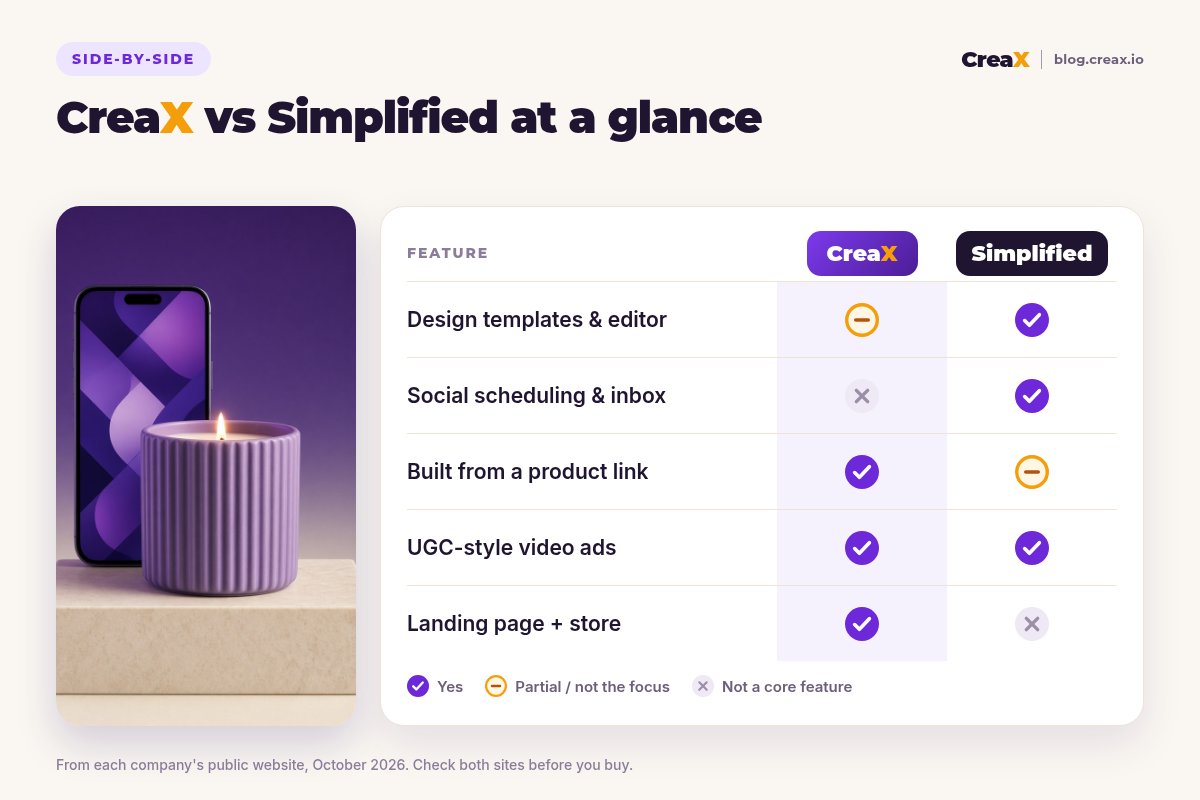
| Simplified | CreaX | |
|---|---|---|
| Main job | Run day-to-day marketing content in one workspace | Turn one product into a complete ad test |
| Starting point | A brief, a prompt, a template, product details or a photo | A product link or product image |
| Static ads | Yes, AI ads generator and design templates | Yes, studio ads in 5 styles and 4 sizes |
| Video ads | AI video tools and a full video editor | UGC-style video ads of 18, 30 or 45 seconds |
| Landing page | Not a core feature (link in bio page available) | Yes, generated from the same product |
| Store | Connects to your Shopify store | Multi-tenant store included |
| Social scheduling | Yes, planner, scheduler and inbox | No, export and post in your own tools |
| AI agent | Riley plans, creates and publishes campaigns | Not an agent; one focused generation |
From each company's public website, October 2026.
How the workflows differ
With Simplified, you typically set up your brand kit, connect your channels and then work in a loop: brief the agent or open a tool, generate drafts, edit them, send them for approval and schedule them. It suits a steady rhythm of content across many channels.
With CreaX, the loop is shorter and tied to one product:
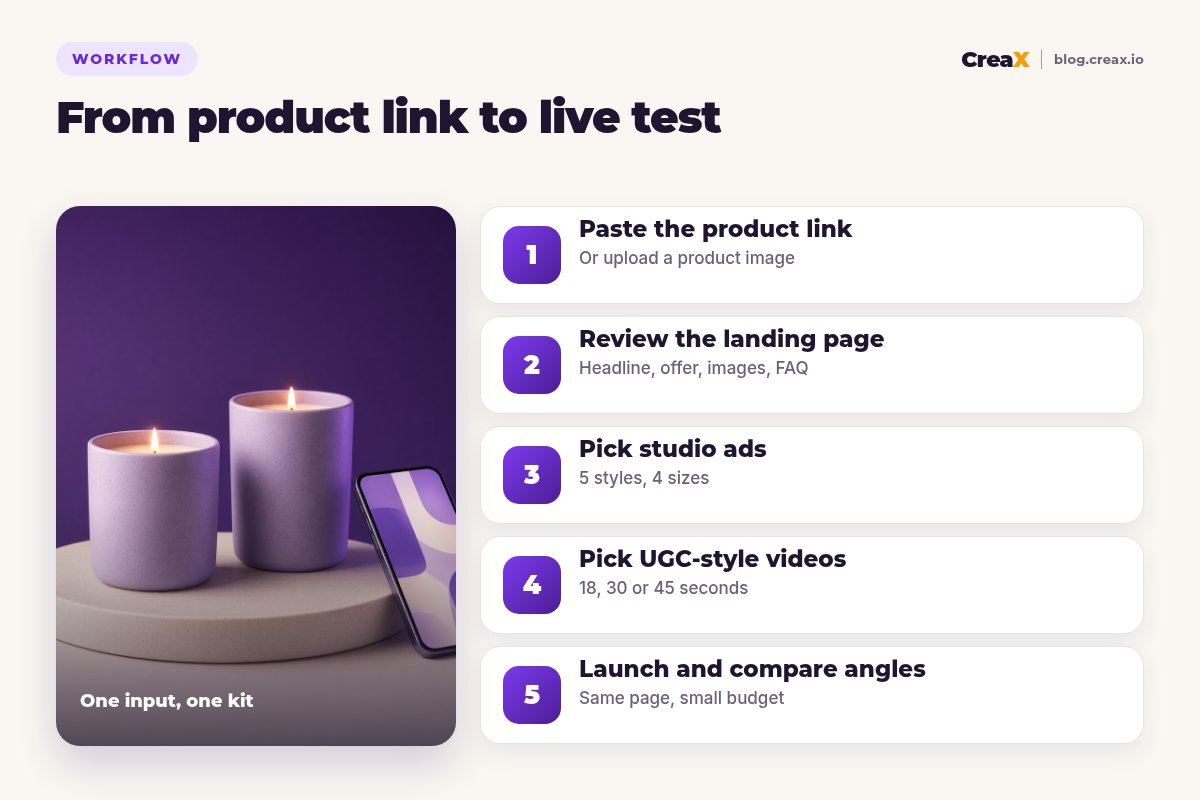
Paste the product link
Review the landing page
Pick studio ads
Pick UGC-style videos
Launch and compare angles
BudgetPricing: CreaX plans vs Simplified
CreaX uses simple monthly credit plans. Credits are spent when you generate, and you can top up any time:
| CreaX plan | Price / month | Credits | Good fit |
|---|---|---|---|
| Free | $0 | 0 | Look around the app before buying credits |
| Basic | $4.99 | 2,000 | Your first product tests |
| Standard | $14.99 | 6,500 | Testing new products every week |
| Pro | $29.99 | 14,000 | Several products or stores at once |
| Premium | $49.99 | 25,000 | Agencies and high-volume media buyers |
| Top-up | $1 | 500 | Extra credits when a test takes off |
Current plans on creax.io/pricing.
Simplified is free to start and sells paid plans with credits that vary by plan. We do not quote its prices because they change; check simplified.com/pricing for current plans and what each one includes.
★Compare what you would actually use
Fair playWhere Simplified is the better pick
Simplified is a serious, broad product, and for many teams it is the better fit:
Simplified
Strengths
- +Social planner, scheduler, inbox and analytics in one place
- +AI writer, design templates and brand kit for everyday content
- +Full browser video editor with subtitles and translation
- +AI agent that can plan and publish campaigns with approvals
- +Client workspaces and approvals for agencies
- +Shopify app for titles, descriptions and SEO meta
Trade-offs
- −No landing page builder for product tests
- −Many tools means more setup and more choices
- −Ads are one feature among many, not the whole focus
CreaX
Strengths
- +Landing page, studio ads and UGC-style video from one link
- +Ad and page share one message, so tests stay clean
- +About 60–120 seconds per kit
- +Plans from $4.99/month, top-ups $1 per 500 credits
- +Works without an existing Shopify store
Trade-offs
- −No social scheduling, inbox or analytics
- −Not a general design or writing tool
- −No AI agent that runs your calendar
⚖Honest take
Our recommendationWhere CreaX is the better pick
Many ecommerce tests stall in the gap between a good ad and a page that sells. CreaX is built to close that gap:
- You test lots of products. Each product gets its own page, statics and video from one input, not a new project every time.
- You have no designer or page builder. The landing page comes with the ads, so you are not stitching a design app, a video app and a page builder together. See how to turn a product link into a landing page.
- You care about message match. When the ad and the page come from the same product understanding, the click lands on the same promise.
- You run several stores or clients. The multi-tenant store keeps niches and client brands apart.
If you are weighing other broad design tools too, read CreaX vs Canva and CreaX vs Predis.ai.
Build your next product test in one pass
Paste a product link and get the landing page, studio ads and UGC-style video ads together, so your test can go live today.
ExampleWorked example: one product, both workflows
Say you sell a ribbed ceramic scented candle and want to test three angles: “a calm evening ritual”, “a gift that looks expensive” and “a scent that fills the room”. Only claim burn time or ingredients if your supplier can prove them.
| Task | Simplified setup | CreaX setup |
|---|---|---|
| Static ads for 3 angles | AI ads generator or templates with your brand kit | Studio ads per angle from the product link |
| Video ads | AI video tools, then edit in the video editor | UGC-style video per angle, 18, 30 or 45 seconds |
| Landing page | Build elsewhere, or send to your store page | Generated from the same link, then edited |
| Organic social around the launch | Strong: plan, schedule and reply in one calendar | Export assets and post with your own tools |
| Hand-offs between tools | At least one (ads → page builder) | None for the first test |
A qualitative comparison of the work involved, not a speed or performance benchmark.
A sensible split: use CreaX to build the test, the page and the paid creatives, and if you already use Simplified, schedule organic posts about the candle there. Our list of the best AI tools for social media managers covers more options for the social side.
!Keep claims honest in both tools
Choose with confidenceDecision checklist
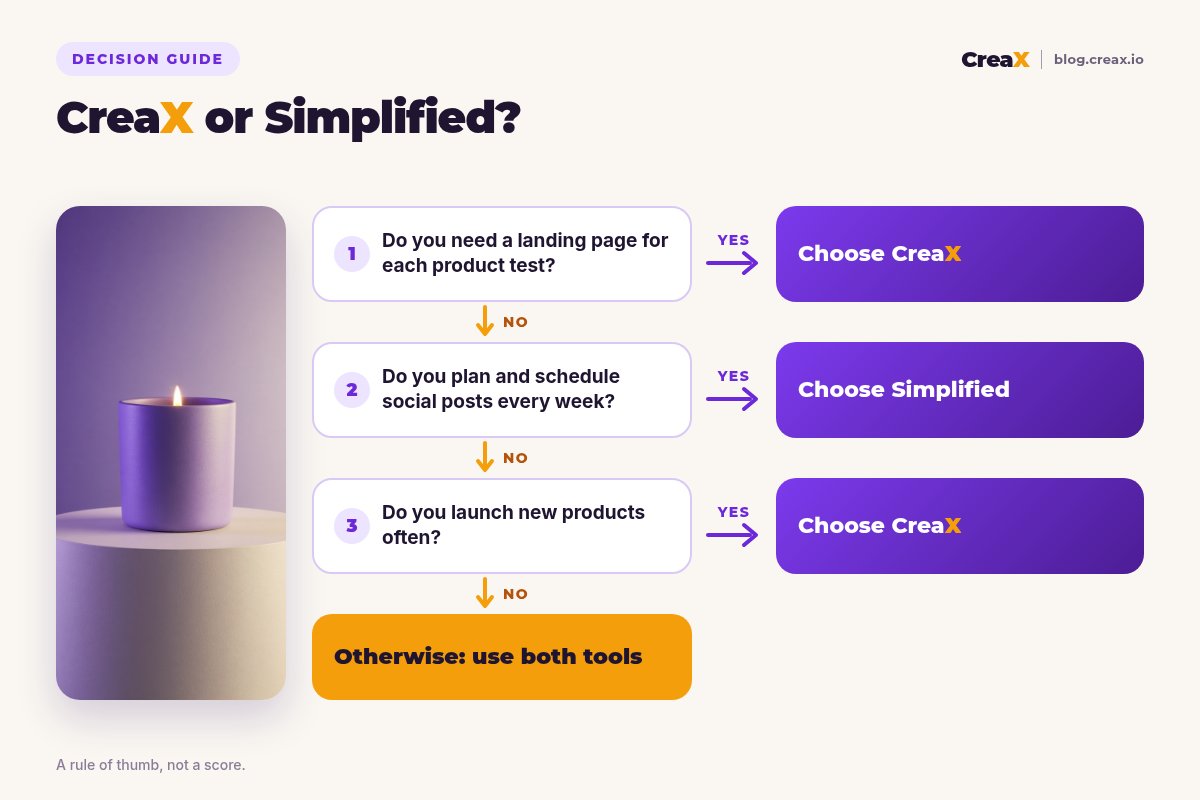
Answer these before you pay
- ✓Do you need a landing page for each product you test? If yes, lean CreaX.
- ✓Do you post and reply on social every day? If yes, Simplified's planner and inbox are a real advantage.
- ✓Do you edit longer videos yourself? Simplified's video editor helps; CreaX makes short ad videos.
- ✓How many new products do you launch each month? Many products favours a kit-per-product tool.
- ✓Do you manage social accounts for clients? Simplified's workspaces and approvals fit agencies doing social.
- ✓Do you run paid tests for clients? CreaX's multi-tenant store keeps client stores apart.
Using both is a fair answer. Simplified can run the content calendar, and CreaX can build each new product test, from the ads to the page they click to.
FAQFrequently asked questions
Q.Is CreaX a good Simplified alternative?
Q.Can Simplified build a landing page?
Q.Does CreaX schedule social posts?
Q.Which is cheaper, CreaX or Simplified?
Q.Do both work with Shopify?
Q.Can I use CreaX and Simplified together?
Ready to test your next product?
One product link, about 60–120 seconds, and you have the landing page, studio ads and UGC-style video ads for your first test.
This guide is published by CreaX. We describe other tools from their own public websites as of October 2026, avoid invented scores or prices, and recommend checking each vendor's site for current features and plans.