
CreaX vs Runway for Product Ads: Generative Video vs Ready Ad Kits
Comparison · Generative video
CreaX vs Runway is a comparison between a creative studio and a production line. Runway is a generative AI suite where you direct video, images and audio with frontier models, editing tools and agents, and it can turn product photos into polished video ads. CreaX is an AI ecommerce creative OS that turns one product link into UGC-style video ads, studio static ads, a landing page and a store. Here is an honest guide to which one fits your product ads.
Updated October 2026 · By the CreaX team
Key takeaways
- ✓Runway is an all-in-one generative creative platform: its own Gen-4.5 video model plus models from other labs, Aleph editing, an agent for end-to-end videos, Premiere Pro and After Effects plugins, node-based workflows and a product-photo-to-video-ad use case.
- ✓CreaX turns one product link or image into UGC-style video ads, studio ad creatives, a publish-ready landing page and a multi-tenant store in about 60–120 seconds.
- ✓Pick Runway if you want cinematic brand content, full creative control or generative video for many kinds of projects, and you have the time or team to direct it.
- ✓Pick CreaX if you test products often and need ad-ready formats plus the page they click to, without directing every shot.
In this guide
TL;DRThe short answer
Runway gives you the most creative power: prompt or reference-based video generation, frame-level editing, relighting, multi-shot generation and workflows that chain models together. It is built for filmmakers, artists, agencies and brands, and it has a clear product-ad use case. CreaX gives you the most finished output per product: from one link it builds the ad formats sellers actually launch (UGC-style videos, static ads in standard sizes) and the landing page they point to.
So choose based on the job. If the job is “make a beautiful product film”, Runway is the stronger studio. If the job is “get this product tested this week with ads and a page”, CreaX does more of it for you.
⚖Our bias, stated upfront
The competitorWhat Runway is (and who it's built for)
Runway describes itself as building “real-world intelligence” and offers several products. The one most relevant here is Runway Creative, which its site calls an all-in-one, cloud-based creative platform to generate and edit video, images and audio in one workspace. According to its public pages, it includes:
- Video and image models. Runway's own Gen-4.5 video model alongside image, video and audio models from other labs, in one place.
- Editing tools. Aleph 2.0 and Edit Studio, which let you edit one frame and apply the change across a video, plus apps to relight scenes, change the time of day or replace backgrounds.
- Runway Agent and multi-shot video. Create end-to-end videos through conversation, or get several shots from one prompt.
- Workflows and plugins. Node-based workflows that chain models, and plugins for Premiere Pro and After Effects.
- Product video ads. A use case for turning product photos into video ads (360 spins, reveals, lifestyle scenes) where reference images are used to keep labels, logos, colours and proportions, exported in the aspect ratios your channels need.
- Runway Dev. An API platform with “recipes” for developers, including product ad, product UGC and product campaign image endpoints.
Its FAQ for product ads says you own commercial rights to what you create. Runway is built for creatives, studios and teams of all sizes, across film, advertising and design, not only ecommerce.
Our productWhat CreaX is: the AI ecommerce creative OS
CreaX is built only for selling products. Paste a product link or upload a product image, and in about 60–120 seconds it generates:
- UGC-style video ads in 18, 30 or 45 seconds.
- Studio ad creatives: product photos and static ads in five styles (Classic, Humble Orbit, Punch, Luxe and Meta Feed) and four sizes (1:1, 3:4, 4:5 and 9:16).
- A publish-ready landing page at Simple, Detailed or Advanced level.
- A multi-tenant store for selling, or for keeping niches and client brands apart.
It works in 40+ languages and for 160+ target countries, per creax.io, and is used by dropshippers, media buyers, affiliates, coaches, ecommerce brands and agencies. You review and edit; you don't prompt shot by shot. See what an AI ecommerce creative OS is for the idea behind it.
CompareSide-by-side: features, outputs and workflow
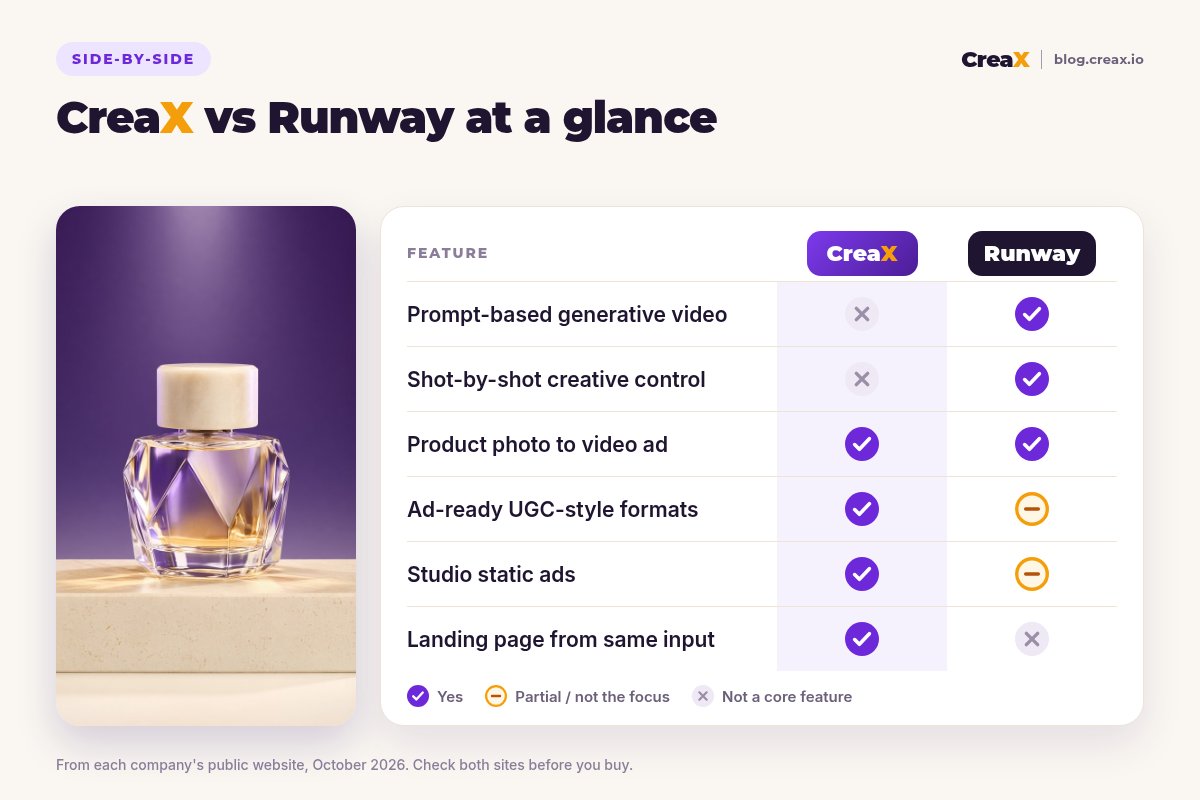
| Runway | CreaX | |
|---|---|---|
| Core job | Generate and edit video, images and audio | Full creative kit for a product test |
| Starting point | Prompts, reference images, footage | A product link or product image |
| Product video ads | Yes: from product photos, with reference consistency | Yes: UGC-style video ads in 18s, 30s or 45s |
| Creative control | Deep: models, shots, frame edits, workflows | Review and edit the generated kit |
| UGC-style ad formats | Product UGC recipe on its developer API | Built in, from the product link |
| Static ads | Image models and a campaign image recipe | Studio ads in 5 styles and 4 sizes |
| Landing page and store | No | Yes, from the same input |
| Pro editing integrations | Premiere Pro and After Effects plugins | Not a core feature |
Based on each company's public website and docs, October 2026. Features change, so check both sites.
The pattern: Runway is wider and deeper as a creative tool. CreaX is narrower but finishes more of the ecommerce job, including the parts that aren't video.
How it worksWorkflow: one product, two tools
With Runway
- Upload a clean product photo (ideally several angles) as the reference.
- Describe each shot (a reveal, a macro detail pass, a lifestyle scene), or ask the agent to plan a full spot.
- Generate takes, keep the best, and refine details with editing tools or by changing one thing in a shot.
- Sequence the shots, add audio and export in each aspect ratio you need.
- Make static ads and the landing page in other tools, then launch.
With CreaX

Paste the product link
Review the landing page
Pick your studio ads
Pick your UGC-style videos
Launch 2–3 angles
Runway rewards creative direction with control and polish. CreaX removes the hand-offs between video, statics and page, which is where most solo sellers lose days.
BudgetPricing
CreaX uses simple monthly credit plans. Credits are spent when you generate, and you can top up any time:
| CreaX plan | Price / month | Credits | Good fit |
|---|---|---|---|
| Free | $0 | 0 | Look around the app before buying credits |
| Basic | $4.99 | 2,000 | Your first product tests |
| Standard | $14.99 | 6,500 | Testing new products every week |
| Pro | $29.99 | 14,000 | Several products or stores at once |
| Premium | $49.99 | 25,000 | Agencies and high-volume media buyers |
| Top-up | $1 | 500 | Extra credits when a test takes off |
Current plans on creax.io/pricing.
Runway says you can try it free and cancel any time, and it sells its own plans, with separate pricing for its developer API. We don't quote its prices because they change; check runwayml.com for current plans.
★Price the whole test, not one clip
Fair playWhere Runway is the better pick
A fair comparison has to say where the other tool is stronger. Runway is one of the most capable creative AI platforms available, and for many teams it is the right choice:
Runway
Strengths
- +Frontier video models plus other labs' models in one place
- +Frame-level edits, relighting and background changes
- +Reference images to keep the product consistent
- +Agent and multi-shot generation for full spots
- +Premiere Pro and After Effects plugins
- +Works for film, design and brand content, not just ads
Trade-offs
- −No landing page or store
- −More control means more time and decisions per ad
- −UGC-style product recipes sit on the developer API
CreaX
Strengths
- +Video ads, static ads, landing page and store from one link
- +Ads and page share one message
- +About 60–120 seconds per kit
- +Plans from $4.99/month, top-ups $1 per 500 credits
- +No prompting or editing skills needed
Trade-offs
- −Far less control over each shot
- −Not a tool for cinematic brand films
- −Not built for non-ecommerce video projects
⚖Honest take
Our recommendationWhere CreaX is the better pick
Many product tests stall not because the video isn't cinematic enough, but because the page, the statics and the variations aren't ready. CreaX is built for that:
- You test lots of products. Each test needs a full kit, not one hero clip.
- You want ad-native formats. UGC-style videos and static ads in feed sizes are what most sellers launch first; see static vs video ads: which first.
- You don’t have a director or editor. Reviewing a generated kit is faster than directing shots.
- You want message match. The ad and the landing page come from the same product understanding.
If generative video is your main interest, our roundup of the best AI video editors for ad creatives compares more options, and how to make product demo video ads without filming covers the workflow.
Build your next product test in one pass
Paste a product link and get the landing page, studio ads and UGC-style video ads together, so your test can go live today.
ExampleWorked example: one product, both workflows
Say you are launching a new perfume with three angles: “a signature scent for evenings out”, “a gift that looks luxurious” and “a long-lasting everyday scent”. Only claim longevity if you can back it up. You want two creatives per angle and one page.
| Task | Runway setup | CreaX setup |
|---|---|---|
| Hero product film | Strong: cinematic reveals, macro shots, relighting | Not a core feature |
| Video ads for 3 angles | Generate and edit shots per angle | UGC-style video per angle from the product link |
| Static ads | Generate images, then lay out ads in another tool | Studio ads in 5 styles, generated with the kit |
| Landing page | Build in your store or a page builder | Generated from the same link, then edited |
| Hand-offs between tools | At least two (ad layouts, page) | None for the first test |
A qualitative comparison of the work involved, not a speed or performance benchmark.
A sensible split for a perfume brand: use Runway for the hero film on the homepage and premium placements, and CreaX for the testing kit: the UGC-style videos, statics and landing page you rotate through paid social.
!Keep claims honest in both tools
Choose with confidenceDecision checklist
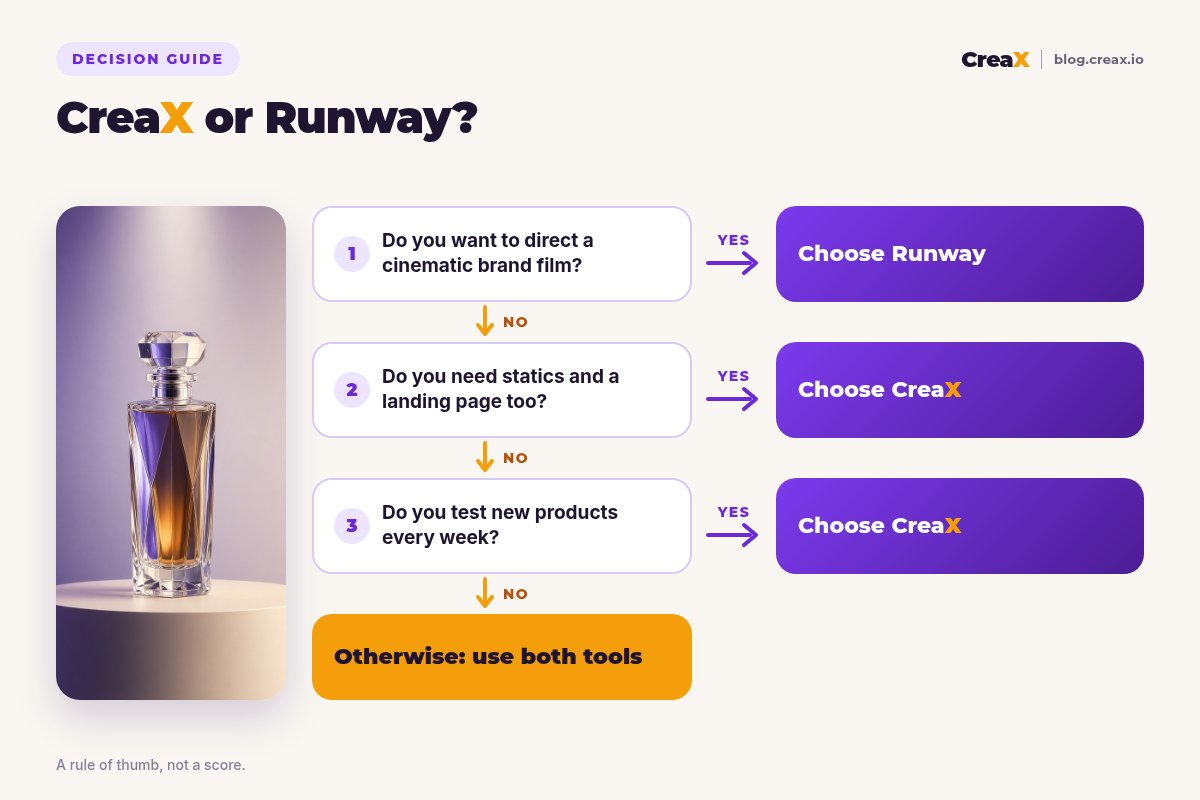
Answer these before you pay
- ✓Do you want cinematic, art-directed product video? That points to Runway.
- ✓Do you have time or a team to direct shots? Runway rewards it; CreaX doesn't need it.
- ✓Do you need static ads and a landing page too? CreaX makes them in the same pass.
- ✓How many products do you test each month? Many products favours a kit-per-product tool.
- ✓Do you also make non-ecommerce video? Films, design and social content point to Runway.
- ✓Do you edit in Premiere Pro or After Effects? Runway's plugins fit that workflow.
Using both is a fair answer. Runway for hero brand content, CreaX for the volume of ad-ready creatives and pages that product testing needs.
FAQFrequently asked questions
Q.Is CreaX a good Runway alternative for product ads?
Q.Can Runway make product ads?
Q.Can Runway make a landing page?
Q.Which is cheaper, CreaX or Runway?
Q.Can I use CreaX and Runway together?
Ready to test your next product?
One product link, about 60–120 seconds, and you have the video ads, studio creatives and landing page for your first test.
This guide is published by CreaX. We describe other tools from their own public websites as of October 2026, avoid invented scores or prices, and recommend checking each vendor's site for current features and plans.