
CreaX vs Pictory: Text-to-Video or Product-to-Ad?
Comparison · AI video
CreaX vs Pictory is really a question about your starting point. Pictory turns words into video: scripts, blog posts, slides, audio and web pages become narrated videos with stock footage, AI visuals, captions and AI voices. CreaX turns a product into an ad test: one product link becomes UGC-style video ads, studio static ads, a landing page and a store. Here is an honest guide to which one fits your ecommerce work.
Updated October 2026 · By the CreaX team
Key takeaways
- ✓Pictory is a text-to-video platform: scripts, articles, PPTs, audio, images and URLs become edited videos with stock footage from Getty Images and Storyblocks, AI voices, captions, avatars and brand kits.
- ✓CreaX is an AI ecommerce creative OS: paste a product link or image and get UGC-style video ads, studio ad creatives, a publish-ready landing page and a multi-tenant store in about 60–120 seconds.
- ✓Pick Pictory if you make lots of content video from written material: explainers, blog repurposing, training, YouTube or social clips.
- ✓Pick CreaX if you sell products and need the ads and the page they click to, built together, on plans from $4.99 a month.
In this guide
TL;DRThe short answer
Both tools make video with AI, and both can start from a URL. That is where the overlap ends. Pictory is built for people who already have words and want video: it reads your script or article, splits it into scenes, finds or generates visuals, adds a voiceover and captions, and gives you an editor to polish the result. CreaX is built for people who have a product and want sales: it reads the product and produces the creatives and the page a paid test needs.
So ask what your next video is for. If it explains, teaches or repurposes content, Pictory is designed for that. If it has to sell a specific product in a feed and send people to a page that converts, CreaX covers more of that job in one pass.
⚖Our bias, stated upfront
The competitorWhat Pictory is (and who it is built for)
Pictory describes itself as an AI video generator that turns text, blogs, scripts, ideas, PPTs, images, screen recordings, URLs and existing videos into videos. Its public pages describe:
- Text, script and blog to video. Paste a script or article and Pictory builds a scene-based storyboard with visuals, captions and an AI voice.
- URL to video. It says it can convert blog posts, homepages and product pages into video.
- Stock and AI visuals. Plans include stock footage from Getty Images and Storyblocks, and an AI Studio that can generate images and clips, including image-to-video with several third-party models.
- Voices, avatars and captions. AI voices from ElevenLabs, AI avatars as an editable layer, automatic subtitles and text-based editing of recorded video.
- Branding and workflow. Brand kits with logos, colors and fonts, templates, horizontal, vertical and square formats, plus Make and Zapier workflows, a Chrome extension and an API.
Its use cases on the site cover marketing, education, corporate training and social media. In short, Pictory is a broad content video tool for marketers, educators and teams who start from words.
Our approachWhat CreaX is: the AI ecommerce creative OS
CreaX starts from the product and stops at a live test. Paste a product link or upload a product image, and in about 60–120 seconds you get:
- UGC-style video ads in 18, 30 or 45 seconds (3, 5 or 7 scenes), made around the product rather than stock footage. Our CreaX UGC video ads explainer shows how they work.
- Studio ad creatives: product photos and static ads in five ad styles (Classic, Humble Orbit, Punch, Luxe and Meta Feed) and four sizes (1:1, 3:4, 4:5 and 9:16).
- A publish-ready landing page at three levels (Simple, Detailed or Advanced) that repeats the promise of the ads.
- A multi-tenant store for testing several niches or running client stores.
You can paste a link from Alibaba, AliExpress, Amazon, Etsy or any product page. creax.io lists 40+ languages and 160+ target countries, and CreaX is built for dropshippers, media buyers, affiliates, coaches, ecommerce brands and agencies. If the page is new to you, see how to turn a product link into a landing page without a designer.
ComparisonCreaX vs Pictory: side-by-side
Here is how the two line up on the jobs an ecommerce seller has to get done.
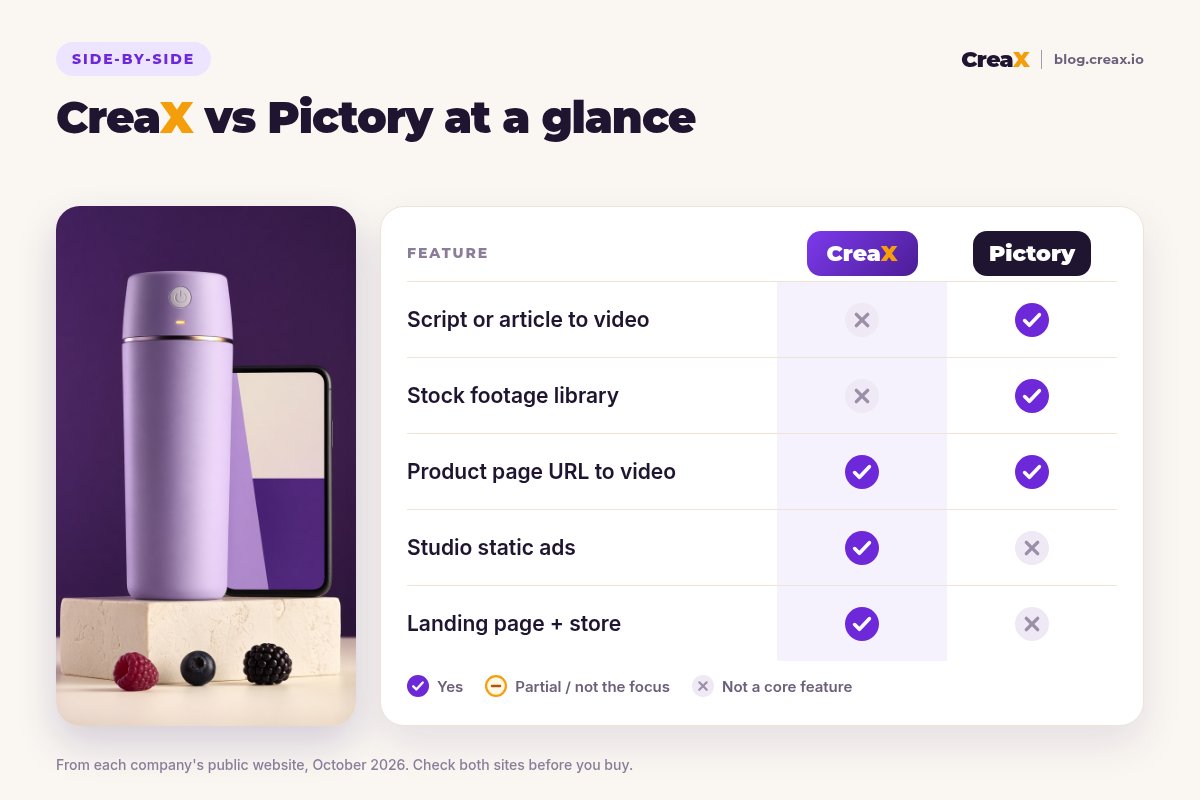
| CreaX | Pictory | |
|---|---|---|
| Core idea | One product link or image → a complete ecommerce ad kit | Text, URLs, slides or audio → an edited video |
| Video style | UGC-style product ads, 18/30/45 seconds | Narrated scene videos with stock or AI visuals, captions and voice |
| Starting from a URL | Product pages, including Alibaba, AliExpress, Amazon and Etsy links | Blog posts, homepages and product pages, per its site |
| Static ads | Studio creatives in 5 ad styles and 4 sizes | Not listed as a core feature (it can generate images in AI Studio) |
| Landing page and store | Publish-ready page plus multi-tenant store | Not listed as a feature |
| Editing and branding | Review and edit outputs; not a full video editor | Storyboard editor, brand kits, text-based editing, templates |
| Long-form and training video | Not the focus | Built for it, including slides to video |
| Pricing | $4.99–$49.99/month credit plans, top-ups $1 per 500 credits | Subscription plans; check pictory.ai/pricing |
Pictory details summarised from its public website, October 2026. Confirm current features and plans on each vendor's site.
See what CreaX builds from your product link
Paste one product link and get UGC-style video ads, studio creatives and a landing page you can test today.
In practiceWorkflow: one product, two tools
Feature lists look alike when both say “AI video”. The difference shows up when you sit down to launch a product test.
With Pictory
- Write a short ad script, or paste the product page URL and let Pictory draft scenes from it.
- Review the storyboard: swap stock clips that do not show your product for your own footage or AI Studio visuals.
- Pick an AI voice, captions style and your brand kit, then export in vertical for TikTok and Reels.
- Make static ads in a design tool, since that is not Pictory's focus.
- Build a product page in your store or page builder, then launch.
With CreaX
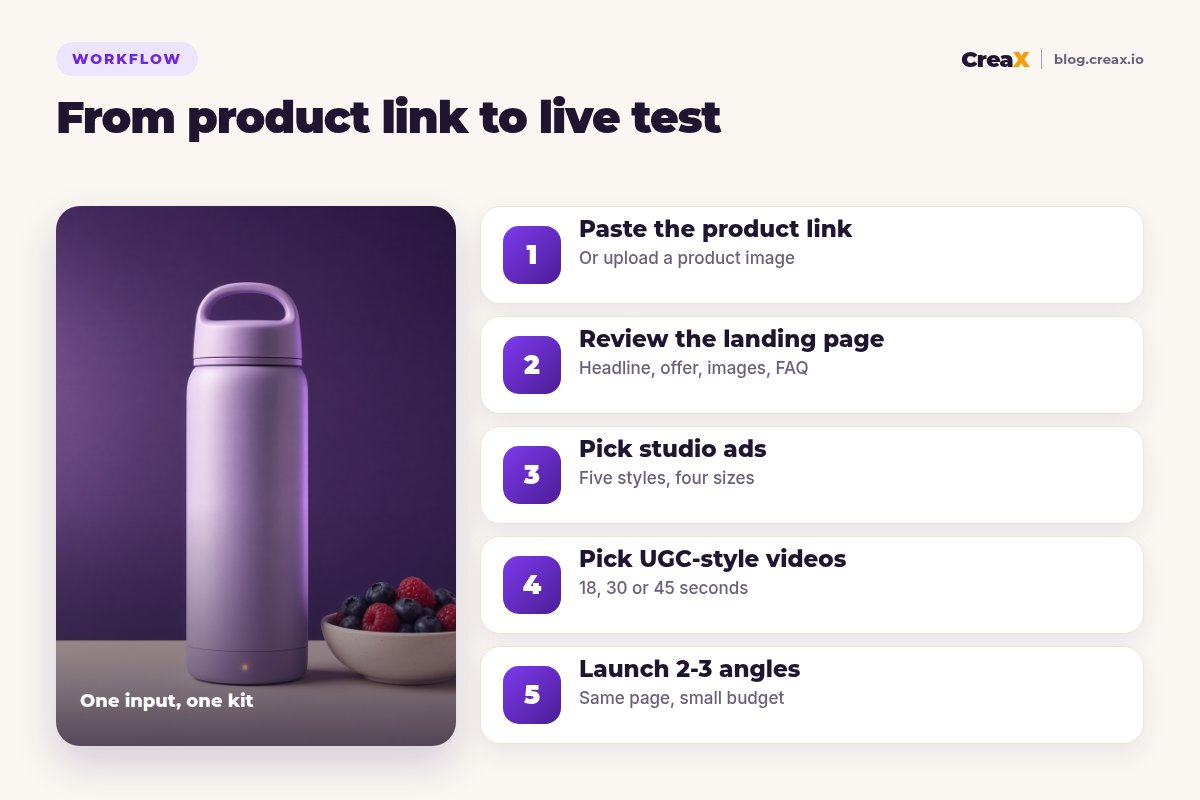
Paste the product link
Review the landing page
Pick your studio ads
Pick your UGC-style videos
Launch 2–3 angles
The biggest practical difference is footage. Stock libraries are great for explainers, but a product ad works best when the viewer sees your actual product. With Pictory you bring or generate those visuals yourself; with CreaX the product is the input, so every asset shows it.
BudgetPricing
CreaX uses simple monthly credit plans. Credits are spent when you generate, and you can top up any time:
| CreaX plan | Price / month | Credits | Good fit |
|---|---|---|---|
| Free | $0 | 0 | Look around the app before buying credits |
| Basic | $4.99 | 2,000 | Your first product tests |
| Standard | $14.99 | 6,500 | Testing new products every week |
| Pro | $29.99 | 14,000 | Several products or stores at once |
| Premium | $49.99 | 25,000 | Agencies and high-volume media buyers |
| Top-up | $1 | 500 | Extra credits when a test takes off |
Current plans on creax.io/pricing. The app shows the credit cost before you generate.
Pictory sells subscription plans with different video-minute, storage, voice and AI-credit allowances per tier, plus team and enterprise options. We do not quote its prices because they change; check pictory.ai/pricing for current plans.
★Price the whole test, not one video
Fair playWhere Pictory is the better pick
A fair comparison has to say where the other tool is stronger. For many teams, Pictory is clearly the right choice:
Pictory
Strengths
- +Turns scripts, blogs, slides and audio into video
- +Large stock libraries from Getty Images and Storyblocks
- +AI voices, avatars, captions and text-based editing
- +Brand kits and templates for consistent content
- +Longer videos, training and YouTube content
- +Make, Zapier, Chrome extension and API
Trade-offs
- −No landing page or store
- −Static ad design is not the focus
- −Stock footage does not show your actual product
CreaX
Strengths
- +Video ads, static ads, landing page and store from one link
- +Every asset is built around your real product
- +About 60–120 seconds per kit
- +Plans from $4.99/month, top-ups $1 per 500 credits
- +Works with links from Alibaba, AliExpress, Amazon, Etsy and more
Trade-offs
- −Not a general content video tool
- −Short ad formats, not long explainers or courses
- −No slides-to-video or audio-to-video
⚖Honest take
Our recommendationWhere CreaX is the better pick
Most product tests fail for reasons a video tool cannot fix on its own: the ad gets a click, but the page does not repeat the promise, the visuals do not show the real product, or there is no page yet. CreaX is built around that problem:
- You test products often. Dropshippers and media buyers launching weekly need a full kit per product, not just a video.
- You need the product on screen. UGC-style videos and studio ads are made from your product, not from generic stock clips.
- You want message match. The ad and the page come from the same product understanding, so the click lands on the same promise.
- You have no designer. Static ads in five styles and four sizes come in the same pass.
If you are comparing more AI video tools, see our roundup of the best AI UGC video ad generators and CreaX vs InVideo AI. For making product video without filming, see product demo video ads without filming.
Build your next product test in one pass
Paste a product link and get the landing page, studio ads and UGC-style video ads together, so your test can go live today.
ExampleWorked example: one product, both workflows
Say you sell a portable blender bottle and want to test two angles: “smoothies at the gym” and “breakfast at your desk”. Only use claims like battery life or blade strength if your supplier can prove them.
| Task | Pictory setup | CreaX setup |
|---|---|---|
| Video ads for 2 angles | Script per angle, stock or AI clips, AI voice, captions | UGC-style video per angle from the product link |
| Showing the real product | Upload your own clips or generate visuals | Built in: every asset uses the product |
| Static ads | Make them in a design tool | Studio ads in 5 styles, generated with the kit |
| Landing page | Build in your store or a page builder | Generated from the same link, then edited |
| Content beyond ads | Strong: blog-to-video, how-to videos, YouTube | Not the focus |
A qualitative comparison of the work involved, not a speed or performance benchmark.
A sensible split for this seller: CreaX for the paid test (ads, statics and page), and Pictory later for content such as recipe videos or blog-to-video clips that build the brand once the product is proven.
Choose with confidenceDecision checklist
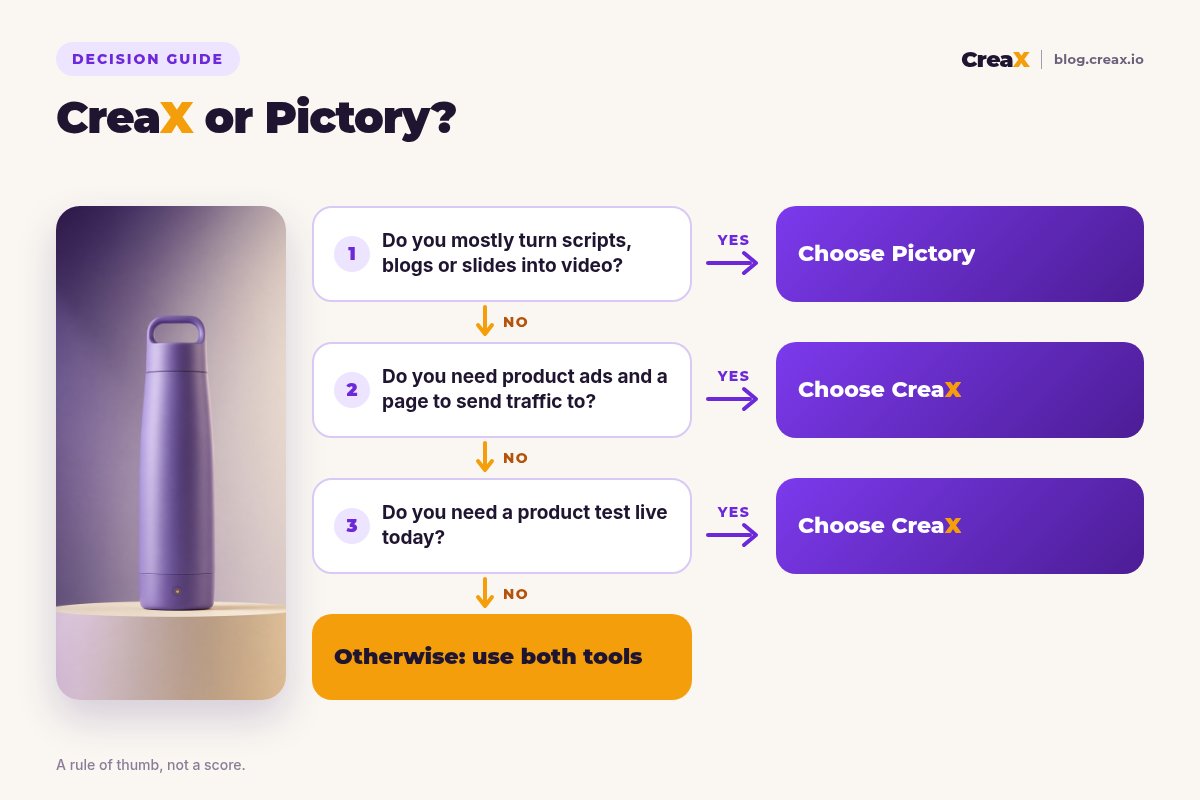
Answer these before you pay
- ✓Do you mostly start from scripts, articles or slides? Lean Pictory.
- ✓Do you start from a product link or product photo? Lean CreaX.
- ✓Does the video need to show your actual product? CreaX builds every asset around it.
- ✓Do you need static ads and a landing page too? CreaX makes them in the same pass.
- ✓Do you make long explainers, training or YouTube videos? Pictory is built for that.
- ✓Do you need automation through Zapier, Make or an API? Pictory lists these on its site.
Using both is a fair answer. Many brands use a content video tool for education and social content and a creative OS for paid product tests and the pages behind them.
FAQFrequently asked questions
Q.Is CreaX a good Pictory alternative?
Q.Can Pictory make product ads?
Q.Can Pictory build a landing page?
Q.Which is cheaper, CreaX or Pictory?
Q.Can I use CreaX and Pictory together?
Ready to test your next product?
One product link, about 60–120 seconds, and you have the video ads, studio creatives and landing page for your first test.
This guide is published by CreaX. We describe other tools from their own public websites as of October 2026, avoid invented scores or prices, and recommend checking each vendor's site for current features and plans.