
CreaX vs Photoroom: Product Photo Editing vs Ad Creation
Comparison · Product photos vs ad kits
CreaX vs Photoroom is not really a fight between two versions of the same tool. Photoroom is one of the best-known AI photo editors for sellers: background removal, AI product photography, batch editing and an API. CreaX starts from the same product and goes further down the funnel: studio ad creatives, UGC-style video ads, a landing page and a store from one link. Here is an honest look at which one you need, and when to use both.
Updated October 2026 · By the CreaX team
Key takeaways
- ✓Photoroom is an AI photo editor and visual platform: fast background removal, AI product staging, batch editing, brand kits, resizing, video templates, marketplace sync and an image API.
- ✓CreaX is an AI ecommerce creative OS: paste a product link or image and get studio ad creatives, UGC-style video ads, a publish-ready landing page and a multi-tenant store in about 60–120 seconds.
- ✓Pick Photoroom if your bottleneck is clean, consistent product photos across a catalog or marketplaces.
- ✓Pick CreaX if your bottleneck is getting a complete ad test live: ads, video and the page they click to, from one product.
In this guide
TL;DRThe short answer: CreaX vs Photoroom
Both tools take a product photo and make it better. The difference is what you walk away with. Photoroom gives you a better product image, and lots of them: cutouts, white backgrounds, staged lifestyle shots, resized versions for every channel, at the scale of a full catalog. CreaX gives you a finished ad test: the static ads, the UGC-style video, the landing page and a store, all built from the same product understanding.
So the useful question is not “which AI is better?” It is “where am I losing time right now?” If your listings look messy and inconsistent, Photoroom fixes that brilliantly. If you have decent photos but no ads, no video and no page that matches them, CreaX covers more of the work in one pass. Plenty of sellers will end up using both.
⚖Our bias, stated upfront
The competitorWhat Photoroom is (and who it's built for)
Photoroom describes itself as an AI-powered photo editor and listing studio for product photography. It is best known for its background remover, and it has grown into a broader visual platform for ecommerce, from solo sellers on a phone to enterprise teams processing large catalogs. Its public feature list includes:
- Background remover for clean cutouts, white backgrounds and transparent exports.
- AI product photography and staging: upload a product photo and generate studio or lifestyle shots around it.
- Batch editing across many images at once, in the web app or through the Image API.
- Brand kit and templates that keep backgrounds, colors, logos and layouts consistent.
- Instant resize for different channels, and video templates that turn a product shot into short videos for Reels, TikTok and Stories.
- Marketplace sync to publish images to Shopify and marketplace feeds, plus enterprise options like custom models.
In short, Photoroom is built around one asset, the product image, and it does that job at almost any scale. Resellers, marketplace sellers, fashion and resale platforms and catalog-heavy brands are its natural audience.
Our approachWhat CreaX is: the AI ecommerce creative OS
CreaX starts from the same product, but its goal is a campaign, not a picture. Paste a product link or upload a product image, and in about 60–120 seconds CreaX generates:
- Studio ad creatives: polished product photos and static ads for feeds and stories (see our guide to studio ad creatives from one product photo).
- UGC-style video ads: vertical, social-first videos that show and sell the product.
- A publish-ready landing page that repeats the promise of the ads, so the click lands on the same message.
- A multi-tenant store for testing several niches or running separate stores for clients.
It is built for dropshippers, media buyers, affiliates, coaches, ecommerce brands and agencies who want the creative side of a product test done today. If you have one good image, our walkthrough on turning one product image into a week of ad tests shows how far it can go.
ComparisonSide-by-side: features, outputs and workflow
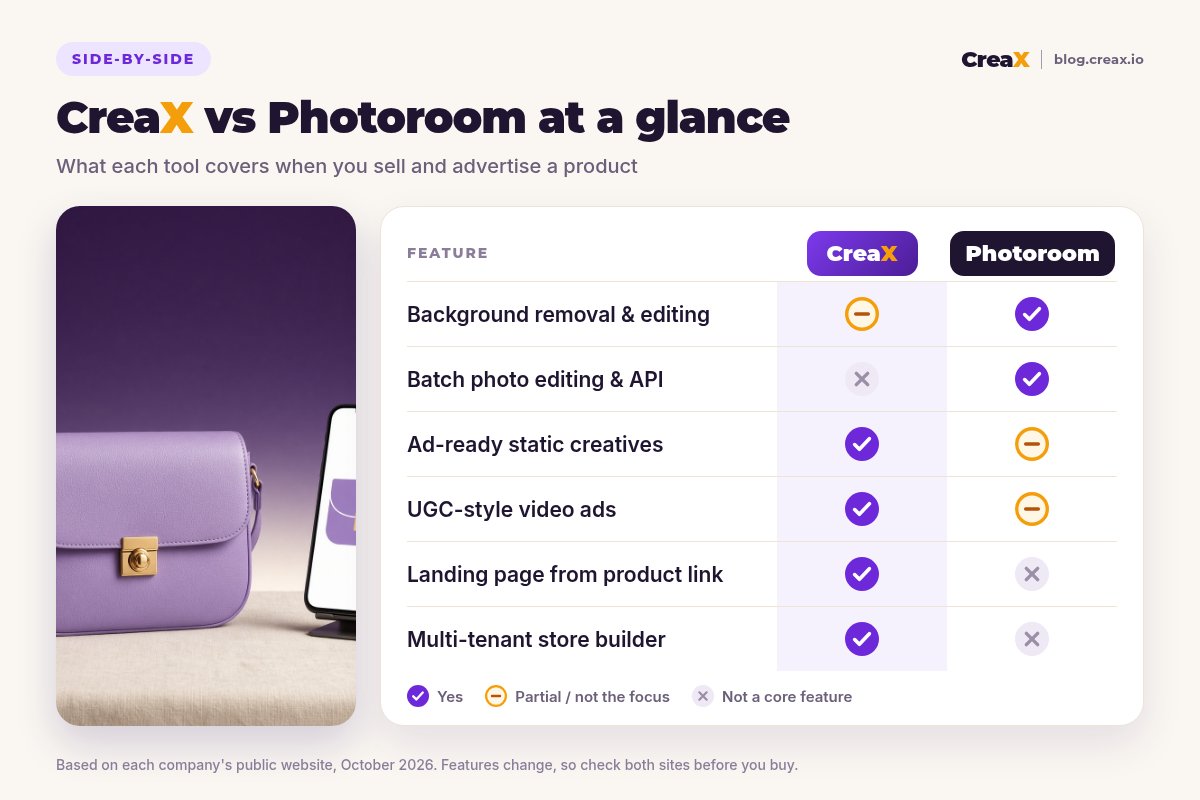
Here is how the two tools line up on the jobs a seller actually has to get done. “Partial” means the tool can help, but it is not what the product is built around.
| CreaX | Photoroom | |
|---|---|---|
| Core idea | One product link or image → a complete ad test kit | One product photo → better product images, at any scale |
| Background removal | Not the focus; works from your product image | Its signature feature: fast, precise cutouts |
| Product photos | Studio-style product photos as part of the kit | AI product photography, staging and editing |
| Batch & API | Generate a kit per product | Batch editing for catalogs, plus an Image API |
| Static ads | Ad-ready static creatives in the same generation | Templates and brand kit for designed visuals |
| Video | UGC-style video ads | Video templates from product shots |
| Landing page | Publish-ready page from the same link | Not listed as a feature |
| Store | Multi-tenant store builder | Syncs images to Shopify and marketplaces; no store builder listed |
| Pricing | $4.99–$49.99/month credit plans, top-ups $1 per 500 credits | Check photoroom.com/pricing |
Photoroom details summarised from its public website, October 2026. Always confirm current features and plans on each vendor's site.
Turn your product photo into a full ad test
Upload a product image or paste a link: get studio creatives, UGC-style video ads and a landing page you can test today.
What the workflow feels like
With Photoroom, you upload product photos, remove or replace backgrounds, apply your brand kit, generate staged scenes, resize for each channel and export, one image or thousands at a time. The output is a set of excellent images. Turning them into ads, writing hooks, producing video beyond templates and building the page the ads send traffic to happens in other tools.
With CreaX, you paste the product link and review a kit: the page, the static ads and the videos. Your time goes into picking angles and editing claims rather than designing. The trade-off is less pixel-level control over each individual photo than a dedicated editor gives you.

BudgetPricing: CreaX plans vs Photoroom
CreaX uses simple monthly credit plans. Credits are spent when you generate assets, and you can top up any time:
| CreaX plan | Price / month | Credits | Good fit |
|---|---|---|---|
| Free | $0 | 0 | Look around the app before buying credits |
| Basic | $4.99 | 2,000 | Your first product tests |
| Standard | $14.99 | 6,500 | Testing new products every week |
| Pro | $29.99 | 14,000 | Several products or stores at once |
| Premium | $49.99 | 25,000 | Agencies and high-volume media buyers |
| Top-up | $1 | 500 | Extra credits when a test takes off |
Current plans on creax.io/pricing. The credit cost of each generation is shown in the app before you generate.
Photoroom publishes its own plans, from individual sellers to API and enterprise options. We are not going to quote its prices here, because they change and depend on how you use it (app, batch or API). Check photoroom.com/pricing for current numbers.
★Compare the cost of the job, not the tool
Fair playWhere Photoroom is the better pick
Photoroom is a serious, mature product, and for many sellers it is the right tool:
Photoroom
Strengths
- +Fast, precise background removal
- +Batch editing for large catalogs, plus an Image API
- +Brand kit keeps every image consistent
- +Mobile and web apps for sellers on the go
- +Marketplace sync and enterprise options
Trade-offs
- −Ads, hooks and landing pages happen elsewhere
- −Video is template-based, not UGC-style ads
- −No store builder
CreaX
Strengths
- +Studio ads, UGC-style video, landing page and store from one link
- +Ads and page share one message
- +About 60–120 seconds per kit
- +Low entry price: $4.99/month, top-ups $1 per 500 credits
- +Works without an existing store
Trade-offs
- −Less pixel-level control over individual photos
- −Not built for retouching thousands of catalog images
- −No image API for catalog pipelines
⚖Honest take
Our recommendationWhere CreaX is the better pick
A perfect product photo does not sell anything on its own. It has to become an ad, the ad needs a hook, and the click needs a page that keeps the promise. That is the gap CreaX is built for:
- You test new products often. Dropshippers and media buyers need a whole kit per product, not just cleaner photos.
- You need video. UGC-style video ads come out of the same generation as the statics.
- You have no page yet. The landing page is generated from the same link, so you are not waiting on a page build. More in how to turn a product link into a landing page.
- You run several stores or clients. The multi-tenant store keeps niches and client brands apart.
If your main question is which image tool to use, our roundup of the best AI product photo generators compares Photoroom, CreaX and eight more options. For design-led workflows, see CreaX vs Canva.
Build your next product test in one pass
Paste a product link and get studio ads, UGC-style video ads and a landing page together, so your test can go live today.
ExampleWorked example: one product, both workflows
Say you are launching a lavender leather crossbody bag. You have three supplier photos with busy backgrounds, and you want to test two angles on Meta: “fits everything you need for a day out” and “a small luxury that goes with everything”.
| Task | Photoroom setup | CreaX setup |
|---|---|---|
| Clean product photos | Strong: cutouts, white background, consistent brand look | Works from the supplier image; clean it first if it is very messy |
| Lifestyle and studio shots | AI staging around the product | Studio ad creatives generated with the kit |
| Static ads for 2 angles | Templates, or design them in another tool | Generated with the kit, then edited |
| Video ads | Video templates from product shots | UGC-style video ads per product |
| Landing page | Build in your store or a page builder | Generated from the same link |
A qualitative comparison of the work involved, not a speed or performance benchmark.
A sensible combined setup: run the supplier photos through a background remover so the source image is clean, then generate the kit in CreaX from that clean image. Photoroom keeps your catalog photos consistent; CreaX turns the product into a test you can launch.
!Keep the product accurate in both tools
Choose with confidenceDecision checklist
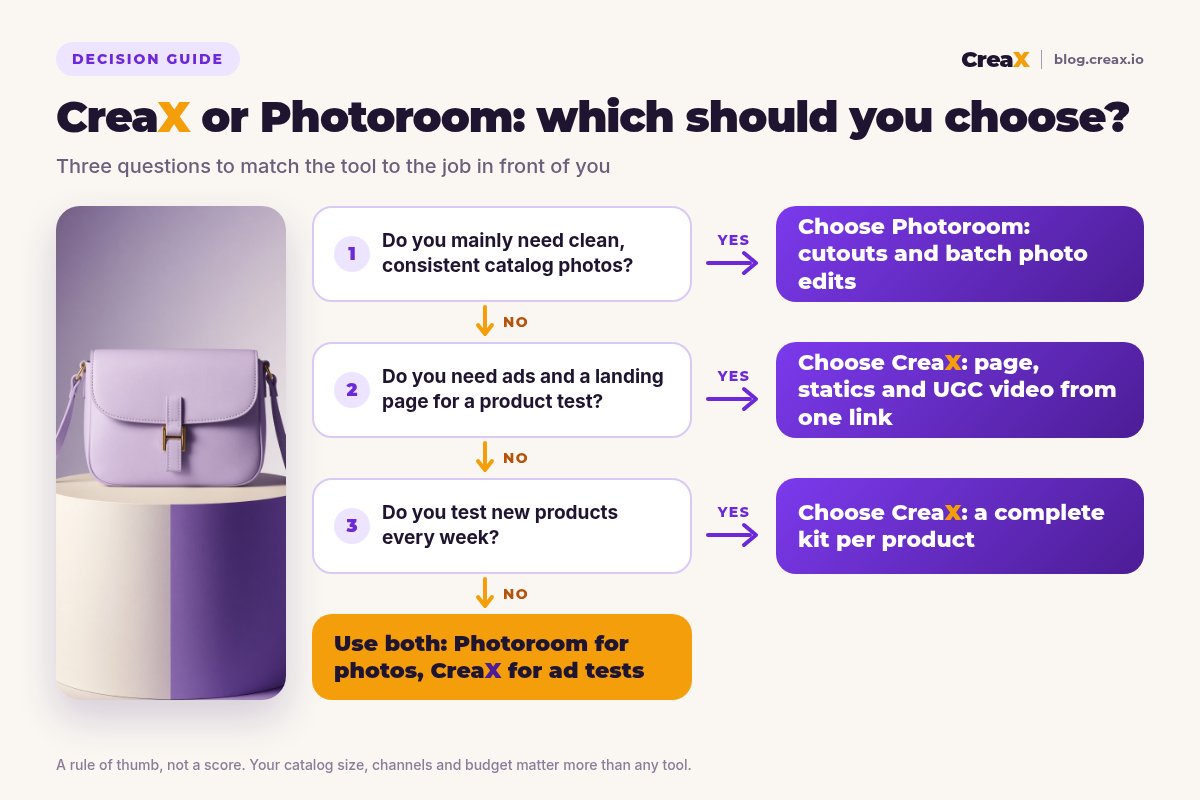
Answer these before you pay
- ✓Is your main problem messy or inconsistent product photos? Lean Photoroom.
- ✓Do you manage hundreds or thousands of SKUs? Batch editing and an API favour Photoroom.
- ✓Do you need static ads and video ads, not just photos? CreaX makes both in one pass.
- ✓Do you have a landing page that matches your ads? If not, lean CreaX.
- ✓Do you test new products every week? A kit per product favours CreaX.
- ✓Do you run several stores or client brands? The CreaX multi-tenant store helps.
Using both is a legitimate answer. Photoroom for catalog and marketplace images, CreaX for new-product ad tests and the pages they point to.
FAQFrequently asked questions
Q.Is CreaX a Photoroom alternative?
Q.Does Photoroom make video ads?
Q.Does Photoroom build landing pages?
Q.Which is cheaper, CreaX or Photoroom?
Q.Can I use Photoroom and CreaX together?
Q.Do I need a Shopify store to use CreaX?
Ready to turn product photos into a test?
One product link or image, about 60–120 seconds: studio creatives, UGC-style video ads and a landing page for your next test.
This guide is published by CreaX. We describe other tools from their own public websites as of October 2026, avoid invented scores or prices, and recommend checking each vendor's site for current features and plans.