
CreaX vs Pencil: AI Ad Creative Platforms Compared
Comparison · AI ad platforms
CreaX vs Pencil AI is really a question about how you work. Pencil is a governed, multi-model ad production platform built for brand and marketing teams. CreaX turns one product link into a complete ecommerce test kit: UGC-style video ads, studio creatives, a landing page and a store. Here is an honest comparison, and when it makes sense to use both.
Updated October 2026 · By the CreaX team
Key takeaways
- ✓Pencil calls itself the AI operating system for marketing: many AI models in one platform, a Brand Library, AI agents, workflows, bulk variations, ad account connections and enterprise governance.
- ✓CreaX is an all-in-one AI ecommerce creative OS: paste a product link or image and get UGC-style video ads, studio ads, a publish-ready landing page and a multi-tenant store in about 60–120 seconds.
- ✓Pick Pencil if you run campaigns for an established brand with a team, approvals, brand rules and many markets.
- ✓Pick CreaX if you sell products online and need the whole first test, ads plus the page they click to, from one input on a plan that starts at $4.99 a month.
In this guide
TL;DRThe short answer
Both platforms generate static and video ads with AI. The difference is the starting point and the finish line. Pencil starts from your brand: a Brand Library of logos, fonts, tone of voice and approved claims, plus briefs, agents and workflows that a marketing team uses to produce on-brand campaigns at scale, then launch and track them in connected ad accounts. CreaX starts from a product: one link or image in, and out comes everything a new product test needs on day one, including the landing page and a store.
So the honest question is not “which AI is smarter?†It is “what does my team look like, and what is missing from my next launch?†A brand team with designers, approvals and several markets will appreciate Pencil's control and governance. A dropshipper, media buyer or small brand that needs a page and a set of ads live tonight will get further, faster, with CreaX.
⚖Our bias, stated upfront
The competitorWhat Pencil is (and who it's built for)
Pencil (trypencil.com) describes itself as “the AI operating system for marketing.†Its pitch is that one governed platform should give marketing teams access to many leading AI models, so they are not locked into a single vendor. Its website names models from providers such as OpenAI, Google, Anthropic, Adobe, Kling and Runway in one orchestration layer.
Its public feature list includes:
- A Brand Library per workspace: logos, colors, fonts, tone of voice, product names, approved claims and disclaimers, applied to every generation.
- Several ways to create: a conversational Chat with AI agents, a hands-on Ads Editor, node-based Workflows on a canvas, and Sheets / Feed Variations for spreadsheet-style bulk production.
- AI agents for tasks like audience research, headline writing, image generation, campaign ideas and video scripting, plus the option to build your own.
- Text, image and video ad outputs with auto-resizing to common formats such as 1:1, 9:16, 4:5 and 16:9, and AI video cutdowns.
- Ad account connections to launch and track ads on channels including Meta, TikTok, YouTube, Google Display and LinkedIn, with creative performance predictions and insights.
- Enterprise governance: SOC 2 Type II, a no-train policy, IP ownership, role-based access and brand safety controls, plus managed services and training for larger customers.
Pencil's help center recommends feeding it a solid brand kit and a handful of product images and videos for best results. That tells you who it is designed for: brands with established identities and teams who will invest in setting it up properly, then produce a lot of on-brand creative across channels and markets.
Our approachWhat CreaX is: the AI ecommerce creative OS
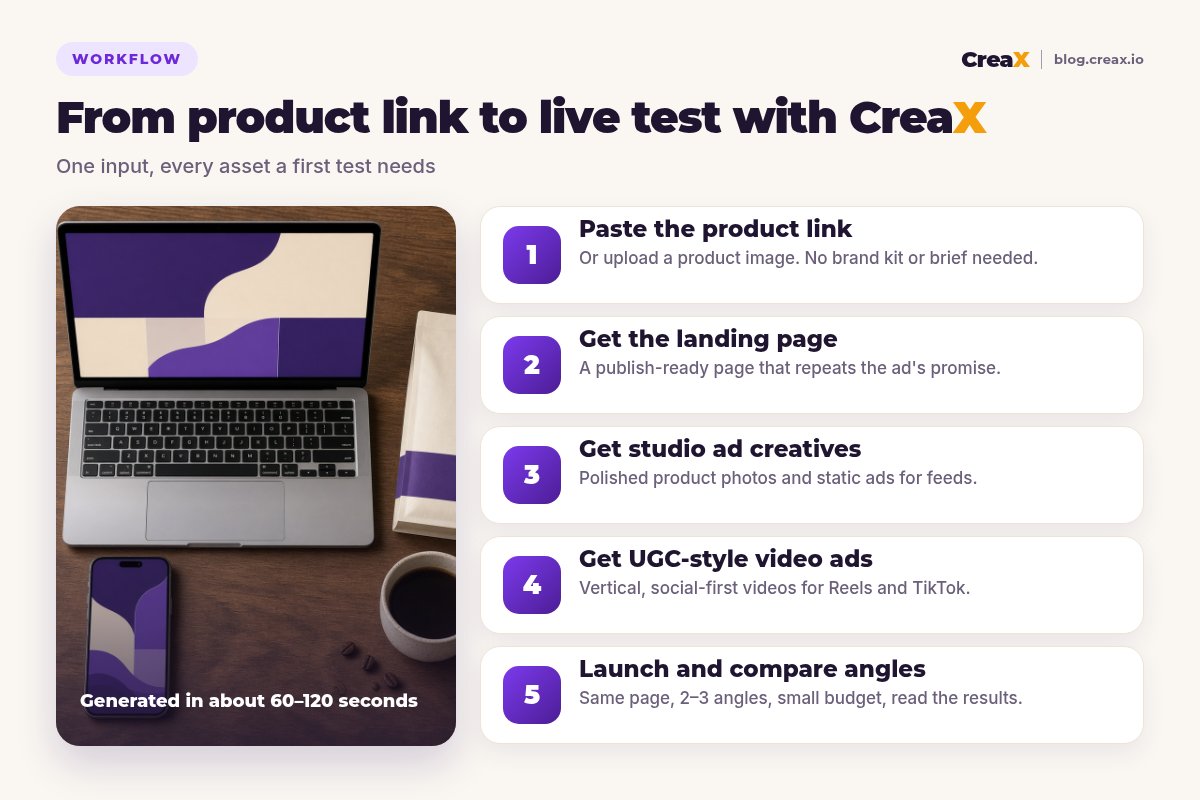
CreaX starts from the product instead of the brand system. Paste a product link or upload a product image, and in about 60–120 seconds CreaX generates the assets a first test needs:
- UGC-style video ads: vertical, social-first videos for Reels, TikTok and Shorts placements.
- Studio ad creatives: polished product photos and static ads for feeds and stories. Our guide to studio ad creatives from one product photo shows what that looks like.
- A publish-ready landing page that repeats the promise of the ads, so the click lands on the same message.
- A multi-tenant store, useful for testing several niches or building stores for clients.
It is built for dropshippers, media buyers, affiliates, coaches, ecommerce brands and agencies, people who have something to sell and want the creative side of a test done today, without a brand kit, a brief or a designer. If you are new to the page side, see how to turn a product link into a landing page.
ComparisonCreaX vs Pencil: side-by-side
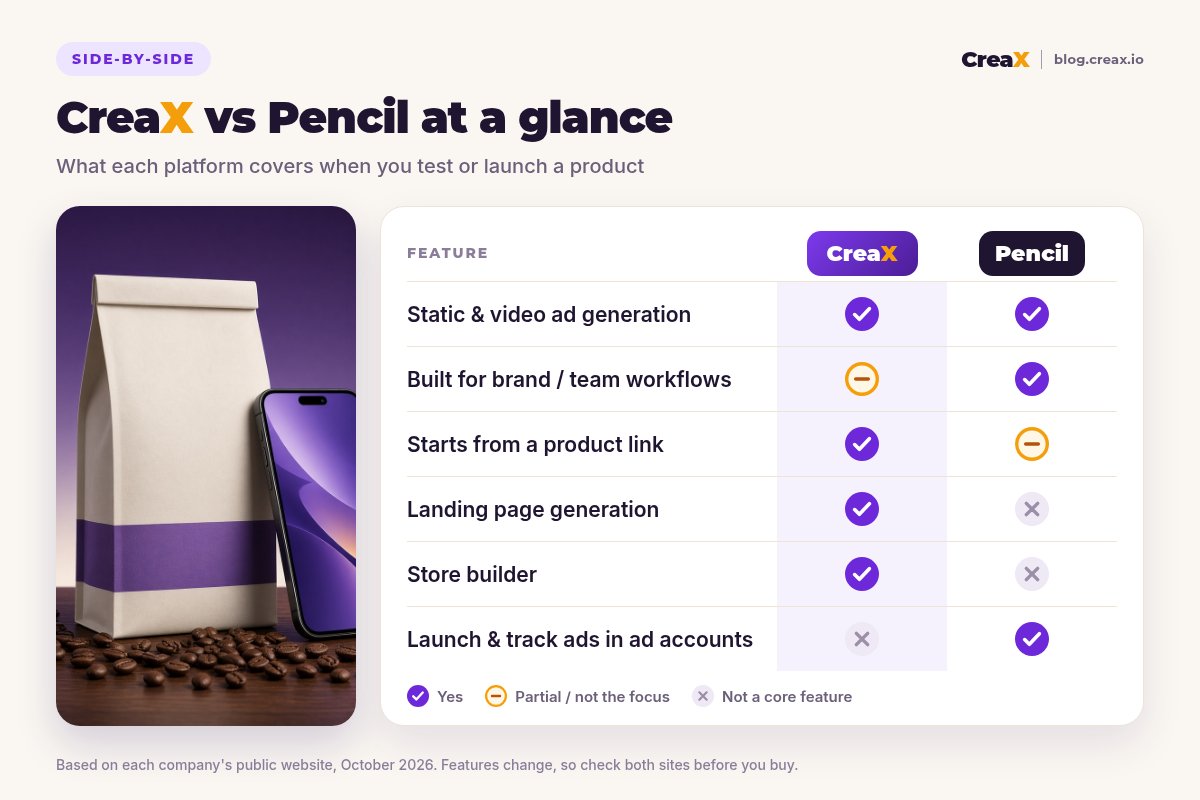
Here is how the two platforms line up on the jobs that matter when you launch or test a product. “Partial†means the platform can help, but it is not what it is built around.
| CreaX | Pencil | |
|---|---|---|
| Core idea | One product link or image → a complete ecommerce ad kit | Brand Library + briefs + agents → on-brand campaigns at scale |
| Typical input | A product link or a product image | Brand kit, product images and videos, a brief or a chat |
| Static & video ads | Studio ads and UGC-style video ads in one generation | Text, image and video ads across many AI models |
| Team & governance | Not the focus | Workspaces, roles, approvals, brand safety, enterprise terms |
| Bulk variations | A kit per product or angle | Workflows and Sheets / Feed Variations for scale |
| Landing page | Publish-ready page matching the ads | Not listed as a core feature |
| Store | Multi-tenant store builder | No |
| Launch & analytics | You run the ads in your own ad accounts | Connect ad accounts to launch, track and get predictions |
| Pricing | $4.99–$49.99/month credit plans, top-ups $1 per 500 credits | Self-serve and custom plans; check trypencil.com/pricing |
Pencil details summarised from its public website and help center, October 2026. Always confirm current features and plans on each vendor's site.
Workflow: what a launch looks like in each
In Pencil, a typical flow is: set up the Brand Library, write a brief or chat with an agent, generate concepts and ads, refine them in the editor or a workflow, scale variations across formats and markets, get them approved, then publish to connected ad accounts and watch the results.
In CreaX, the flow is shorter because the scope is narrower: paste the product link, review the generated landing page, pick the studio ads and UGC-style videos you want to test, edit anything that doesn't match how you want to sell, and launch a small test with 2–3 angles pointing at the same page.
See your product as a complete test kit
Paste one product link and get UGC-style video ads, studio creatives and a landing page that tell the same story. No brand kit or brief needed.
BudgetPricing: CreaX plans vs Pencil
CreaX uses simple monthly credit plans. Credits are spent when you generate assets, and you can top up at any time:
| CreaX plan | Price / month | Credits | Good fit |
|---|---|---|---|
| Free | $0 | 0 | Look around the app before buying credits |
| Basic | $4.99 | 2,000 | Your first product tests |
| Standard | $14.99 | 6,500 | Testing new products every week |
| Pro | $29.99 | 14,000 | Several products or stores at once |
| Premium | $49.99 | 25,000 | Agencies and high-volume media buyers |
| Top-up | $1 | 500 | Extra credits when a test takes off |
Current plans on creax.io/pricing. The credit cost of each generation is shown in the app before you generate.
Pencil publishes self-serve plans for solo users and growing teams, plus custom-priced plans for enterprises that add governance, bulk feed generation, managed services and training. We won't quote its numbers here because they change; check trypencil.com/pricing for current plans and how it counts generations.
★Compare the cost of a complete launch
Fair playWhere Pencil is the better pick
An honest comparison has to say where the other tool is stronger. For some teams, Pencil is clearly the right choice:
Pencil
Strengths
- +Many leading AI models in one governed platform
- +Brand Library enforces logos, tone, claims and disclaimers
- +Agents, workflows and spreadsheet-style bulk variations
- +Connects to ad accounts to launch, track and predict performance
- +Enterprise controls: roles, no-train policy, IP terms, SOC 2
Trade-offs
- −You still need a landing page and store elsewhere
- −Best results need a set-up brand kit and asset library
- −More power means more decisions per campaign
CreaX
Strengths
- +UGC-style video, studio ads, landing page and store from one link
- +No brand kit or brief needed to start
- +Fast: about 60–120 seconds per kit
- +Low entry price: $4.99/month, top-ups $1 per 500 credits
- +Ads and page share one message for clean tests
Trade-offs
- −Not an enterprise governance platform: no approval chains or role controls
- −No built-in ad account launching or performance predictions
- −Brand teams may want more manual design control
⚖Honest take
Our recommendationWhere CreaX is the better pick
For ecommerce sellers, most tests fail for reasons a brand platform doesn't address on its own. The ad gets the click, but the page doesn't repeat the promise, the product images look like supplier photos, or there is no page yet. CreaX is built around that problem:
- You test lots of products. Dropshippers and media buyers need the full kit per product, not a campaign system per brand.
- You don’t have a brand kit or a designer. CreaX works from the product link itself, so you can test before you've invested in brand assets.
- You want message match. The page and the ads come from the same product understanding, so the click lands on the same promise.
- You run several stores or clients. The multi-tenant store keeps niches or client brands separate.
If you are comparing broader options, our roundup of the best AI ad creative generators for ecommerce covers more tools, and CreaX vs AdCreative.ai looks at another ad-focused platform.
Launch your next product test in one pass
Paste a product link and get the landing page, studio ads and UGC-style video ads together, so the test can go live today.
ExampleWorked example: one product, both workflows
Say a small roastery is launching a new single-origin coffee bag online and wants to test three angles: “bright and fruity for pour-over fansâ€, “freshly roasted to order†(only if that is true) and “a gift for coffee loversâ€. They want static and video ads for each angle and a page to send traffic to.
| Task | Pencil setup | CreaX setup |
|---|---|---|
| Brand consistency | Strong: Brand Library applies fonts, colors, tone and approved claims | Generated from the product; you edit to taste |
| Static and video ads per angle | Agents and workflows create and scale variations | Studio ads and UGC-style video from the product link |
| Formats and markets | Auto-resize and localisation built for scale | Formats for the main social placements |
| Landing page | Build in your store or a page builder | Generated from the same link, then edited |
| Where buyers check out | Your existing store | Your store, or the CreaX store |
| Launch and tracking | From connected ad accounts inside Pencil | In your own ad accounts |
A qualitative comparison of the work involved, not a speed or performance benchmark.
If the roastery already has a strong brand, a Shopify store with good pages and a marketer who will live in the tool, Pencil gives them control and scale. If it is two founders who need to see which angle sells before investing in more creative, CreaX gets the page and the ads live with far fewer moving parts.
!Keep claims honest in both tools
Choose with confidenceDecision checklist
Answer these before you pay
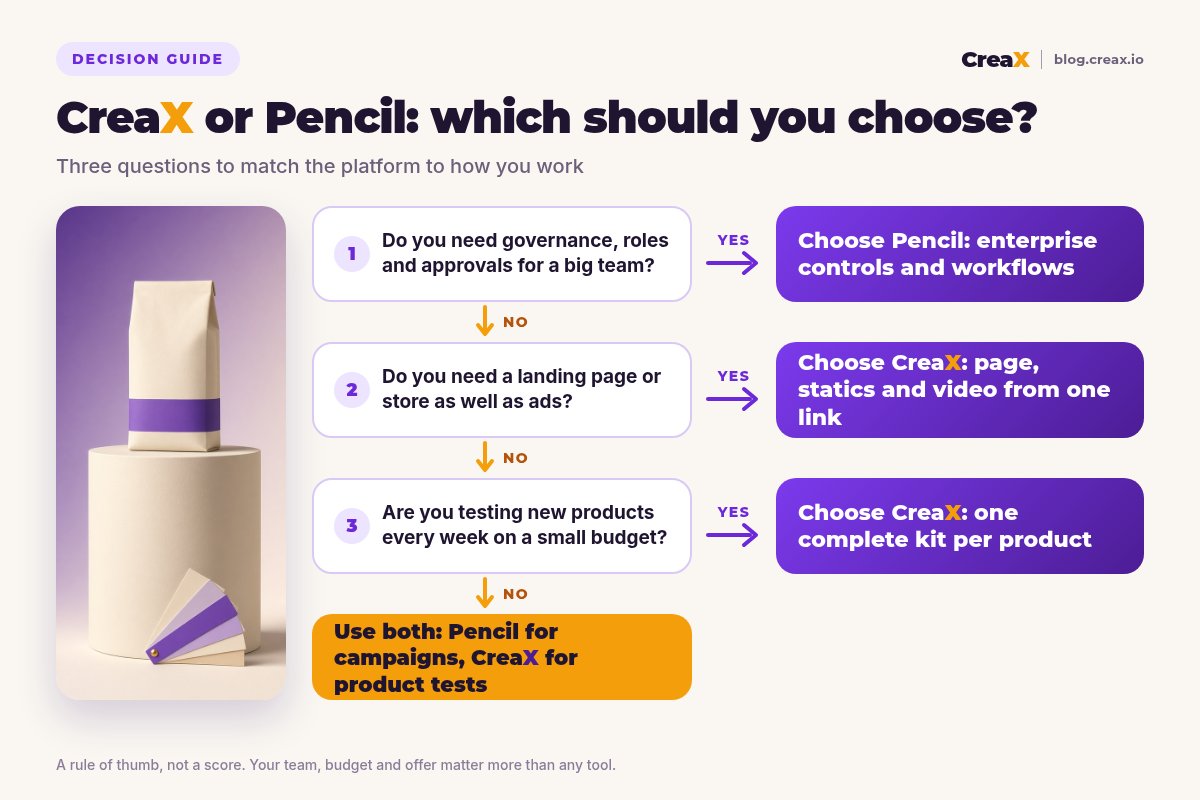
- ✓Do several people need roles, approvals and brand rules? Lean Pencil.
- ✓Do you have a converting product page already? If not, the page is your bottleneck. Lean CreaX.
- ✓Do you want to launch and track ads from inside the creative tool? Pencil connects to ad accounts.
- ✓How many new products do you test per month? Many products favours a kit-per-product tool like CreaX.
- ✓Do you have a brand kit and asset library ready? Pencil works best with one; CreaX doesn't need one.
- ✓What is your monthly tool budget? Compare the full launch cost, not one feature.
Using both is a legitimate answer. A brand team might run its always-on, multi-market campaigns in Pencil and use CreaX to spin up landing pages and quick test kits for new products before they get the full campaign treatment.
FAQFrequently asked questions
Q.Is CreaX a good Pencil alternative?
Q.Does Pencil build landing pages?
Q.Which is cheaper, CreaX or Pencil?
Q.Is Pencil only for big enterprises?
Q.Do I need a brand kit to use CreaX?
Q.Can I use Pencil and CreaX together?
Ready to test your next product?
One product link, about 60–120 seconds: UGC-style video ads, studio creatives and a landing page for your first test.
This guide is published by CreaX. We describe other tools from their own public websites as of October 2026, avoid invented scores or prices, and recommend checking each vendor's site for current features and plans.