
CreaX vs Pebblely: AI Product Photos or a Full Ad Kit?
Comparison · AI product photos
CreaX vs Pebblely is a question of scope. Pebblely is an AI product photography tool: upload a product photo and get it placed in attractive lifestyle scenes, in bulk if you need to. CreaX is an AI ecommerce creative OS: one product link or image becomes studio ad creatives, UGC-style video ads, a landing page and a store. Here's an honest comparison of what each does well, when to pick which, and when to use both.
Updated October 2026 · By the CreaX team
Key takeaways
- ✓Pebblely focuses on one job and does it well: turning product photos into lifestyle images for listings, social posts, banners and ads, with templates and bulk generation.
- ✓CreaX treats the photo as step one of a launch: it also produces static ads, UGC-style video ads, a landing page and a store from the same input.
- ✓If you need lots of lifestyle images for a big catalog, Pebblely is the more focused choice. If you need a complete paid test for a product, CreaX covers more of the work.
- ✓You can also use both: Pebblely for catalog imagery, CreaX for ad tests.
In this guide
TL;DRThe short answer
Choose Pebblely if your problem is product imagery: you have plain or white-background photos and want attractive lifestyle versions for marketplace listings, your website, emails and social posts, possibly for many products at once. Choose CreaX if your problem is launching a product: you need ads people will stop for, video for Reels and TikTok, and a page that repeats the promise, without hiring a photographer, a video editor and a page builder.
⚖Our bias, stated upfront
The competitorWhat Pebblely is (and who it's built for)
Pebblely is an AI product photography tool aimed at sellers and creative teams. According to its website and help pages, it offers:
- AI backgrounds and lifestyle scenes from a single product photo, with automatic background removal so you don't need Photoshop skills.
- 100+ templates as starting points (a product on a marble floor, on a wooden table, in a living room, emerging from water) plus your own custom descriptions.
- Multiple marketing uses: marketplace listing photos, social media content, website imagery, email banners and ad creatives.
- Bulk generation for producing images for many products with similar or varied backgrounds.
- Common sizes for different channels, the ability to edit generated images, a Shopify app and an API.
It has a free tier to try and paid plans; we don't list its prices because they change, so check its pricing page. In short, Pebblely is a focused, easy tool for anyone who needs more and better product photos without a photoshoot.
Our approachWhat CreaX is: the AI ecommerce creative OS
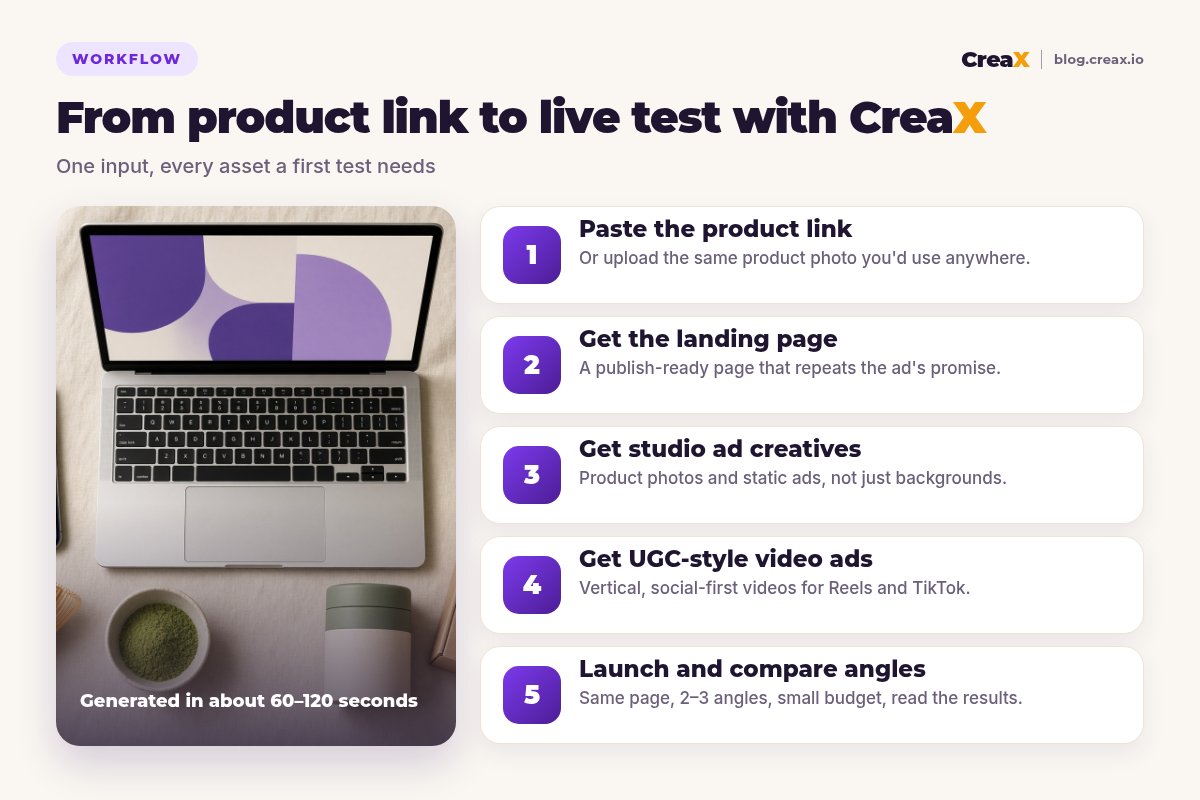
CreaX starts from the same input, a product link or product image, but aims at a different finish line: a product that's ready to advertise. In about 60–120 seconds, it generates:
- Studio ad creatives: polished product photos and static ads designed for feeds, not just a new background.
- UGC-style video ads: vertical, social-first videos for Reels, TikTok and Stories.
- A publish-ready landing page that repeats the ad's promise.
- A multi-tenant store, so you can sell and keep niches or clients separate.
So the honest framing is: Pebblely gives you better photos; CreaX gives you a launch kit that includes ad-ready imagery. Our guide to studio ad creatives from one product photo shows what the image side of CreaX looks like.
ComparisonCreaX vs Pebblely: side-by-side
Here's how they line up on the jobs ecommerce sellers care about. “Partial” means the tool can help, but it isn't what it's built around.
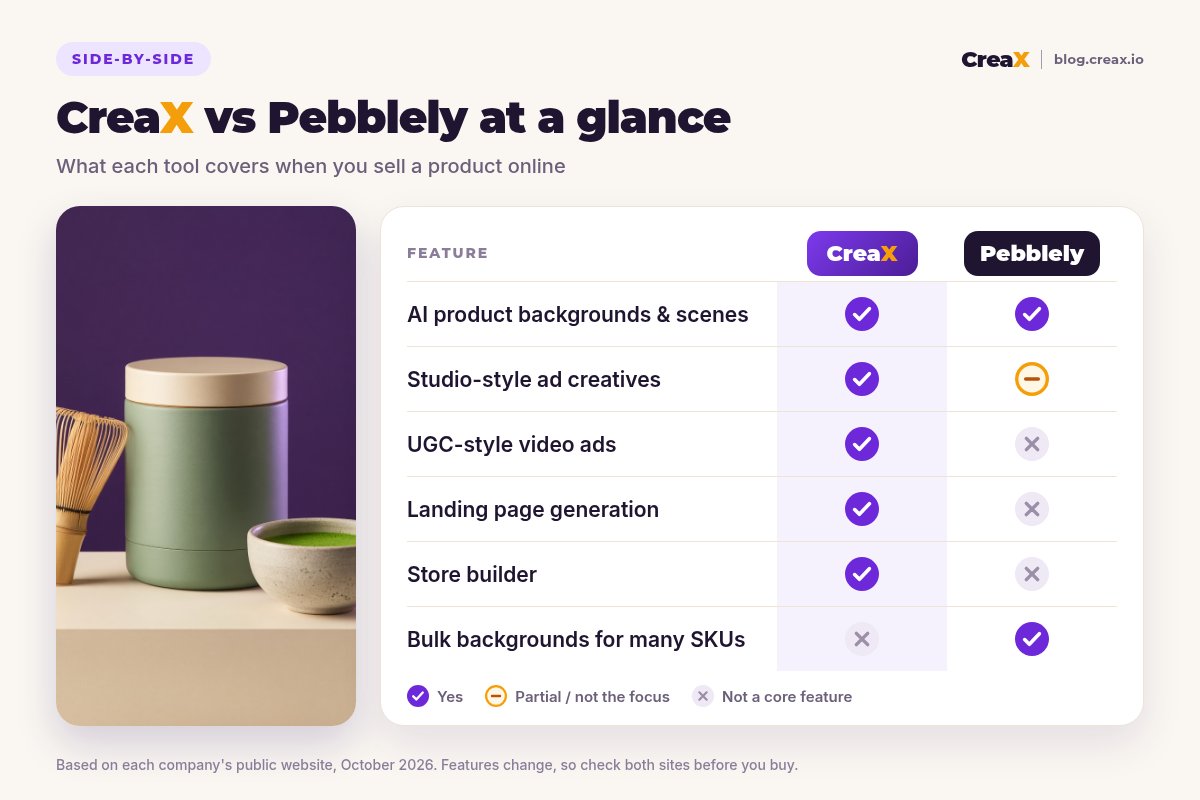
| CreaX | Pebblely | |
|---|---|---|
| Core idea | One product link → complete ecommerce ad kit | One product photo → many lifestyle photos |
| Typical input | Product link or product image | Product photo |
| Lifestyle backgrounds | Yes, as part of studio creatives | Yes: core feature, 100+ templates |
| Ad-ready static ads | Studio ad creatives | Images you can use in ads; layout is up to you |
| Video ads | UGC-style video ads | Not a core feature |
| Bulk images for many SKUs | Not the focus | Bulk generation |
| Landing page | Publish-ready page from the same link | Not offered |
| Store | Multi-tenant store builder | Not offered (Shopify app for images) |
| Pricing | $4.99–$49.99/month credit plans, top-ups $1 per 500 credits | Free tier and paid plans: check site |
Pebblely details summarised from its public website and help pages, October 2026. Always confirm current features and plans on each vendor's site.
Workflow: what a launch looks like in each
With Pebblely, a typical flow is: upload a product photo, let it remove the background, choose a template or describe a scene, generate several options, pick the best and download them in the sizes you need. Then you take those images into your store, your ad manager or a design tool to build the actual ads and pages.
With CreaX, you paste the product link (or upload the same photo), review the landing page, pick the studio ads and UGC-style videos for 2–3 angles, edit anything that doesn't match how you want to sell, and launch a small test pointing at the page.
Go from product photo to ad test
Upload a product image or paste a link and get studio creatives, UGC-style video ads and a landing page in one pass.
BudgetPricing: CreaX plans vs Pebblely
CreaX uses simple monthly credit plans. Credits are spent when you generate assets, and you can top up at any time:
| CreaX plan | Price / month | Credits | Good fit |
|---|---|---|---|
| Free | $0 | 0 | Look around before you buy credits |
| Basic | $4.99 | 2,000 | Your first product test |
| Standard | $14.99 | 6,500 | Testing new products every week |
| Pro | $29.99 | 14,000 | Several products or stores at once |
| Premium | $49.99 | 25,000 | Agencies and high-volume testers |
| Top-up | $1 | 500 | Extra credits when a test takes off |
Current plans on creax.io/pricing. The credit cost of each generation is shown in the app before you generate.
Pebblely has a free tier and paid plans with different limits and features. We won't quote its numbers because they change; check pebblely.com/pricing for current plans.
★Price the whole job, not the photo
Fair playWhere Pebblely is the better pick
An honest comparison has to say where the other tool is stronger. For these sellers, Pebblely is the better fit:
Pebblely
Strengths
- +Focused, simple AI product photography
- +100+ templates plus custom scene descriptions
- +Bulk generation for many products
- +Images for listings, website, email and social
- +Shopify app and API
Trade-offs
- −No video ads, landing page or store
- −You still design the ads around the images
- −Single-purpose: other launch steps need other tools
CreaX
Strengths
- +Studio ads, UGC-style video, landing page and store from one link
- +Ad-ready creatives, not just new backgrounds
- +About 60–120 seconds per kit
- +Low entry price: $4.99/month, top-ups $1 per 500 credits
- +Ad and page share one message
Trade-offs
- −Not built for bulk catalog photo editing
- −Fewer scene templates to browse than a dedicated photo tool
- −More than you need if you only want listing photos
⚖Honest take
Our recommendationWhere CreaX is the better pick
Better photos help, but they rarely launch a product on their own. For sellers who grow through paid ads, the gaps are usually elsewhere: no video, ads that don't look like ads, or no page that repeats the promise. CreaX is built around those gaps:
- You need ads, not just images. Studio creatives come out shaped for feeds.
- You need video. UGC-style videos are part of the same kit.
- You need somewhere to send traffic. The landing page comes from the same link.
- You test new products often. One input per product, every asset at once.
If you're comparing more photo tools, our roundup of the best AI product photo generators covers ten options, including both of these. And if your alternative is hiring someone, see CreaX vs a freelance designer.
Launch your next product test in one pass
Paste a product link and get studio creatives, UGC-style video ads and a landing page together, so the test can go live today.
ExampleWorked example: one product, both workflows
Say a small tea brand sells a ceremonial-grade matcha tin and wants to do two things this month: refresh the listing photos for its whole range of teas, and run a paid test of three angles for the matcha: “a calmer morning than coffee”, “café matcha at home” and “a gift for tea lovers”.
| Task | Pebblely | CreaX |
|---|---|---|
| Lifestyle photos for the whole range | Strong: templates and bulk generation | Not the focus |
| Static ads for each angle | Images to design ads around | Studio ad creatives |
| Video ads for Reels and TikTok | Use another tool | UGC-style video ads from the same link |
| Landing page for the test | Build elsewhere | Generated from the same link |
| Where buyers check out | Your existing store | Your store, or the CreaX store |
A qualitative comparison of the work involved, not a speed or quality benchmark.
The brand could reasonably use both: Pebblely for the catalog refresh and CreaX for the matcha test. If the only job this month were the paid test, CreaX would cover all of it. For a fast way to run that test, see our guide to launching a product test in 24 hours.
!Keep product images honest
Choose with confidenceDecision checklist
Answer these before you pay
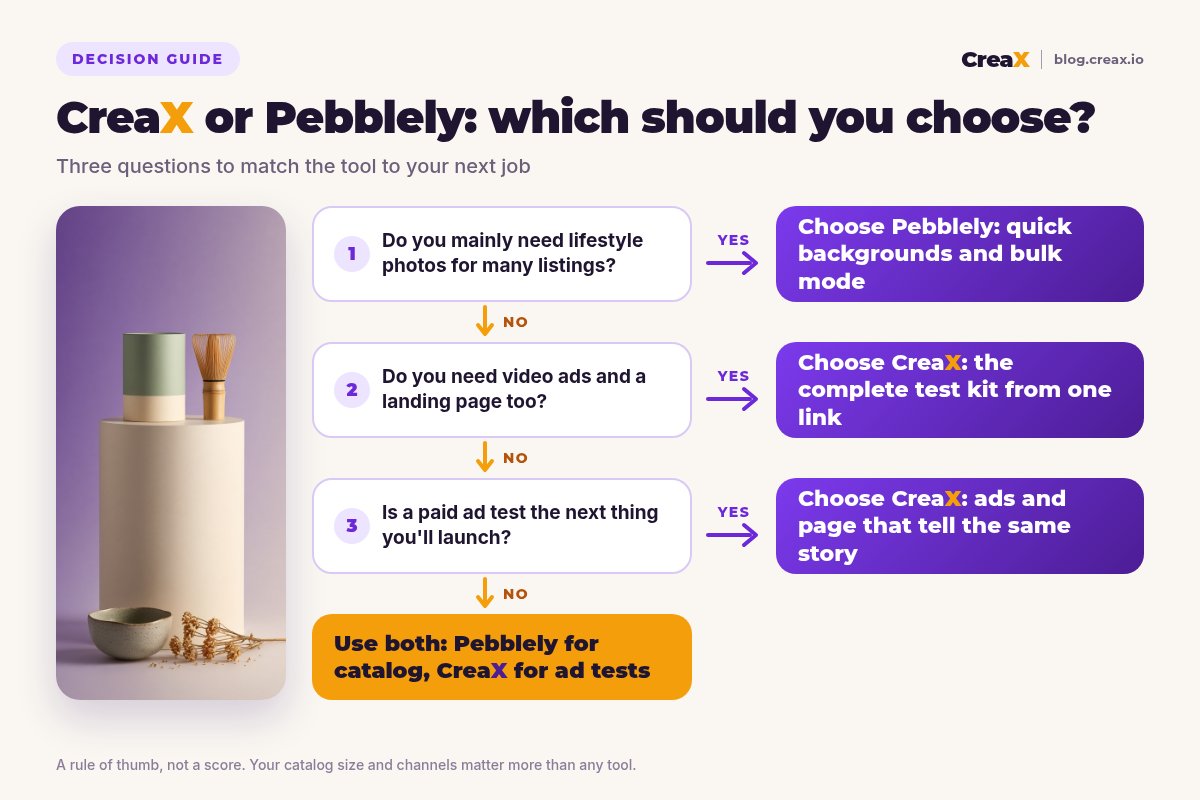
- ✓Is your main need listing and website photos? Lean Pebblely.
- ✓Do you have many SKUs to refresh at once? Pebblely's bulk mode fits.
- ✓Do you need video ads too? CreaX includes UGC-style video; Pebblely doesn't.
- ✓Do you have a page that matches each ad? If not, lean CreaX.
- ✓Are you launching a paid test this month? CreaX covers the whole kit.
- ✓What is your monthly tool budget? Price the whole job, not just the images.
Using both is a legitimate answer. Our guide to turning one product image into a week of ad tests shows how far a single photo can go on the CreaX side.
FAQFrequently asked questions
Q.Is CreaX a good Pebblely alternative?
Q.Does Pebblely make video ads?
Q.Can CreaX edit photos in bulk for a whole catalog?
Q.Which is cheaper, CreaX or Pebblely?
Q.Can I use Pebblely images in CreaX?
Q.Do AI product photos work for ads?
Ready to turn your product photo into a launch?
One product link or image, about 60–120 seconds: studio creatives, UGC-style video ads, a landing page and a store, ready for review.
This guide is published by CreaX. We describe other tools from their own public websites as of October 2026, avoid invented scores or prices, and recommend checking each vendor's site for current features and plans.