
CreaX vs MakeUGC: AI UGC Video Ads Compared for Dropshippers
Comparison · AI UGC video ads
CreaX vs MakeUGC is a common question for dropshippers testing AI UGC ads. MakeUGC builds UGC-style video ads around AI actors who present your script and product. CreaX turns a product link into a complete test kit: UGC-style video ads, studio ad creatives, a landing page and a store. Here is a fair look at what each does best, and when to use both.
Updated October 2026 · By the CreaX team
Key takeaways
- ✓MakeUGC is a video-first AI UGC tool: write a script, pick an AI actor, generate. It adds product-in-hand videos, custom AI actors, a video editor, a Video Agent that recreates reference ads, and a library of ad formats to remix.
- ✓CreaX is an all-in-one AI ecommerce creative OS: one product link or image becomes UGC-style video ads, studio ads, a publish-ready landing page and a multi-tenant store in about 60–120 seconds.
- ✓Pick MakeUGC if actor-led, script-driven video is the core of your creative strategy and your store page already converts.
- ✓Pick CreaX if you need the whole first test (video, statics and the page the ads point to) for every product you try.
In this guide
TL;DRThe short answer: CreaX vs MakeUGC
Both tools help you make UGC-style video ads without hiring creators. The difference is what surrounds the video. MakeUGC goes deep on the actor: choosing one, writing what they say, having them hold your product, and recreating proven ad structures. CreaX goes wide on the product test: the video, the static ads, the landing page and the store all come out of one product link.
For a dropshipper, the honest question is: “What is the slowest part of my next test?†If it's getting enough actor-led videos with different scripts, MakeUGC is built for that. If it's getting a page, statics and video live for a product you found this morning, CreaX removes more steps.
⚖Our bias, stated upfront
The competitorWhat MakeUGC is (and who it's built for)
MakeUGC is an AI UGC video ad maker used by ecommerce brands, apps, agencies and SaaS companies. Its core flow is simple: write your script, pick an AI actor, generate the video. Around that, its public site lists:
- A large library of realistic AI actors, plus the option to build your own AI actor.
- Product-in-hand videos, where an AI actor holds and presents your product on camera.
- Full motion control to have an avatar perform specific movements.
- A built-in video editor for captions, music, B-roll and trims.
- Video Agent: upload a reference ad and it rebuilds the structure and pacing using your product and creator images.
- Content Library: browse ad formats by niche and style, then recreate one with your product and dialogue.
- AI scripting, custom AI workflows and an API for teams that automate.
In short, MakeUGC is designed for marketers whose creative strategy is “many actors, many scripts, many hooks†and who want to borrow structures from ads that already work.
Our approachWhat CreaX is: the AI ecommerce creative OS
CreaX starts from the product, not the presenter. Paste a product link or upload a product image, and in about 60–120 seconds you get:
- UGC-style video ads: vertical, social-first videos that show and sell the product, ready for TikTok, Reels and Shorts.
- Studio ad creatives: polished product photos and static ads for feeds and stories (see studio ad creatives from one product photo).
- A publish-ready landing page that repeats the promise of the ads, so the click lands on the same message.
- A multi-tenant store, useful for running several niches or client brands.
It is built for dropshippers, media buyers, affiliates, coaches, ecommerce brands and agencies who need the creative side of a test done today. For the page side in detail, see turning a product link into a landing page.
ComparisonSide-by-side: features, outputs and workflow
Here is how the two line up on the jobs a dropshipper has to get done. “Partial†means the tool can help, but it is not what the product is built around.
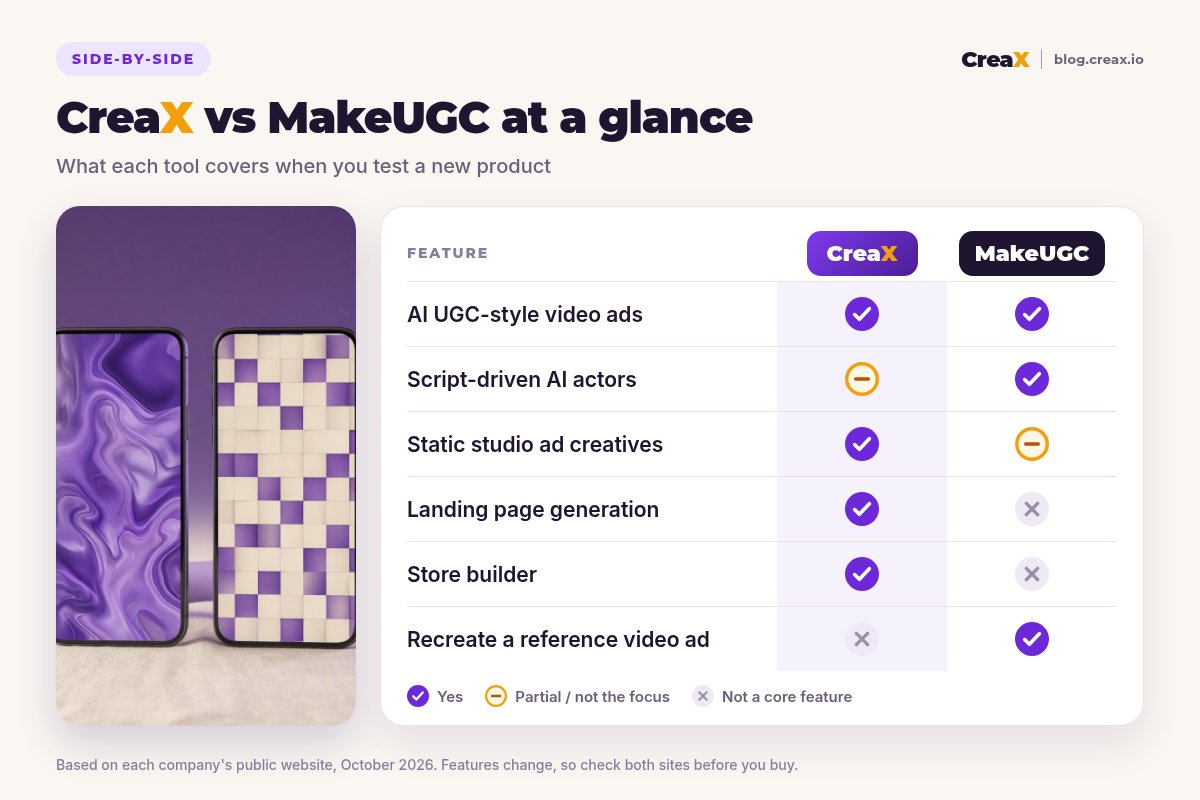
| CreaX | MakeUGC | |
|---|---|---|
| Starting point | A product link or product image | A script, an AI actor and your product images |
| UGC-style video ads | Generated from the product | The main product: AI actors, voices, editor |
| Presenter control | Not the focus | Choose or build AI actors; motion control; product in hand |
| Static ads & product photos | Studio ad creatives in the same generation | Image models are available; video is the focus |
| Landing page | Publish-ready page matching the ads | Not listed as a feature |
| Store | Multi-tenant store builder | No |
| Learning from other ads | Not included | Video Agent and Content Library recreate proven formats |
| Automation | One kit per product or angle | Custom AI workflows and an API |
| Pricing | $4.99–$49.99/month credit plans, top-ups $1 per 500 credits | Subscription and credit plans; check makeugc.ai |
MakeUGC details summarised from its public website, October 2026. Always confirm current features and plans on each vendor's site.
How the workflows feel
With MakeUGC, you spend your time on the video: writing or generating scripts, choosing actors, deciding whether the actor should hold the product, editing captions and B-roll, then exporting. You still need a product page and static ads from somewhere else.
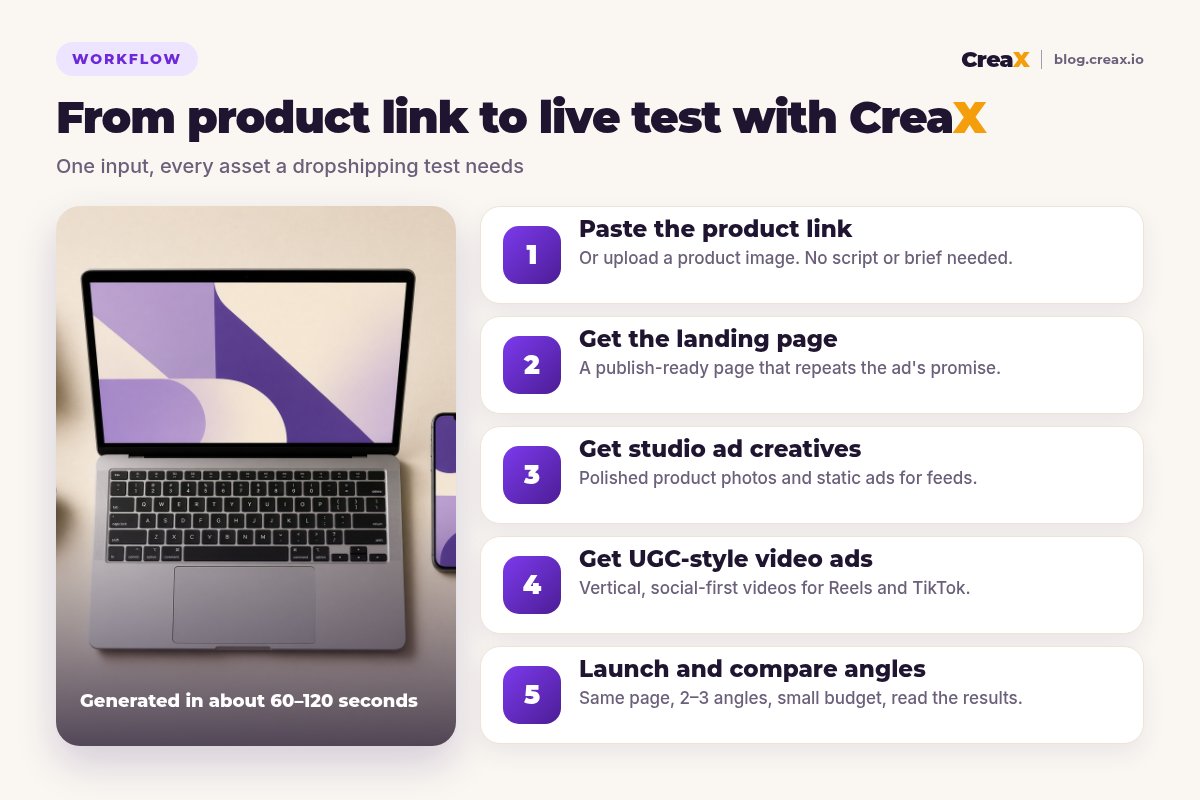
With CreaX, you spend your time reviewing one kit: checking the page's claims and offer, choosing which statics and videos represent your angles, and launching. You have less control over who presents the video, and fewer hand-offs between tools.
See what CreaX builds from your product link
Paste one product link and get UGC-style video ads, studio creatives and a landing page you can test today.
BudgetPricing: CreaX plans vs MakeUGC
CreaX uses simple monthly credit plans. Credits are spent when you generate, and the credit cost of each generation is shown in the app:
| CreaX plan | Price / month | Credits | Good fit |
|---|---|---|---|
| Free | $0 | 0 | Look around the app before buying credits |
| Basic | $4.99 | 2,000 | Your first product tests |
| Standard | $14.99 | 6,500 | Testing new products every week |
| Pro | $29.99 | 14,000 | Several products or stores at once |
| Premium | $49.99 | 25,000 | Agencies and high-volume media buyers |
| Top-up | $1 | 500 | Extra credits when a test takes off |
Current plans on creax.io/pricing.
MakeUGC publishes its own subscription, credit and API plans on its website, and they change regularly. We won't quote its prices here because any number could be out of date by the time you read this, so check makeugc.ai directly.
★Compare the cost of a complete test
Fair playWhere MakeUGC is the better pick
MakeUGC is a strong, focused product, and for some sellers it is the right first choice:
MakeUGC
Strengths
- +Deep presenter control: pick, build and direct AI actors
- +Product-in-hand videos with an actor holding your item
- +Video Agent and Content Library to recreate proven ad structures
- +Built-in editor for captions, music and B-roll
- +Workflows and API for teams producing at volume
Trade-offs
- −No landing page or store; you build those elsewhere
- −Statics are secondary to video
- −More creative decisions per video (script, actor, motion)
CreaX
Strengths
- +UGC video, studio ads, landing page and store from one link
- +Ads and page share one message, which keeps tests clean
- +About 60–120 seconds per kit
- +Low entry price: $4.99/month, top-ups $1 per 500 credits
- +Works without an existing Shopify store
Trade-offs
- −Not an AI actor studio: less control over who presents
- −No built-in reference-ad recreation
- −Teams that only want actor videos may not use the page and store
⚖Honest take
Our recommendationWhere CreaX is the better pick
Dropshipping tests often fail for reasons a video tool can't fix on its own: the page doesn't repeat the ad's promise, the product photos look like supplier images, or there is no page yet. CreaX is built around that problem:
- You test many products. Every new product needs a page, statics and video, not just another actor video.
- You work alone. One generation replaces the designer, the page builder and the first round of video.
- You care about message match. The page and ads come from the same product understanding.
- You run several niches or clients. The multi-tenant store keeps them separate.
If you want to compare more UGC video tools, see our roundup of the best AI UGC video ad generators for dropshipping and our CreaX vs Creatify comparison.
Build your next product test in one pass
Paste a product link and get the landing page, studio ads and UGC-style video ads together, so your test can go live today.
ExampleWorked example: one product, both workflows
Say you want to test a self-cleaning pet grooming brush with three angles: “less fur on the sofaâ€, “a calmer grooming routine†and “one click to clean the brushâ€. You want two creatives per angle and a page to send traffic to.
| Task | MakeUGC setup | CreaX setup |
|---|---|---|
| Video ads for 3 angles | Strong: scripts per angle, actors holding the brush | UGC-style video per angle from the product link |
| Static ads | Possible with image models, or a separate design tool | Studio ads generated with the kit |
| Landing page | Build in your store or a page builder | Generated from the same link, then edited |
| Where buyers check out | Your existing store | Your store, or the CreaX store |
| Hand-offs between tools | Two to three | None for the first test |
A qualitative comparison of the work involved, not a speed or performance benchmark.
With MakeUGC you would spend your time on actors and scripts, which pays off if a human face is your edge. With CreaX you would spend it checking one kit and choosing which angles to fund, which pays off if getting a clean test live fast is your edge.
!Keep claims and personas honest
Choose with confidenceDecision checklist
Answer these before you pay
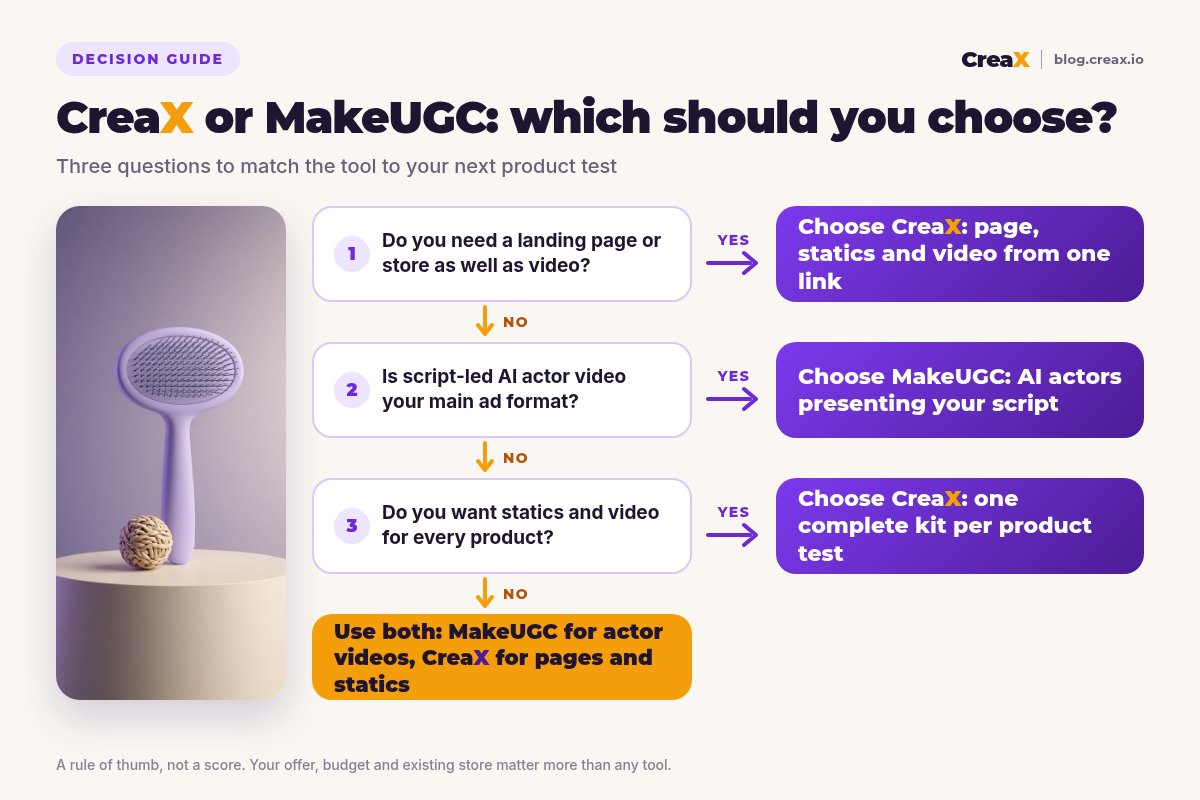
- ✓Do you already have a product page that converts? If not, the page is your bottleneck. Lean CreaX.
- ✓Is an actor talking to camera central to your ads? If yes, lean MakeUGC.
- ✓Do you need static ads as well as video? CreaX makes both in one pass.
- ✓Do you want to recreate proven ad structures? MakeUGC's Video Agent and Content Library are built for that.
- ✓How many new products do you test each month? Many products favours a kit-per-product tool.
- ✓Do you run multiple stores or client brands? The CreaX multi-tenant store helps.
Using both is a legitimate answer. A practical split is MakeUGC for actor-led variations on proven products, and CreaX for launching new products, producing statics and building the pages those ads point to. Our guide on how many creatives to test per product helps you plan the volume.
FAQFrequently asked questions
Q.Is CreaX a good MakeUGC alternative?
Q.Does MakeUGC build landing pages?
Q.Which is cheaper, CreaX or MakeUGC?
Q.Can I use MakeUGC and CreaX together?
Q.Do I need a Shopify store to use CreaX?
Q.Are AI UGC ads allowed on Meta and TikTok?
Ready to test your next product?
One product link, about 60–120 seconds, and you have the video ads, studio creatives and landing page for your first test.
This guide is published by CreaX. We describe other tools from their own public websites as of October 2026, avoid invented scores or prices, and recommend checking each vendor's site for current features and plans.