
CreaX vs Madgicx: Ad Optimization Platform vs Creative Production
Comparison · Meta ads
CreaX vs Madgicx is not really a head-to-head, because the two tools sit on different sides of a Meta campaign. Madgicx is an AI ad platform that works on your ad account: it audits campaigns, prepares optimization actions, reports on results and also generates image ads. CreaX is an AI ecommerce creative OS that makes what goes into the account: UGC-style video ads, studio static ads and the landing page they send traffic to. Here is how to tell which one you need first, and when to use both.
Updated October 2026 · By the CreaX team
Key takeaways
- ✓Madgicx is an agentic AI advertising platform for Meta ads: AI Marketer audits and actions, Copilot, an AI Ad Generator for image ads, Creative Insights, automation rules, an ad launcher and cross-channel reporting.
- ✓CreaX turns one product link or image into UGC-style video ads, studio ad creatives, a publish-ready landing page and a multi-tenant store in about 60–120 seconds.
- ✓Pick Madgicx when you already spend steadily on Meta and your problem is managing, optimizing and reporting on that spend.
- ✓Pick CreaX when your problem is having enough good creatives, videos and pages to test. Many teams use both.
In this guide
TL;DRThe short answer
Think of a paid campaign as two jobs. One is making the ads: the angles, images, videos and the page people land on. The other is running the account: budgets, bids, which ads to pause or scale, and reporting on what worked. Madgicx is built mainly for the second job, for Meta ads specifically, and it has added AI image ad generation. CreaX is built only for the first job, for ecommerce products, and goes further on it: video, statics, a page and a store from one link.
So the honest question is not which is better, but which job is your bottleneck right now. If you have plenty of creatives and a messy account, start with optimization. If you have a new product and nothing to test, start with production.
⚖Our bias, stated upfront
The competitorWhat Madgicx is (and who it is built for)
Madgicx calls itself an agentic AI advertising platform for Meta ads and an official Meta Business Partner. It is aimed at ecommerce brands scaling on Facebook and Instagram, agencies running many ad accounts, and performance marketers. Its public pages describe:
- AI Marketer. Audits your Meta ad accounts every day, flags wasted spend and scaling opportunities, and prepares actions you approve with one click.
- Copilot. An AI assistant inside the app that answers questions about your ad account from your own data.
- AI Ad Generator. Generates new image ads from a prompt, an uploaded image, your existing creatives or an ad from the Meta Ad Library, with an AI image editor.
- Creative Insights. Breaks down your creatives, including video, to show which elements perform, and flags creative fatigue.
- Ads Manager 2.0, automation and Ad Launcher. Bulk management, rules that run on your conditions, and launching ads to Meta from inside Madgicx.
- Reporting and integrations. One-Click Report dashboards with Meta, Google Ads, TikTok, Shopify and Klaviyo data, plus MCP servers that bring Madgicx into AI assistants.
Madgicx states that it optimizes Meta ads only, while its reporting also covers other channels. In short, it is a control room for Meta advertisers that also makes image ads.
Our approachWhat CreaX is: the AI ecommerce creative OS
CreaX starts from the product and stops at a live test. Paste a product link or upload a product image, and in about 60–120 seconds you get:
- UGC-style video ads in 18, 30 or 45 seconds (3, 5 or 7 scenes), vertical and social-first.
- Studio ad creatives: product photos and static ads in five ad styles (Classic, Humble Orbit, Punch, Luxe and Meta Feed) and four sizes (1:1, 3:4, 4:5 and 9:16).
- A publish-ready landing page at three levels (Simple, Detailed or Advanced) that repeats the promise of the ads.
- A multi-tenant store for testing several niches or running client stores.
You can paste a link from Alibaba, AliExpress, Amazon, Etsy or any product page. creax.io lists 40+ languages and 160+ target countries. CreaX does not manage or optimize your ad account; you launch the creatives in Meta, TikTok or any platform you use. Our page on CreaX for media buyers shows how it fits a buyer's workflow.
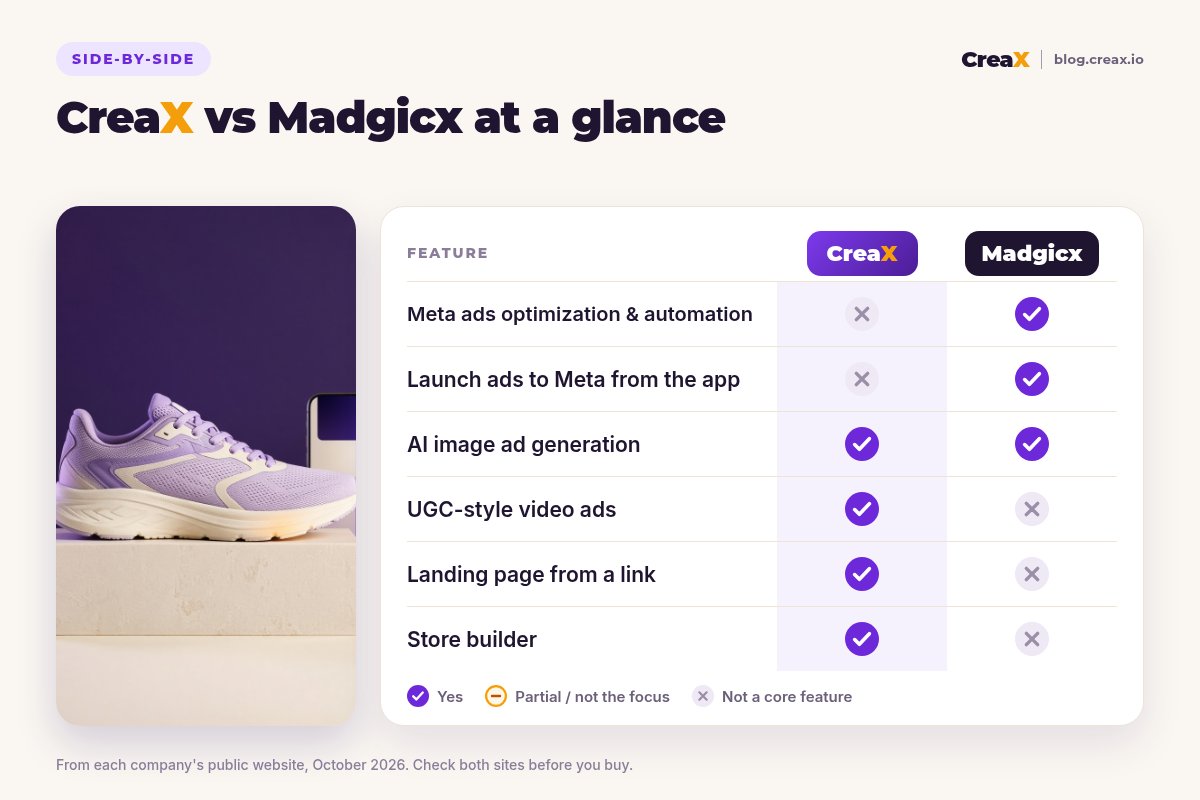
ComparisonCreaX vs Madgicx: side-by-side
Here is how the two line up on the jobs a Meta advertiser actually has.
| CreaX | Madgicx | |
|---|---|---|
| Core idea | One product link or image → a complete ecommerce ad kit | AI platform that audits, optimizes, reports on and launches Meta ads |
| Ad account optimization | Not a feature | AI Marketer, automation rules, Ads Manager 2.0 |
| Image ads | Studio creatives in 5 ad styles and 4 sizes from the product | AI Ad Generator from prompts, images or Ad Library ads |
| Video ads | UGC-style video ads, 18/30/45 seconds | Analyzes video creatives; image ads are the generator's focus |
| Landing page and store | Publish-ready page plus multi-tenant store | Not listed as a feature |
| Creative analytics | Not a feature: measure in your ad platform | Creative Insights, fatigue flags, One-Click Report |
| Channels | Creatives for any platform | Optimizes Meta; reports on Meta, Google Ads, TikTok and more |
| Pricing | $4.99–$49.99/month credit plans, top-ups $1 per 500 credits | Plans priced by monthly ad spend; check madgicx.com/pricing |
Madgicx details summarised from its public website and help center, October 2026. Confirm current features and plans on each vendor's site.
Need more creatives to test?
Paste one product link into CreaX and get UGC-style video ads, studio creatives and a landing page you can launch today.
In practiceWorkflow: one product, two tools
Here is what launching and running one product looks like with each tool.
With Madgicx
- Connect your Meta ad account (and, if you like, other data sources for reporting).
- Generate image ads from a prompt, a product image or an ad you like in the Ad Library, and refine them in the image editor.
- Launch them to Meta from the Ad Launcher, or upload video and other creatives you made elsewhere.
- Let AI Marketer and your automation rules flag what to pause, scale or fix, and approve the actions you agree with.
- Use Creative Insights to see which creative elements work, then brief your next batch. The landing page lives in your store.
With CreaX
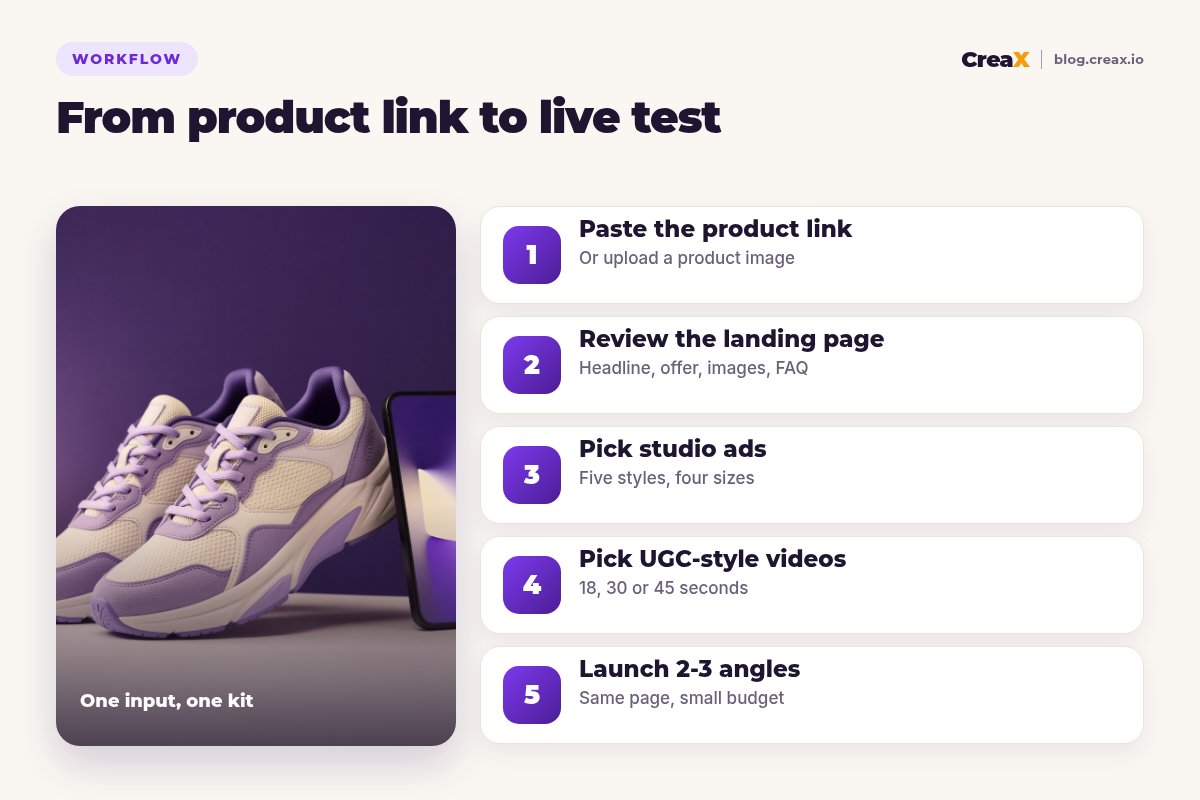
Paste the product link
Review the landing page
Pick your studio ads
Pick your UGC-style videos
Launch 2–3 angles
Notice where each workflow is thin. Madgicx assumes you have a product page and can source video. CreaX assumes you will manage the campaign in your ad platform. That is why the two fit together more often than they compete.
BudgetPricing
CreaX uses simple monthly credit plans. Credits are spent when you generate, and you can top up any time:
| CreaX plan | Price / month | Credits | Good fit |
|---|---|---|---|
| Free | $0 | 0 | Look around the app before buying credits |
| Basic | $4.99 | 2,000 | Your first product tests |
| Standard | $14.99 | 6,500 | Testing new products every week |
| Pro | $29.99 | 14,000 | Several products or stores at once |
| Premium | $49.99 | 25,000 | Agencies and high-volume media buyers |
| Top-up | $1 | 500 | Extra credits when a test takes off |
Current plans on creax.io/pricing. The app shows the credit cost before you generate.
Madgicx says its plans are priced by monthly ad spend, with monthly, quarterly and annual billing and a free trial. We do not quote its prices; check madgicx.com/pricing for the plan that matches your spend.
★Match the tool to the size of your spend
Fair playWhere Madgicx is the better pick
A fair comparison has to say where the other tool is stronger. For established Meta advertisers, Madgicx does things CreaX simply does not:
Madgicx
Strengths
- +Daily AI audits of Meta ad accounts with one-click actions
- +Automation rules and bulk management
- +Creative Insights and fatigue flags on your real data
- +AI image ads from prompts, images or Ad Library examples
- +Launch ads to Meta from inside the app
- +Cross-channel reports agencies can share with clients
Trade-offs
- −Optimization is for Meta only
- −No landing page or store
- −Video ad production is not the generator's focus
- −Pricing grows with ad spend
CreaX
Strengths
- +Video ads, static ads, landing page and store from one link
- +UGC-style video ads in 18, 30 or 45 seconds
- +Ad and page share one message
- +Plans from $4.99/month, top-ups $1 per 500 credits
- +Creatives for Meta, TikTok or any platform
Trade-offs
- −Does not manage, optimize or report on ad accounts
- −No creative analytics: you judge results in your ad platform
- −No Ad Library inspiration built in
⚖Honest take
Our recommendationWhere CreaX is the better pick
Account tools cannot optimize ads you do not have. CreaX is the better first step when:
- You are launching a new product. You need a full test kit (video, statics, page) before there is any data to optimize.
- Video is your gap. UGC-style video ads come with every kit, without casting or filming.
- Your page is the weak link. If clicks do not convert, a matching landing page often matters more than a better bid.
- You advertise beyond Meta. The same kit works for TikTok, Pinterest or any platform you buy on.
- Creative fatigue keeps catching you. Fresh variations of a winning angle are a paste away. See our guide to scaling winning creative variations.
For more on why creative carries so much weight on Meta today, read broad targeting and creative and Advantage+ creatives for dropshipping.
Make the creatives your account needs
Paste a product link and get the landing page, studio ads and UGC-style video ads together, ready to launch in Meta or anywhere else.
ExampleWorked example: one product, both tools
Say a small brand sells lightweight running sneakers and spends steadily on Meta. Results are flat, and the team has been re-running the same three ads for weeks.
| Task | Madgicx | CreaX |
|---|---|---|
| Find out what is wrong | Strong: account audit, fatigue flags, creative breakdown | Not a feature |
| New image ads | AI Ad Generator from prompts or Ad Library examples | Studio ads in 5 styles from the product link |
| New video ads | Bring them from another tool | UGC-style videos for each angle |
| A page for a new angle | Build in your store | Generated from the same link, then edited |
| Launch and manage | Strong: Ad Launcher, rules, one-click actions | Upload to your ad platform yourself |
A qualitative comparison of the work involved, not a performance benchmark.
A sensible setup for this team: Madgicx (or Meta's own tools) to read the account and spot fatigue, CreaX to produce fresh angles, such as “light enough for race day” and “comfortable on long walks”, with a video and a matching page for each. If you are diagnosing a drop yourself, our guide on why ROAS drops after scaling and creative fatigue signs will help.
Choose with confidenceDecision checklist
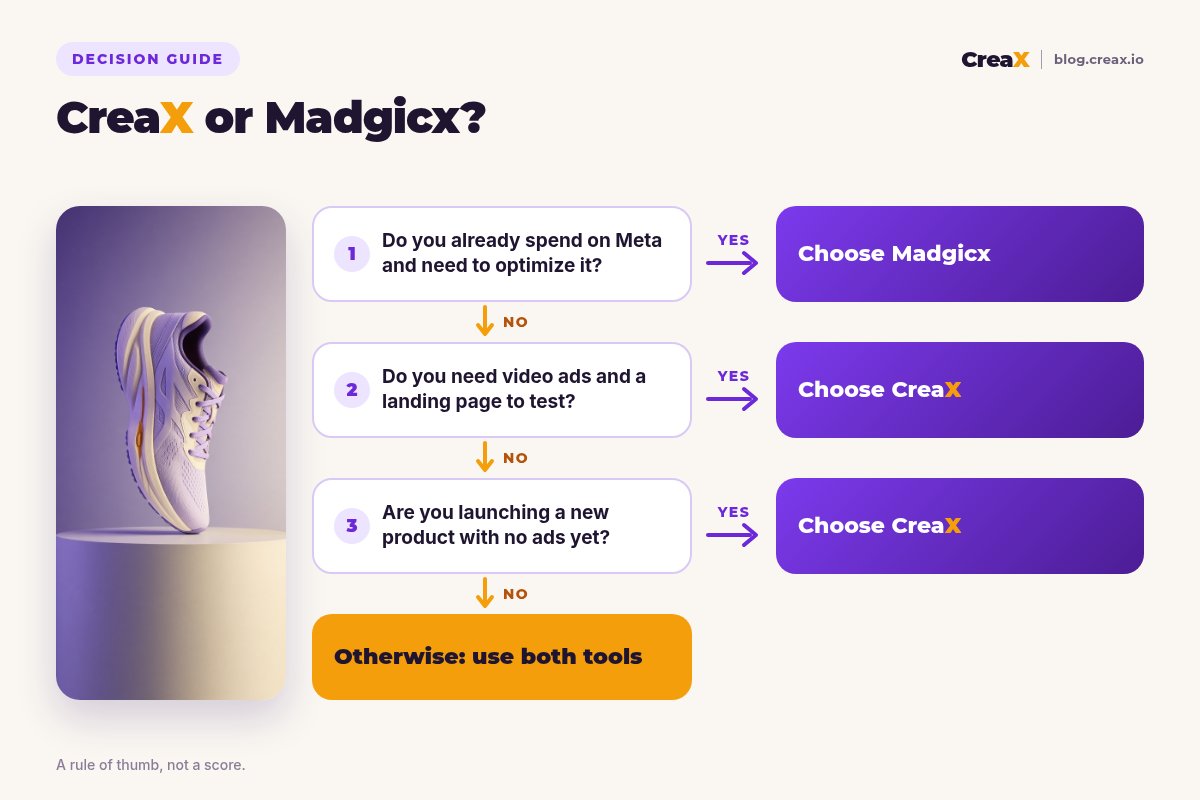
Answer these before you pay
- ✓Do you already spend steadily on Meta? If yes, an optimization platform like Madgicx is worth a look.
- ✓Are you launching a new product with nothing to test yet? Start with CreaX.
- ✓Do you need video ads and a landing page? CreaX makes both from one link.
- ✓Do you manage many ad accounts or report to clients? Madgicx is built for that.
- ✓Do you advertise mainly outside Meta? Madgicx optimizes Meta only; CreaX creatives work anywhere.
- ✓Is your bottleneck creatives or decisions? Creatives point to CreaX, decisions to Madgicx.
Using both is a common answer. Production and optimization are different jobs, and plenty of media buyers keep one tool for each. See our list of the best tools for media buyers for the rest of the stack.
FAQFrequently asked questions
Q.Is CreaX a Madgicx alternative?
Q.Does Madgicx make video ads?
Q.Does CreaX optimize Meta campaigns?
Q.Which is cheaper, CreaX or Madgicx?
Q.Should a new store start with CreaX or Madgicx?
Ready to give your account fresh creatives?
One product link, about 60–120 seconds, and you have the video ads, studio creatives and landing page for your next test.
This guide is published by CreaX. We describe other tools from their own public websites as of October 2026, avoid invented scores or prices, and recommend checking each vendor's site for current features and plans.