

CreaX vs Claid.ai: Catalog Photos vs Ad Creatives
Comparison · CreaX vs Claid.ai
CreaX vs Claid.ai comes down to catalog photos versus ad creatives. Claid.ai is an AI product photography platform with an API for editing and generating product images at scale. CreaX is an AI ecommerce creative OS that turns one product link into a landing page, studio ad creatives and UGC-style video ads. Here's what each does best and how to choose.
Updated October 2026 · By the CreaX team
Key takeaways
- ✓Claid.ai is built for product photos: AI photoshoots, AI fashion models, background removal, upscaling, light and color fixes, short AI video clips, and an API for bulk catalog work.
- ✓CreaX is built for launching and advertising a product: a landing page, studio ad creatives and UGC-style video ads from one link in about 60–120 seconds.
- ✓Marketplaces and large catalogs that need consistent images point to Claid.ai. Sellers who need ads and a page for each product test point to CreaX.
- ✓They can work together: Claid.ai for clean catalog images, CreaX for the ads and pages that sell them.
In this guide
SummaryThe short answer: CreaX vs Claid.ai
Verdict
Claid.ai perfects product photos. CreaX turns a product into ads and a page.
If you run a marketplace, a large store or an apparel brand with many SKUs, image quality and consistency at scale is a real problem, and that's Claid.ai's focus. If you test products one by one with paid ads, the bottleneck is usually the full creative kit, which is CreaX's focus.
CompetitorWhat Claid.ai is (and who it's built for)
According to its official site, Claid.ai is an AI product photography and photo editing platform focused only on product imagery. Its public feature set includes:
- AI Photoshoot: place products into editorial and lifestyle scenes.
- AI Fashion Models: turn a garment into on-model shots with diverse AI models.
- AI videos: turn still images into short video clips; the site also mentions fashion and UGC-style videos.
- Editing tools: background removal, upscaling, and light and color fixes.
- An API to edit and generate images in bulk, in your brand style, to platform requirements.
- Detail preservation: Claid says its AI is trained on product photography to keep logos, labels and shapes intact.
Claid.ai is built for ecommerce brands, fashion sellers, marketplaces and platforms that onboard many sellers and need every image to meet the same standard. It offers a free way to try the studio.
CreaXWhat CreaX is: the AI ecommerce creative OS
CreaX starts from the product and ends with a launch-ready kit. Paste a product link or upload a product image, and in about 60–120 seconds CreaX generates:
- A publish-ready landing page for the product.
- Studio ad creatives: product photos and static ads in multiple sizes for Facebook, Instagram and other ad platforms.
- UGC-style video ads: AI presenter videos, 15 or 30 seconds, for TikTok and Instagram.
- A multi-tenant store for testing products and niches.
The ads and the page come from the same product link, so they tell one story. Our explainer on studio ad creatives from one product photo shows the static side in detail.
CompareSide-by-side: features, outputs and workflow
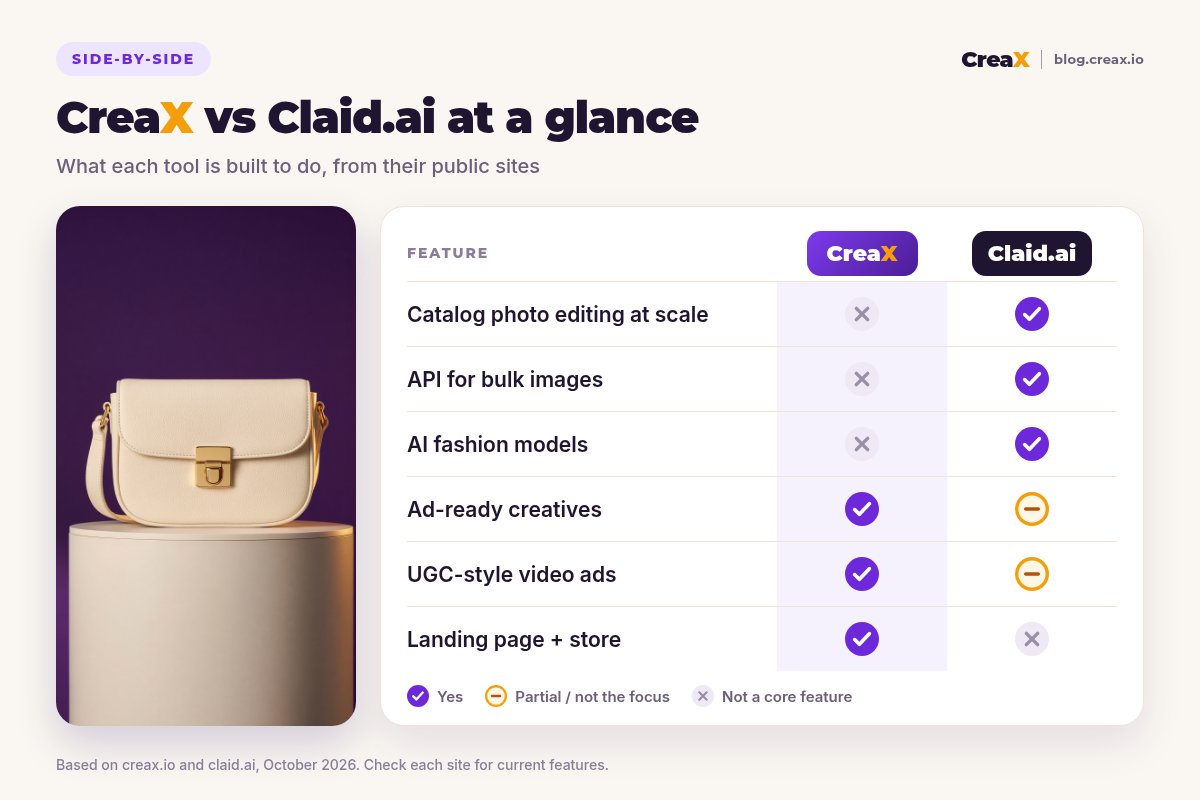
| CreaX | Claid.ai | |
|---|---|---|
| Main job | Launch and advertise a product | Edit and generate product photos |
| Input | Product link or product image | Product photos (app or API) |
| Images | Studio photos and static ads | Photoshoots, on-model shots, cutouts, upscales |
| Video | UGC-style AI presenter video ads | Short AI clips from stills |
| Landing page and store | Included | Not a core feature |
| Bulk / API | Not a core feature | Core feature |
Based on creax.io and claid.ai, October 2026. Features change; check both sites.
CreaX
Strengths
- +Landing page, statics and UGC-style video from one link
- +Ads and page share one product story
- +Fast, many variations per product
- +Transparent credit plans from $4.99/month
Trade-offs
- −Not a catalog photo editor
- −No bulk image API
- −No AI fashion model shoots
Claid.ai
Strengths
- +Product-focused photo AI
- +AI fashion models and photoshoots
- +API for bulk catalog work
- +Editing: cutouts, upscale, light and color
Trade-offs
- −No landing pages or store
- −Video is short clips, not full ad scripts
- −Ad copy and angles are up to you
For more photo-focused options, see our roundup of the best AI product photo generators and our comparisons with Photoroom and Flair.ai.
CostPricing: CreaX plans vs Claid.ai
CreaX uses monthly credit plans; each generation uses credits, and top-ups cost $1 per 500 credits:
| CreaX plan | Price / month | Credits |
|---|---|---|
| Free | $0 | 0 |
| Basic | $4.99 | 2,000 |
| Standard | $14.99 | 6,500 |
| Pro | $29.99 | 14,000 |
| Premium | $49.99 | 25,000 |
CreaX prices, October 2026.
Claid.ai offers a free way to try its studio, with paid options for heavier use and API access. Prices depend on volume and features, so check claid.ai for current plans. If you're comparing costs, compare per job: per catalog image for Claid.ai, per product launch (page plus ads) for CreaX.
Turn your product photos into a full ad set
Paste a product link or upload an image and get a landing page, studio creatives and UGC-style video ads in about 60–120 seconds.
FairWhere Claid.ai is the better pick
- Large catalogs: hundreds or thousands of SKUs that need consistent backgrounds, lighting and formats.
- Marketplaces and platforms that onboard sellers and need every image to meet requirements automatically.
- Apparel brands that want on-model shots from garment photos without a photoshoot.
- Developers who want image editing and generation through an API inside their own product.
- Photo cleanup: upscaling and fixing light and color on existing images.
⚖Where CreaX doesn't compete
CreaXWhere CreaX is the better pick
- You launch products with paid ads and need a page, statics and videos for each test.
- You want UGC-style video ads with an AI presenter, not only animated product shots.
- You need a landing page that continues the ad's promise.
- You test several angles per product and need fresh variations quickly.
- You run niche or client stores and want a multi-tenant store builder.
For sellers whose catalog photos are already good enough, the bottleneck is turning them into ads and a page, which is why we recommend CreaX for launches. Our guide on turning one product image into a week of ad tests shows the workflow.

Photos ready? Make the ads and page today
CreaX turns one product link into a landing page, studio creatives and UGC-style video ads that tell the same story.
ExampleWorked example: one product, both workflows
Say you sell a leather crossbody bag in several colors. Here's how the two tools split the work:
| Stage | With Claid.ai | With CreaX |
|---|---|---|
| Catalog images | Remove backgrounds, fix light and color, create lifestyle scenes for every color | Not a core feature |
| On-model shots | AI fashion models wearing the bag | Not a core feature |
| Ads | Use the images in ads you design yourself; short clips from stills | Static ads and UGC-style video ads around your angles |
| Landing page | Not a core feature | A publish-ready page for the bag |
| Launch | You build the campaign | You build the campaign with ads and page that match |
Illustrative workflow based on each tool's public features. No performance figures implied.
A practical combination: use Claid.ai to make every color variant look consistent on your store, then paste the product link into CreaX to produce the landing page and an ad set around one or two angles, such as “hands-free city days” or “fits phone, keys and wallet”, matched to the bag's real size.
!Keep images true to the product
DecideDecision checklist
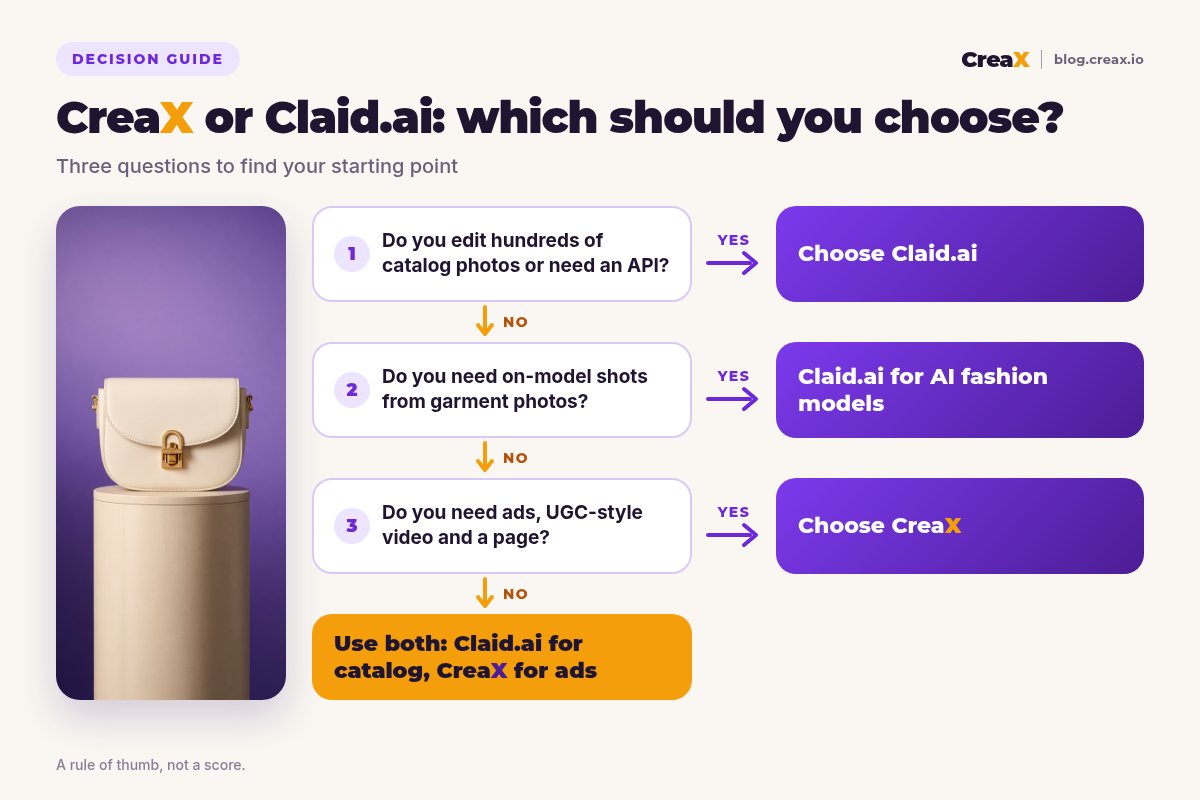
Which should you choose?
- ✓You edit or generate images for a large catalog → Claid.ai
- ✓You need an image API inside your platform → Claid.ai
- ✓You need on-model shots from garment photos → Claid.ai
- ✓You need a landing page and ads for a product test → CreaX
- ✓You want UGC-style video ads with an AI presenter → CreaX
- ✓You need both clean catalog images and campaign creatives → use both
FAQFrequently asked questions
Q.Is CreaX a Claid.ai alternative?
Q.Can Claid.ai make video ads?
Q.Does CreaX have an API for bulk image editing?
Q.Which is better for fashion brands?
Q.Can I use Claid.ai images in CreaX?
Q.Which should a small store start with?
Ready to launch your next product?
One product link, about 60–120 seconds: a landing page, studio creatives and UGC-style video ads from the same product story.
This guide is published by CreaX. We describe other tools from their own public websites as of October 2026, avoid invented scores or prices, and recommend checking each vendor's site for current features and plans.