
CreaX vs Captions: AI Video Editing or a Full Ecommerce Ad Kit?
Comparison · AI video ads
CreaX vs Captions is a choice between two different jobs. Captions (which now includes Mirage Studio) is an AI video editor: it edits your footage, adds captions, fixes eye contact, and can generate UGC-style ads with AI avatars from a product URL. CreaX is an AI ecommerce creative OS: one product link in, and you get UGC-style video ads, studio static ads, a landing page and a store. Here is an honest guide to which one fits your store.
Updated October 2026 · By the CreaX team
Key takeaways
- ✓Captions is an AI video creation and editing app on phone and web: AI Edit, auto captions, translated subtitles, AI avatars and AI twins, eye-contact correction, denoise, and an AI Ads tool that turns a product URL into a UGC-style ad.
- ✓CreaX turns one product link or image into UGC-style video ads, studio ad creatives, a publish-ready landing page and a multi-tenant store in about 60–120 seconds.
- ✓Pick Captions if you film yourself or a team, want your own AI twin, or need fast editing for organic content as well as ads.
- ✓Pick CreaX if you test products often and need the video, the statics and the page they click to, built from the same input.
In this guide
TL;DRThe short answer
Both tools can take a product URL and give you a UGC-style video ad. The difference is everything around that video. Captions is built around video: editing footage you already have, generating presenters with AI avatars or a digital twin of yourself, captioning and translating. CreaX is built around a product test: the video ads, the static ads, the landing page and the store come out of one generation, so the ad and the page tell the same story.
So the useful question is not which AI makes better video. It is what your next test is missing. If you already have product pages and static ads, and video editing is your bottleneck, Captions is made for that. If you need everything for a new product tonight, CreaX covers more of the work in one pass.
⚖Our bias, stated upfront
The competitorWhat Captions is (and who it's built for)
Captions describes itself as AI that edits like a professional editor. Its site also says Mirage Studio has now been merged into Captions. According to its public pages, it offers:
- AI Edit. Upload footage, pick a style, and the app cuts scenes, overlays B-roll, adds zooms, music and transitions.
- Text to edit. A chat-based editor where you describe changes in plain language.
- Automatic captions and translation. Stylised captions, plus translated subtitles in more than 100 languages, per its website.
- AI avatars and AI twins. Choose a digital avatar or create a twin of yourself, then change outfits, backgrounds or product inserts with prompts.
- Clean-up tools. Eye-contact correction, background noise removal and trimming of pauses and filler words.
- AI Ads. Paste a product URL; Captions pulls the product name, description and images, writes a UGC-style script you can edit, and generates the ad with an avatar or your AI twin. Its help docs say AI Ads scripts are limited to one minute and the videos are cleared for commercial use.
It runs on iOS, Android and the web. Captions is free to sign up, with paid plans for the full feature set. It is built for creators, marketers and agencies who make a lot of video, ads included.
Our productWhat CreaX is: the AI ecommerce creative OS
CreaX is built only for selling products. Paste a product link or upload a product image, and in about 60–120 seconds it generates:
- UGC-style video ads in 18, 30 or 45 seconds, built from your product page.
- Studio ad creatives: polished product photos and static ads in five styles (Classic, Humble Orbit, Punch, Luxe and Meta Feed) and four sizes (1:1, 3:4, 4:5 and 9:16).
- A publish-ready landing page at Simple, Detailed or Advanced level, with headline, benefits, images and FAQ.
- A multi-tenant store, so you can sell without stitching together a separate store builder, or keep niches and clients apart.
It works in 40+ languages and for 160+ target countries, per creax.io. It is used by dropshippers, media buyers, affiliates, coaches, ecommerce brands and agencies. For a deeper look at the video side, see CreaX UGC video ads explained.
CompareSide-by-side: features, outputs and workflow
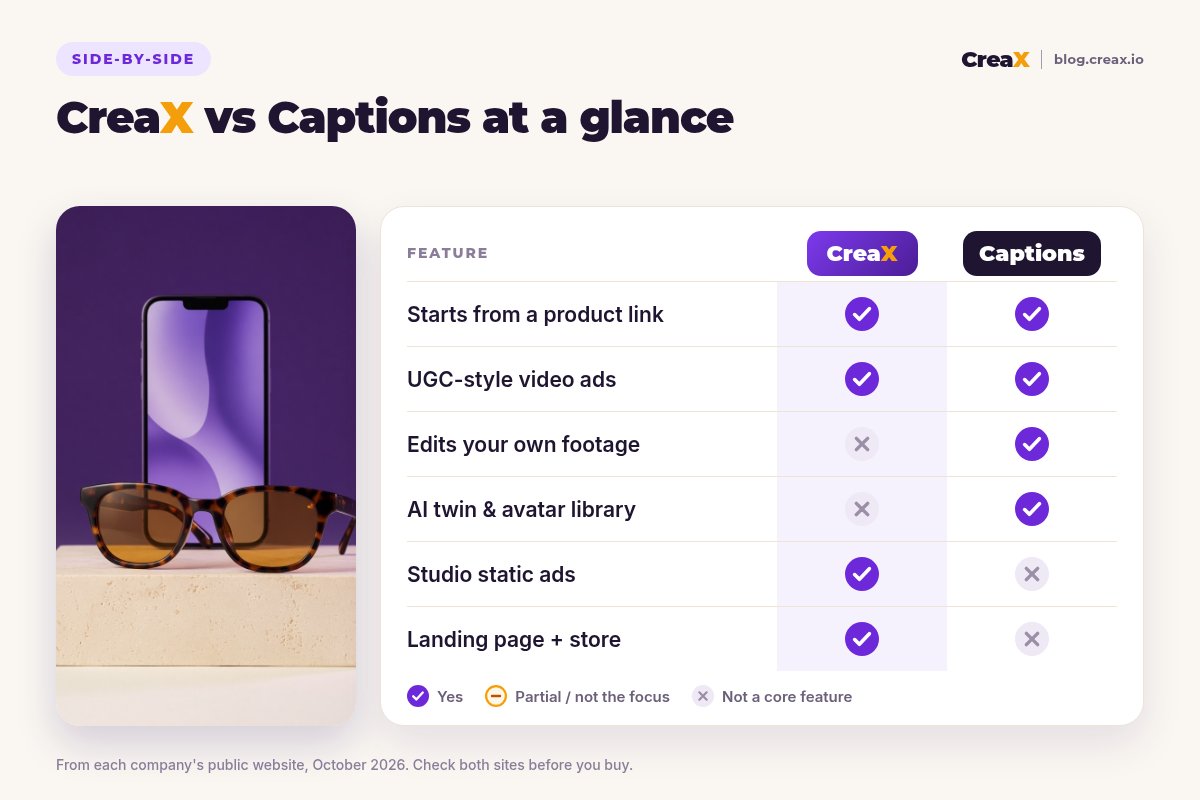
| Captions | CreaX | |
|---|---|---|
| Core job | AI video creation and editing | Full creative kit for a product test |
| Starting point | Your footage, a script, or a product URL (AI Ads) | A product link or product image |
| Video ads | UGC-style ads with AI avatars or your AI twin | UGC-style video ads in 18s, 30s or 45s |
| Editing your own footage | Yes: AI Edit, text to edit, captions, clean-up | Not a core feature |
| Static ads | Not a core feature on its public site | Studio ads in 5 styles and 4 sizes |
| Landing page | No | Yes, from the same input |
| Store | No | Multi-tenant store builder |
| Languages | Translated subtitles in 100+ languages (per its site) | 40+ languages, 160+ target countries (per creax.io) |
Based on each company's public website, October 2026. Features change, so check both sites.
The table shows the pattern. Captions goes deep on video, from editing to presenters. CreaX goes wide across the assets a product test needs.
How it worksWorkflow: one product, two tools
With Captions
- Open AI Ads and paste the product page URL, or upload footage you filmed.
- Check the product details it pulled and edit the script.
- Choose an avatar or your AI twin, generate, then adjust pacing, overlays and captions.
- Duplicate the project to make variations with new hooks or avatars.
- Make static ads and the landing page in other tools, then launch.
With CreaX
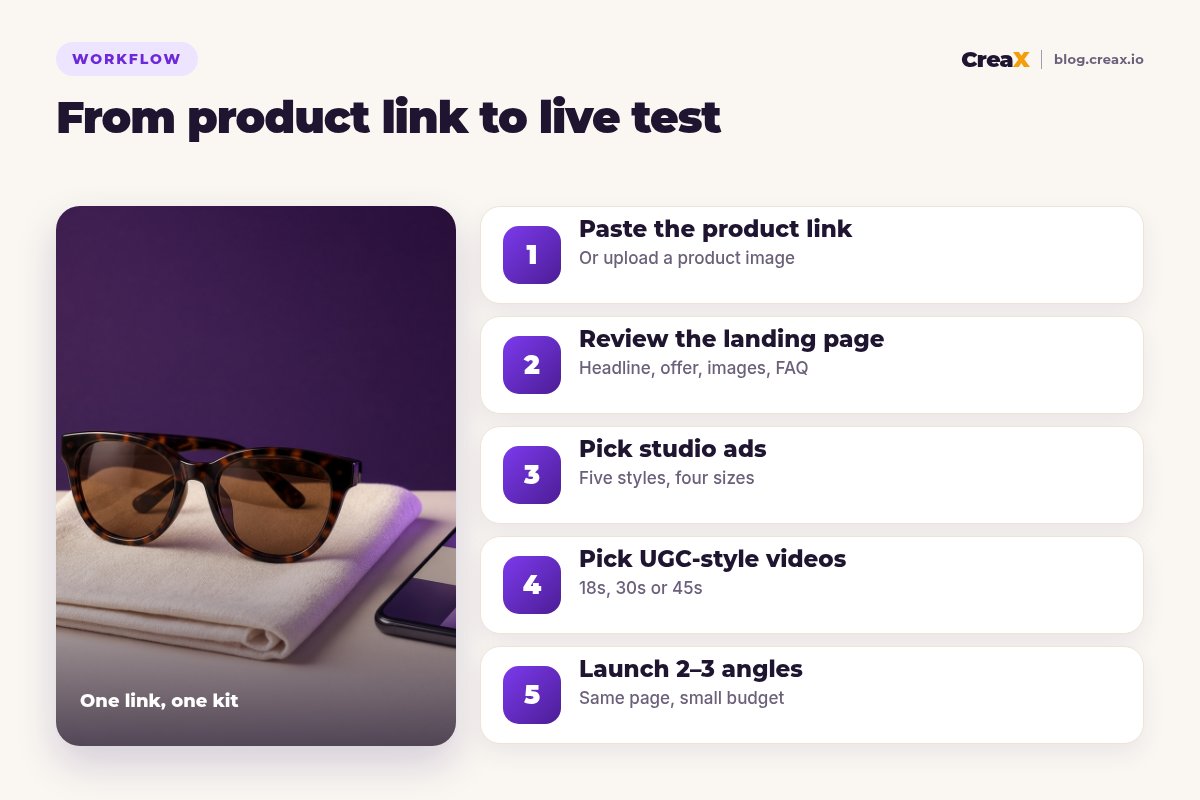
Paste the product link
Review the landing page
Pick your studio ads
Pick your UGC-style videos
Launch 2–3 angles
BudgetPricing
CreaX uses simple monthly credit plans. Credits are spent when you generate, and you can top up any time:
| CreaX plan | Price / month | Credits | Good fit |
|---|---|---|---|
| Free | $0 | 0 | Look around the app before buying credits |
| Basic | $4.99 | 2,000 | Your first product tests |
| Standard | $14.99 | 6,500 | Testing new products every week |
| Pro | $29.99 | 14,000 | Several products or stores at once |
| Premium | $49.99 | 25,000 | Agencies and high-volume media buyers |
| Top-up | $1 | 500 | Extra credits when a test takes off |
Current plans on creax.io/pricing.
Captions is free to sign up and sells paid subscriptions that unlock its full feature set. We don't quote its prices because they change; check captions.ai for current plans.
★Price the whole test, not one video
Fair playWhere Captions is the better pick
A fair comparison has to say where the other tool is stronger. For several kinds of teams, Captions is the right choice:
Captions
Strengths
- +Edits footage you filmed yourself, fast
- +AI twin: your face and voice on new videos
- +Chat-based editing with simple prompts
- +Captions and translated subtitles
- +Eye-contact, denoise and pause trimming
- +Useful for organic content as well as ads
Trade-offs
- −No landing page or store
- −Static ads are not its focus
- −You still direct scripts, avatars and edits per video
CreaX
Strengths
- +Video ads, static ads, landing page and store from one link
- +Ads and page share one message
- +About 60–120 seconds per kit
- +Plans from $4.99/month, top-ups $1 per 500 credits
- +Works without an existing Shopify store
Trade-offs
- −Not a video editor for your own footage
- −No AI twin of yourself
- −Video-only teams may not use the page and store
⚖Honest take
Our recommendationWhere CreaX is the better pick
Many ecommerce tests fail for reasons a video editor can't fix. The ad gets the click, but the page doesn't repeat the promise, the photos look like supplier images, or there is no page yet. CreaX is built around that problem:
- You test lots of products. Dropshippers and media buyers launching weekly need a full kit per product, not just a video.
- You need statics as well as video. Studio ads in several styles and sizes come with the same generation; see how studio ad creatives work.
- You want message match. When the ad and the page come from the same product understanding, the click lands on the same promise.
- You run several stores or clients. The multi-tenant store keeps niches and client brands apart.
If avatars are your main interest, compare more options in our roundup of the best AI avatar video generators, or read CreaX vs HeyGen.
Build your next product test in one pass
Paste a product link and get the landing page, studio ads and UGC-style video ads together, so your test can go live today.
ExampleWorked example: one product, both workflows
Say you are launching polarised sunglasses with three angles: “less squinting on bright drives”, “a light frame you forget you're wearing” and “a gift that looks premium”. Only claim polarisation or UV protection if your supplier can document it. You want two creatives per angle and one page.
| Task | Captions setup | CreaX setup |
|---|---|---|
| Video ads for 3 angles | Strong: AI Ads per angle, avatar or AI twin, then fine edits | UGC-style video per angle from the product link |
| Founder-filmed try-on clip | Strong: AI Edit, captions, clean-up | Not a core feature; edit it elsewhere |
| Static ads | Design them in another tool | Studio ads in 5 styles, generated with the kit |
| Landing page | Build in your store or a page builder | Generated from the same link, then edited |
| Hand-offs between tools | At least two (statics, page) | None for the first test |
A qualitative comparison of the work involved, not a speed or performance benchmark.
With Captions you spend your time shaping video, which pays off if you film yourself or want a recognisable presenter. With CreaX you spend it reviewing one kit and choosing which angle to fund, which pays off when speed across many products matters.
!Keep claims honest in both tools
Choose with confidenceDecision checklist
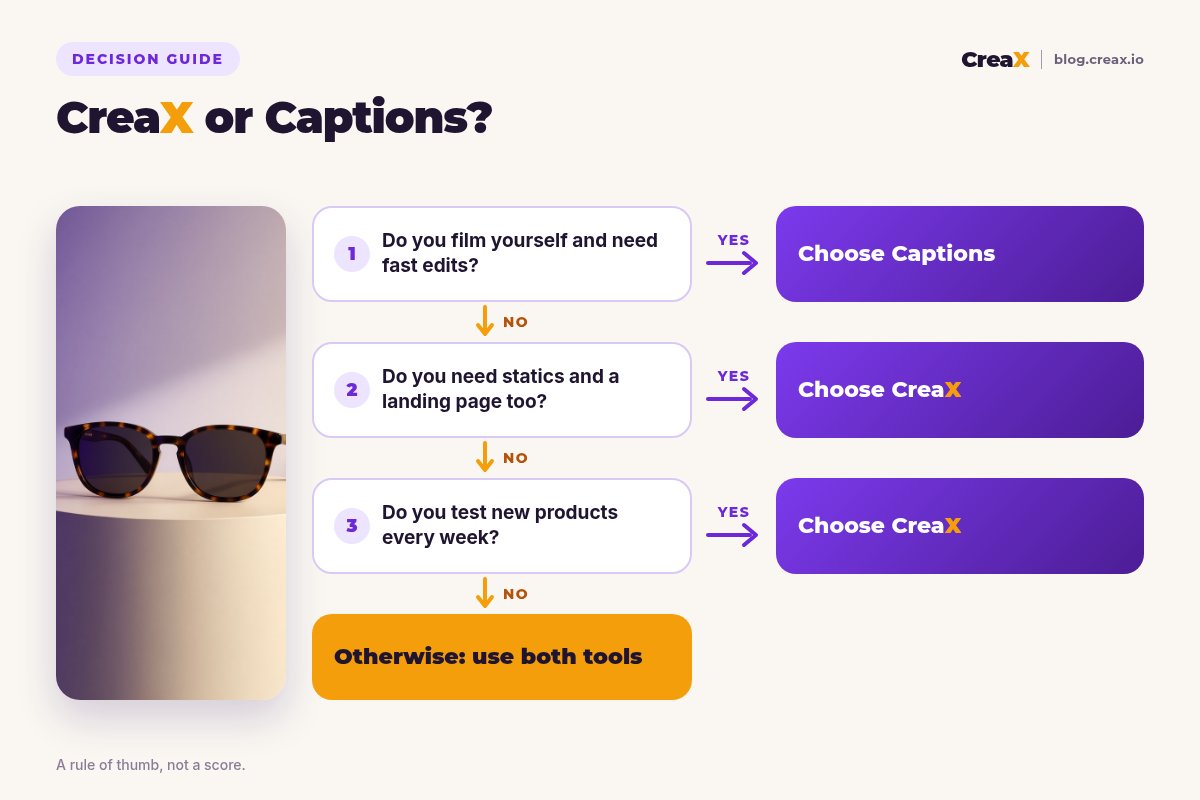
Answer these before you pay
- ✓Do you film yourself or your team? If yes, Captions' editing tools are a real advantage.
- ✓Do you want a digital twin of yourself in ads? That points to Captions.
- ✓Do you need static ads as well as video? CreaX makes them in the same pass.
- ✓Do you have a product page that converts? If not, the page is your bottleneck. Lean CreaX.
- ✓How many products do you test each month? Many products favours a kit-per-product tool.
- ✓Do you also make organic content? Captions covers podcasts, tutorials and social clips too.
Using both is a fair answer. A common setup: CreaX for new-product kits, statics and pages, and Captions for founder-led clips and edits on proven products.
FAQFrequently asked questions
Q.Is CreaX a good Captions alternative?
Q.Is Captions the same as Mirage?
Q.Can Captions make a landing page?
Q.Which is cheaper, CreaX or Captions?
Q.Can I use CreaX and Captions together?
Ready to test your next product?
One product link, about 60–120 seconds, and you have the video ads, studio creatives and landing page for your first test.
This guide is published by CreaX. We describe other tools from their own public websites as of October 2026, avoid invented scores or prices, and recommend checking each vendor's site for current features and plans.