
CreaX vs Adobe Express for Ecommerce Ad Creatives
Comparison · Adobe Express alternative
CreaX vs Adobe Express for ecommerce ad creatives: Adobe Express is a fast design and template app with generative AI for images, video clips, brand kits and editable layouts. CreaX is an AI ecommerce creative OS that turns one product link into UGC-style video ads, studio statics, a landing page and a store. Here's an honest look at which fits product testing, and when to use both.
Updated October 2026 · By the CreaX team
Key takeaways
- ✓Adobe Express goes deep on design: templates, generative fill and effects, brand kits, captions, clip tools and commercially safe Firefly assets.
- ✓CreaX goes wide on the product test: UGC-style video ads, studio statics, a publish-ready landing page and a multi-tenant store from one product link, in about 60–120 seconds.
- ✓Pick Express when you need freeform design and brand templates. Pick CreaX when you need ads and a page from a product link without assembling them by hand.
- ✓You can also use both: CreaX for the test kit, Express for custom brand graphics and edits.
In this guide
TL;DRThe short answer: CreaX vs Adobe Express
Adobe Express is a design workspace. You start from templates or AI prompts, edit layouts, apply brand kits, generate images and video clips, caption footage and resize for social. It's built for marketers and teams who want control over every visual.
CreaX is a product test engine. You paste a product link or upload a product image and get the creatives and the page they send traffic to. It doesn't replace Express's freeform design tools; it removes the slowest part of launching a product test.
iOur bias, stated upfront
The competitorWhat Adobe Express is (and who it's built for)
Adobe Express is Adobe's quick design app for web and mobile. Based on Adobe's public Express pages, it offers:
- Templates and brand kits: thousands of templates for social posts, stories, flyers and more, with brand colours, fonts and locked templates for teams.
- Generative AI: text-to-template, image generation and effects (including generative fill-style edits), designed to be commercially safe via Firefly.
- Video tools: templates, captions, background removal, Clip Maker for turning longer footage into social clips, and Generate Video for b-roll and background footage.
- Resize and schedule: adapt one design across formats and channels.
- Ecommerce page templates: customisable landing-page style layouts you design yourself, with links to your shop.
It's built for marketers, small teams, solopreneurs and anyone who wants Adobe-backed design tools without opening full Photoshop or Premiere.
Our approachWhat CreaX is: the AI ecommerce creative OS
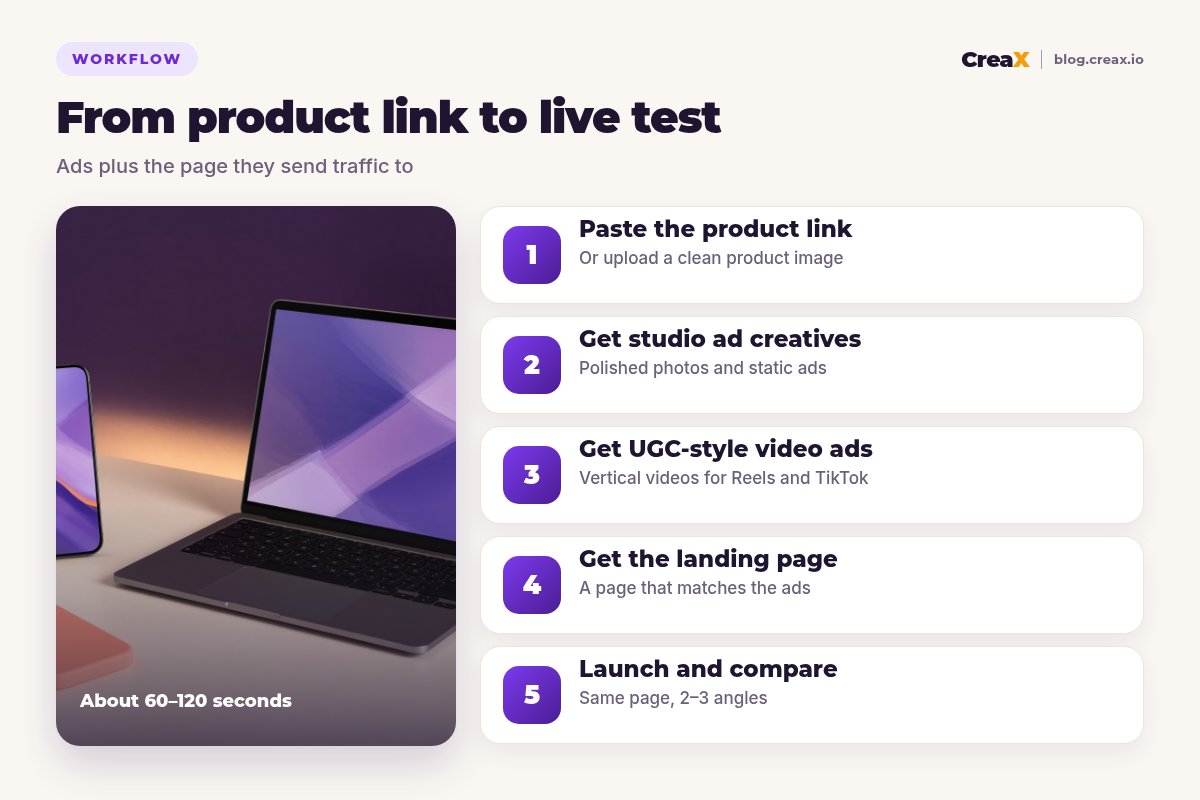
CreaX starts from a product link or image and builds the kit for a paid product test. In about 60–120 seconds you get:
- UGC-style video ads for Reels, Stories and TikTok.
- Studio ad creatives: polished product photos and static ads (see studio ad creatives explained).
- A publish-ready landing page that repeats the ad's promise.
- A multi-tenant store for several products, niches or clients.
It's built for dropshippers, media buyers, affiliates, agencies and brands that test physical products often. Compare also CreaX vs Canva if you're weighing another design app.
ComparisonSide-by-side: features, outputs and workflow
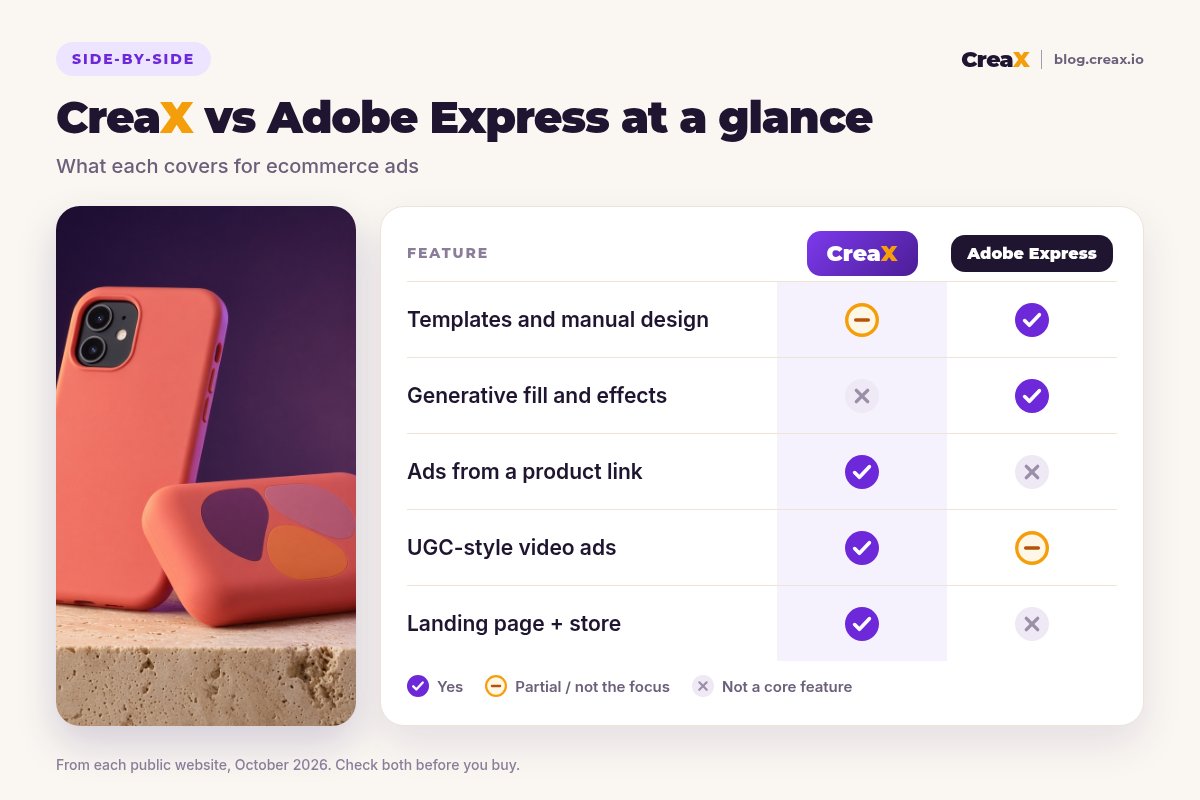
| CreaX | Adobe Express | |
|---|---|---|
| Starts from | Product link or product image | Template, prompt or your files |
| Static ad creatives | Generated studio ads | Templates + generative design |
| Video | UGC-style ads from the product | Templates, captions, Clip Maker, Generate Video |
| Landing page / store | Included from the product link | Page templates you design; shop via links |
| Brand kits / freeform edit | Light editing of outputs | Deep: brand kits, layouts, effects |
| Pricing model | Credits, from $4.99/month | Free plan + paid; check site |
Adobe Express details summarised from adobe.com/express public pages, October 2026.
Workflow with Adobe Express
- Pick a template or generate one from a prompt.
- Add your product photos, brand kit and copy.
- Generate or edit images and video clips as needed.
- Export for ads — and build or link a page separately.
Workflow with CreaX
- Paste a product link or upload an image.
- Review the video ads, statics and landing page.
- Edit claims and wording to match what you can prove.
- Launch 2–3 angles to the same page and compare.
In short: Express gives you more design control; CreaX gives you more of the test done in one step.
BudgetPricing: CreaX plans vs Adobe Express
| CreaX plan | Price / month | Credits | Good fit |
|---|---|---|---|
| Free | $0 | 0 | Look around the app before buying credits |
| Basic | $4.99 | 2,000 | Your first product tests |
| Standard | $14.99 | 6,500 | Testing new products every week |
| Pro | $29.99 | 14,000 | Several products or stores at once |
| Premium | $49.99 | 25,000 | Agencies and high-volume media buyers |
| Top-up | $1 | 500 | Extra credits when a test takes off |
Current plans on creax.io/pricing.
Adobe Express offers a free plan with basic tools and paid plans for more AI and brand features. Plans change, so we won't quote them; check adobe.com/express for current pricing.
★Compare cost per finished test
See what CreaX builds from your product link
Paste a product link and get UGC-style video ads, studio creatives and a landing page you can test today.
Fair playWhere Adobe Express is the better pick
Adobe Express
Strengths
- +Deep templates and freeform design
- +Generative images, effects and video tools
- +Brand kits and locked templates for teams
- +Commercially safe Firefly assets (per Adobe)
- +Resize and edit across formats
Trade-offs
- −You assemble ads and the page yourself
- −Not built from a product link
- −No multi-tenant store for product tests
CreaX
Strengths
- +UGC-style video, studio ads, landing page and store from one link
- +Ads and page share one message
- +Fast path to a live product test
- +Entry plan $4.99/month, top-ups $1 per 500 credits
Trade-offs
- −Not a freeform design studio
- −Lighter brand-kit and template library
- −Not for general graphic design projects
⚖Honest take
Our recommendationWhere CreaX is the better pick
- You sell physical products and test often. One link → ads + page.
- You need UGC-style video without filming. Product-led videos come with the kit.
- You don’t have a page yet. The landing page matches the ads.
- You run several stores or clients. Multi-tenant stores keep them separate.
- You want simple credit pricing. From $4.99/month, top up when a test takes off.
For more design-app context, see our best AI ad creative generators roundup.
Build your next product test in one pass
Paste a product link and get the ads and the landing page together.
ExampleWorked example: one product, both workflows
Say you sell a coral silicone phone case with a matching power bank and want Meta and TikTok tests this week.
| Step | With Adobe Express | With CreaX |
|---|---|---|
| Product visuals | Upload photos; generate/edit with AI | Studio ads generated from the link |
| Video | Templates, captions, Clip Maker or Generate Video | UGC-style video ads included |
| Page | Design a page template or link out | Landing page generated with the ads |
| Angles | Duplicate and redesign each angle | Generate creatives per angle, same page |
| Brand extras | Strong: kits, effects, resize | Light editing of generated outputs |
A qualitative walkthrough, not a performance benchmark.
A sensible split: use CreaX to launch the first test kit for two or three angles, then open Express when you need a custom brand banner, a resized campaign set or a designed email header. You keep testing fast without giving up design control where it matters.
Angles for this product could be “never stuck on low battery”, “a case that stays grippy” and “the matching set as a gift”. Generate those in CreaX first; bring Express in only for the brand extras the kit does not cover.
Choose with confidenceDecision checklist
Answer these before you pay
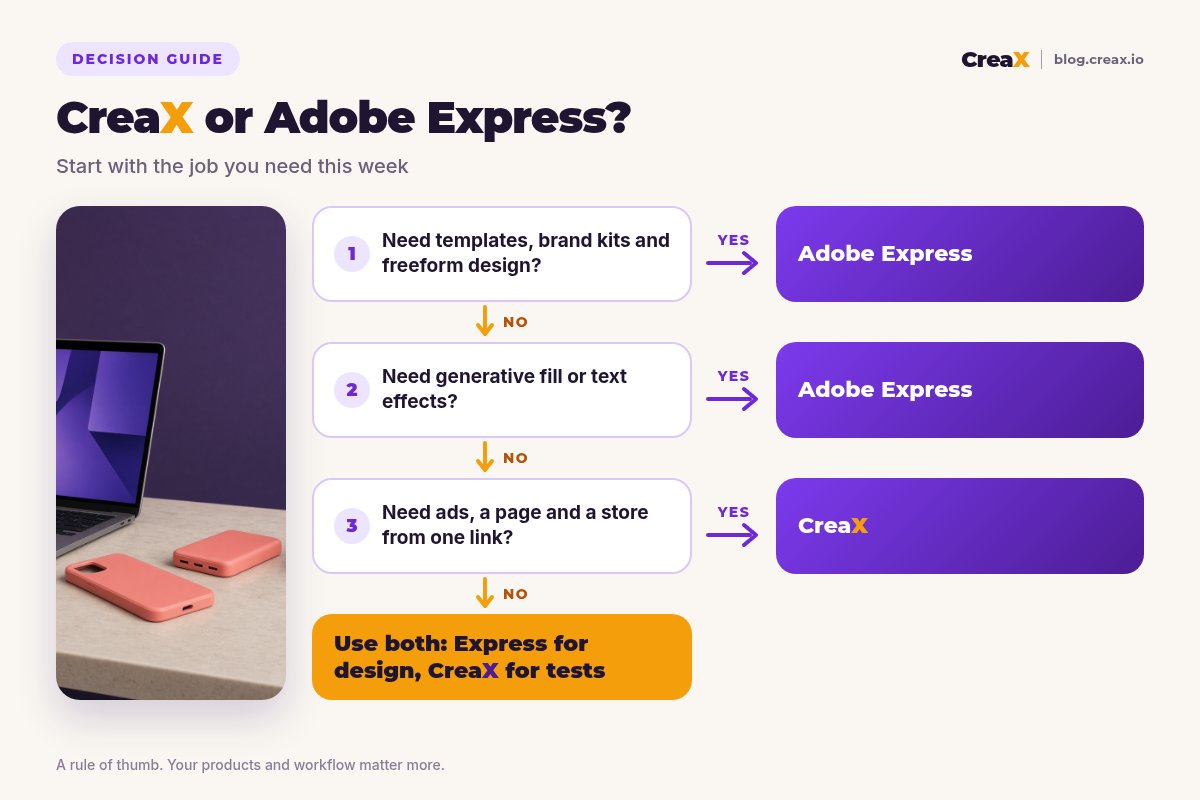
- ✓Is the job freeform design or a product test? Design → Express; product test → CreaX.
- ✓Do you already have product footage and photos? Express shines when you're editing what you have.
- ✓Do you need a page that matches the ads? CreaX includes it; Express pages are designed separately.
- ✓Do you need brand kits and locked templates for a team? Express is built for that.
- ✓How many products do you test? Many products favour a fast kit per product.
- ✓Can you use both? Yes — kit from CreaX, custom design in Express.
FAQFrequently asked questions
Q.Is CreaX a good Adobe Express alternative?
Q.Does Adobe Express make UGC-style product ads from a link?
Q.Can Adobe Express build a landing page?
Q.Are Adobe Express AI assets safe for commercial use?
Q.Which is cheaper?
Q.Can I use CreaX and Adobe Express together?
Ready to build your next product test?
One product link, about 60–120 seconds, and you have the video ads, studio creatives and landing page for your first test.
This guide is published by CreaX. We describe other tools from their own public websites as of October 2026, avoid invented scores or prices, and recommend checking each vendor's site for current features and plans.