
CreaX UGC Video Ads Explained: How the Generator Works
Feature explained · UGC video ads
Looking for an AI UGC video generator that starts from your product, not from a blank editor? This guide explains how CreaX's UGC video ads work: what you put in, what comes out, how long it takes, what it costs in credits, and how to get videos you'd actually run. It also covers the limits, and when a real creator is still the better choice.
Updated October 2026 · By the CreaX team
Key takeaways
- ✓CreaX turns a product link or product image into UGC-style video ads, alongside studio ad creatives, a landing page and a store, in about 60–120 seconds.
- ✓The videos are vertical and social-first, made for feeds like Reels, Stories and TikTok.
- ✓Better input means better output: a clear product page or sharp photo and a clear angle in mind make the biggest difference.
- ✓Plans start at $4.99/month for 2,000 credits, with top-ups at $1 per 500 credits. Real creators still win for some products.
In this guide
AudienceWho this is for: all sellers who run video ads
UGC-style video ads (short, phone-style videos that feel like a real person showing a product) are a staple of social commerce. CreaX's generator is built for anyone who needs those videos often:
- Dropshippers testing several products a month and needing videos for each.
- Media buyers who need fresh creatives when ads fatigue.
- Ecommerce brands that want more angles than their creator budget allows.
- Affiliates and agencies producing ads for products they don't physically have on their desk.
New to the format? Start with what a UGC video ad is and whether you need real creators.
Why it mattersThe problem this solves
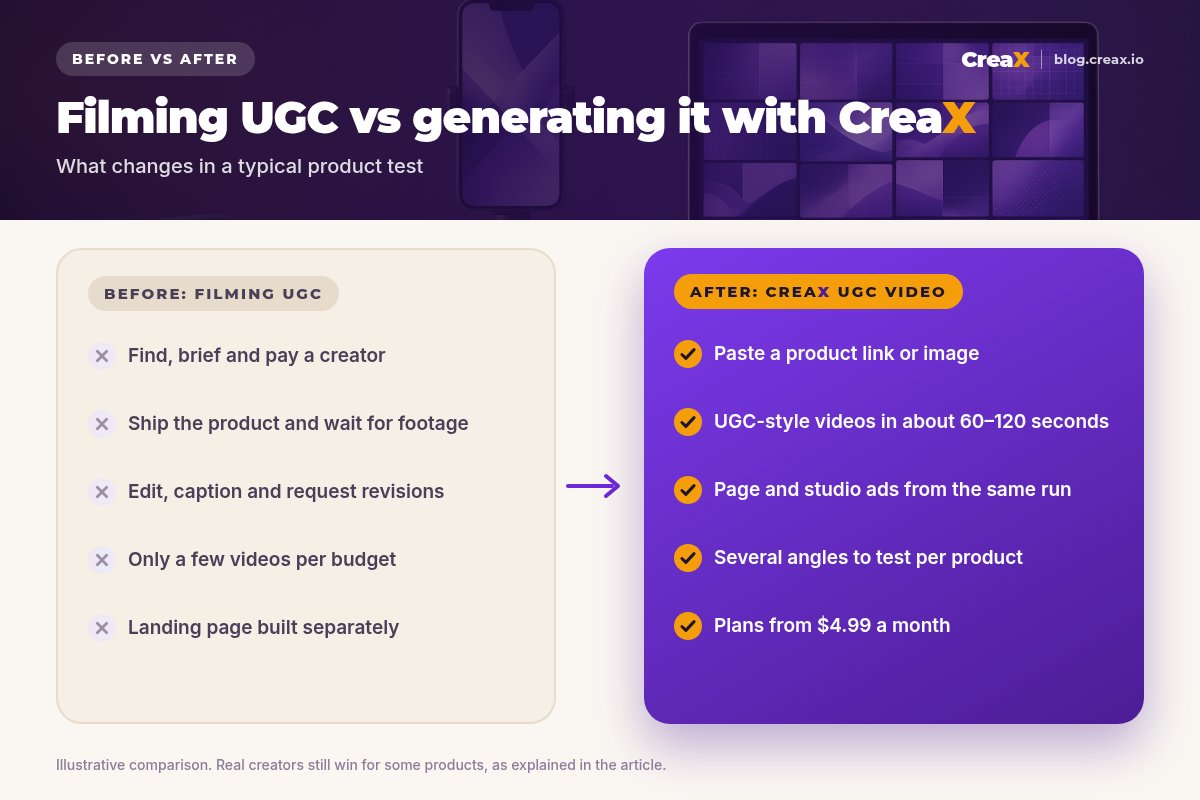
Classic UGC production works, but it's slow and expensive to repeat. You find and brief a creator, ship them the product, wait for footage, request edits, and pay for each video. That's fine for a proven product. It's painful when you're testing new products and angles every week, because most tests won't become winners.
The result is that many sellers test too few angles, run the same videos until they fatigue, or skip video entirely. Our comparison of CreaX vs traditional UGC agencies goes deeper into the cost side.
The outputWhat CreaX produces from one product link or image
A single generation in CreaX produces a full creative kit, not just one video:
| Output | What it is | Where you use it |
|---|---|---|
| UGC-style video ads | Vertical, phone-style product videos | Reels, Stories, TikTok, Shorts |
| Studio ad creatives | Polished product photos and static ads | Feeds, carousels, retargeting |
| Landing page | Publish-ready page built from the product | Where your ads send traffic |
| Store | A multi-tenant store | Selling one or several products |
Everything comes from the same product input, in about 60–120 seconds.
Why does it matter that the video comes with a page? Because a video that promises one thing and a page that says another loses buyers. When both come from the same product understanding, the message matches. For the static side, see studio ad creatives explained.
iWhat we don't claim
How it worksStep-by-step workflow
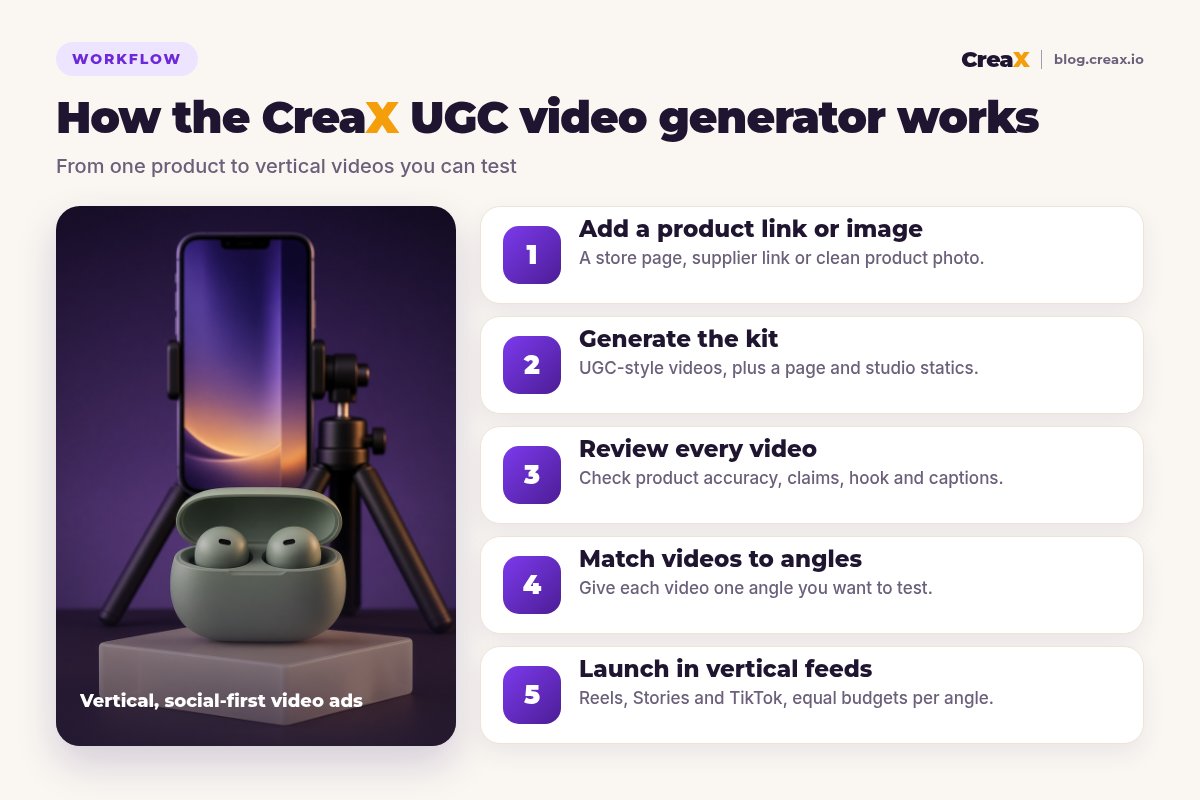
Add a product link or image
Generate the kit
Review every video
Match videos to angles
Launch in vertical feeds
If a video misses, the fix is usually the input: a cleaner photo, a better product page, or a clearer idea of the angle. For a quick-start version of this flow, see how to generate a winner UGC video.
What to look for when you review a video
Whether a UGC-style video comes from a creator or a generator, the ones worth running tend to share the same structure. Use it as your review lens:
| Part | What it does | What to check |
|---|---|---|
| Hook (first seconds) | Stops the scroll | Is the product or problem clear right away? |
| Problem or moment | Makes the viewer relate | Does it fit the angle you chose? |
| Product in action | Shows how it works | Does the product look exactly like the real one? |
| Proof or detail | Builds trust | Is every claim true and confirmed by the supplier? |
| Call to action | Tells viewers what to do | Does it match the landing page offer? |
A review lens, not a formula. Some strong ads skip a part on purpose.
If a video is strong on four of the five parts, it's usually worth testing. If the product looks wrong or a claim isn't true, drop it, however good the hook is.
Turn your product into UGC-style video ads
Paste a product link or upload a photo and get video ads, studio creatives and a landing page in about 60–120 seconds.
ExampleWorked example: wireless earbuds
Say you sell sage green stemless wireless earbuds with a pebble-shaped charging case. Here's how a test could run:
- Input: the product page link from your store, with clear photos of the earbuds and the case.
- Generate: CreaX creates UGC-style videos, studio statics and a landing page from that link.
- Angles: you pick three: “commute companion”, “gym-proof fit” and “the gift that's easy to get right”.
- Review: you drop any video that implies features the earbuds don't have (for example, a battery life or noise-cancelling claim your supplier doesn't confirm).
- Launch: three angles, equal budgets, all pointing to the same landing page.
After the first days, you look at which angle gets the cheapest clicks and the best add-to-cart rate, keep that one, and generate fresh variations of it. The losing angles cost you little, because the videos didn't need a shoot.
PricingWhich plan fits (real CreaX prices)
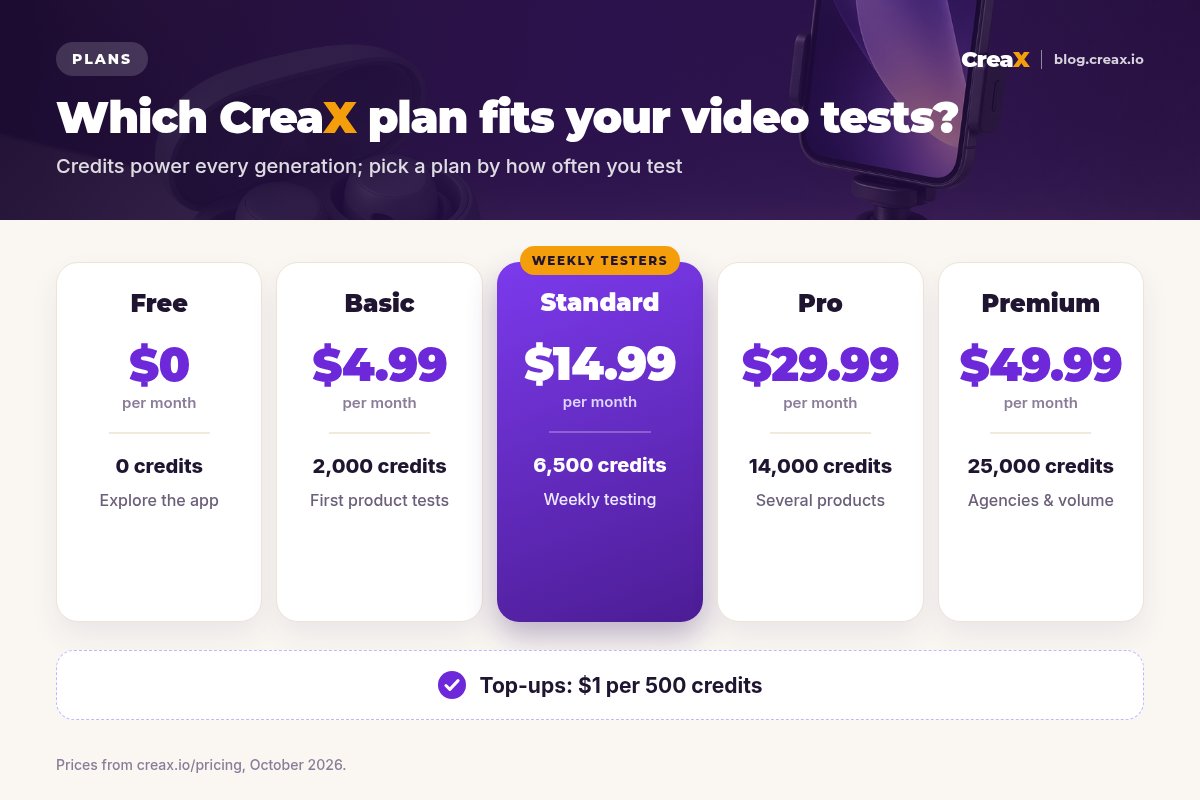
| Plan | Price / month | Credits | Typical fit |
|---|---|---|---|
| Free | $0 | 0 | Look around before buying credits |
| Basic | $4.99 | 2,000 | Your first product tests |
| Standard | $14.99 | 6,500 | Testing new products every week |
| Pro | $29.99 | 14,000 | Several products or stores at once |
| Premium | $49.99 | 25,000 | Agencies and high-volume buyers |
| Top-up | $1 | 500 | Extra credits when a test takes off |
See creax.io/pricing for current plans. Each generation shows its credit cost before you confirm.
Best practiceTips for better results
Before you launch a CreaX video
- ✓Use a clean input. A product page with clear photos and accurate details, or a sharp photo on a plain background.
- ✓Know the angle first. Decide what problem, moment or desire each video should speak to.
- ✓Judge the first seconds. The hook decides whether anyone sees the rest. Drop videos with a weak opening.
- ✓Watch on a phone, sound off. Most feeds start muted; make sure the video still makes sense.
- ✓Check every claim. Remove anything the product can't back up.
- ✓Keep the page matched. Send each video to the landing page from the same generation.
- ✓Refresh winners, not losers. When an angle works, generate new variations of it before it fatigues.
★Name videos by angle
Fair playLimits and when to use other tools
CreaX is built for fast, product-led testing. It isn't the best fit for everything:
- Real creators still win when a real person's experience is the point: skincare results over weeks, fit on different bodies, or a founder's story.
- Avatar-focused tools may suit you better if presenter-led videos with a large choice of AI actors are your main format (see CreaX vs Creatify and CreaX vs Arcads).
- Video editors are better for detailed, frame-by-frame editing of footage you already have.
- Long-form video like tutorials or brand films needs different tools.
⚖Honest take
See your product as a UGC-style video ad
One product link or image, about 60–120 seconds, and you have videos, statics and a matching landing page.
FAQFrequently asked questions
Q.What do I need to create a UGC video ad in CreaX?
Q.How long does it take?
Q.Are the videos made with real creators?
Q.What format are the videos?
Q.How much does a UGC video cost in CreaX?
Q.Can I use CreaX videos for any product?
Ready to test your next angle?
Paste a product link and get UGC-style video ads, studio creatives and a landing page for your next test.
This guide is published by CreaX. We describe other tools from their own public websites as of October 2026, avoid invented scores or prices, and recommend checking each vendor's site for current features and plans.