

CreaX for WooCommerce Stores: AI Ads and Landing Pages
Use case · WooCommerce stores
WooCommerce gives you full control of your store on WordPress: your hosting, your theme, your plugins, your data. What it doesn't give you is the ads. Every new product still needs scroll-stopping creatives, video and a page that matches the ad. This guide shows how WooCommerce store owners can use CreaX to generate AI ad creatives, UGC-style video ads and landing pages from a product link, while WooCommerce keeps handling products, checkout and orders.
Updated October 2026 · By the CreaX team
Key takeaways
- ✓WooCommerce runs the store: products, cart, checkout, payments and orders stay exactly where they are.
- ✓CreaX makes the creative: paste a product link or upload images and get studio ad creatives, UGC-style video ads and a publish-ready landing page in about 60–120 seconds.
- ✓Point buy buttons at your WooCommerce product page, or use a WooCommerce add-to-cart link to send shoppers straight to the cart or checkout.
- ✓Plans start at $4.99 a month for 2,000 credits, with top-ups at $1 per 500 credits, so you can test without a big tool budget.
In this guide
AudienceWho this is for: WooCommerce stores
This guide is for anyone selling with WooCommerce who runs, or wants to run, paid social ads:
- Small brands and makers on WordPress who sell a handful of products and don't have a designer on call.
- Store owners launching new products who need ads and a page for each launch.
- Agencies and freelancers managing several WooCommerce clients who need creatives for each one.
- Content sites with a shop that want to promote products to cold audiences, not just to readers.
If your store is on WooCommerce and your bottleneck is creative (ads, video, a page that converts ad traffic), this workflow is for you. If your bottleneck is store operations, inventory or shipping, other tools will help more.
Why it mattersThe problem this solves
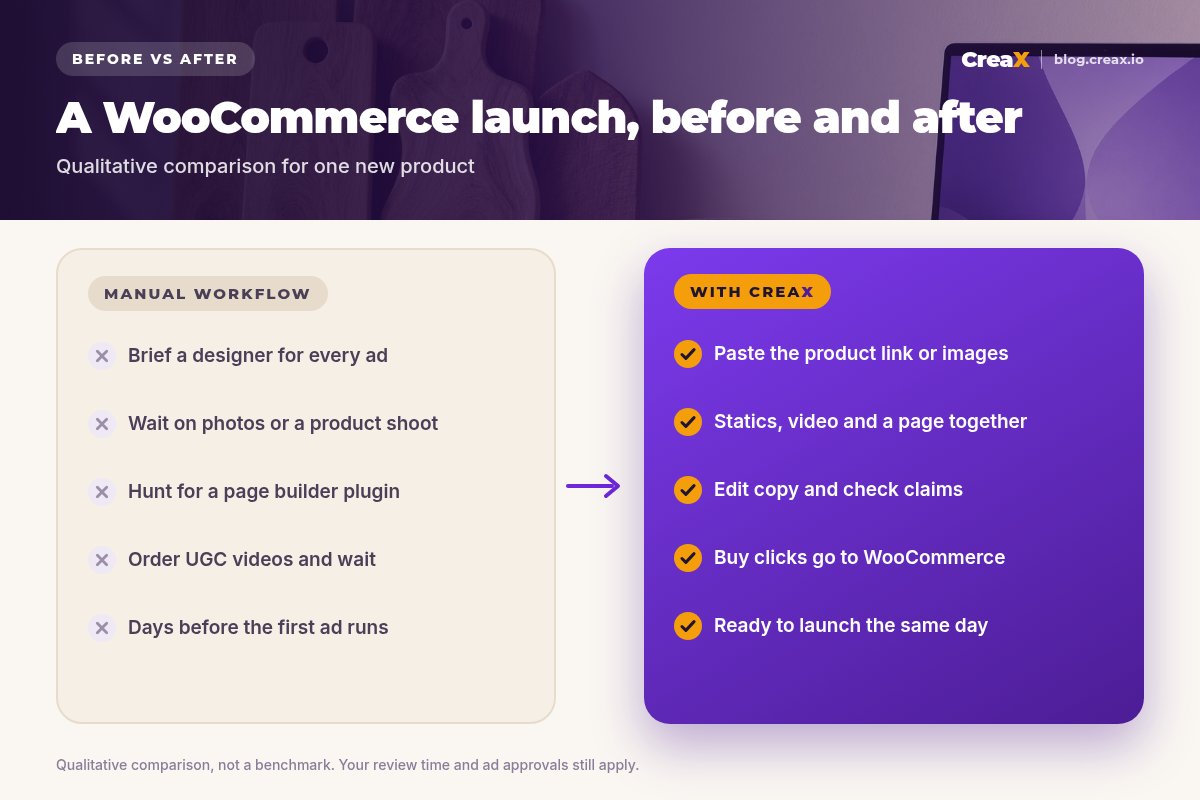
WooCommerce is flexible, but flexibility has a cost: the creative side of a launch is all on you. A typical new-product launch looks like this:
- Brief a designer or open a design tool for every static ad and size.
- Shoot product photos, or work around supplier images.
- Find, install and configure a page builder plugin to make a campaign page that matches the ad.
- Order UGC videos from creators and wait for them.
- Only then launch, and repeat the whole thing when the ads tire.
Each step is manageable on its own. Together they slow every launch down and limit how many products or angles you can test. If you've ever had a product sit for weeks because the ads weren't ready, you know the cost. Our guide on CreaX vs a freelance designer breaks down that trade-off.
OutputsWhat CreaX produces from one product link or image
CreaX is an all-in-one AI ecommerce creative OS. From one product link or product image, it generates:
| Output | What it is | How a WooCommerce store uses it |
|---|---|---|
| Studio ad creatives | Polished product photos and static ads | Meta and TikTok feed and Stories ads, retargeting, email banners |
| UGC-style video ads | Vertical, social-first product videos | Reels, TikTok and Stories campaigns |
| Landing page | A publish-ready page that repeats the ad's promise | A focused destination for cold ad traffic, linked to your WooCommerce product or cart |
| Multi-tenant store | A separate store you can run alongside | Testing a new niche without touching your main WordPress site |
Generated in about 60–120 seconds per product. You review and edit everything before it goes live.
For a deeper look at the static side, see studio ad creatives from one product photo.
Turn a WooCommerce product into a full ad kit
Paste your product link: studio creatives, UGC-style video ads and a landing page in about 60–120 seconds.
How it worksStep-by-step workflow
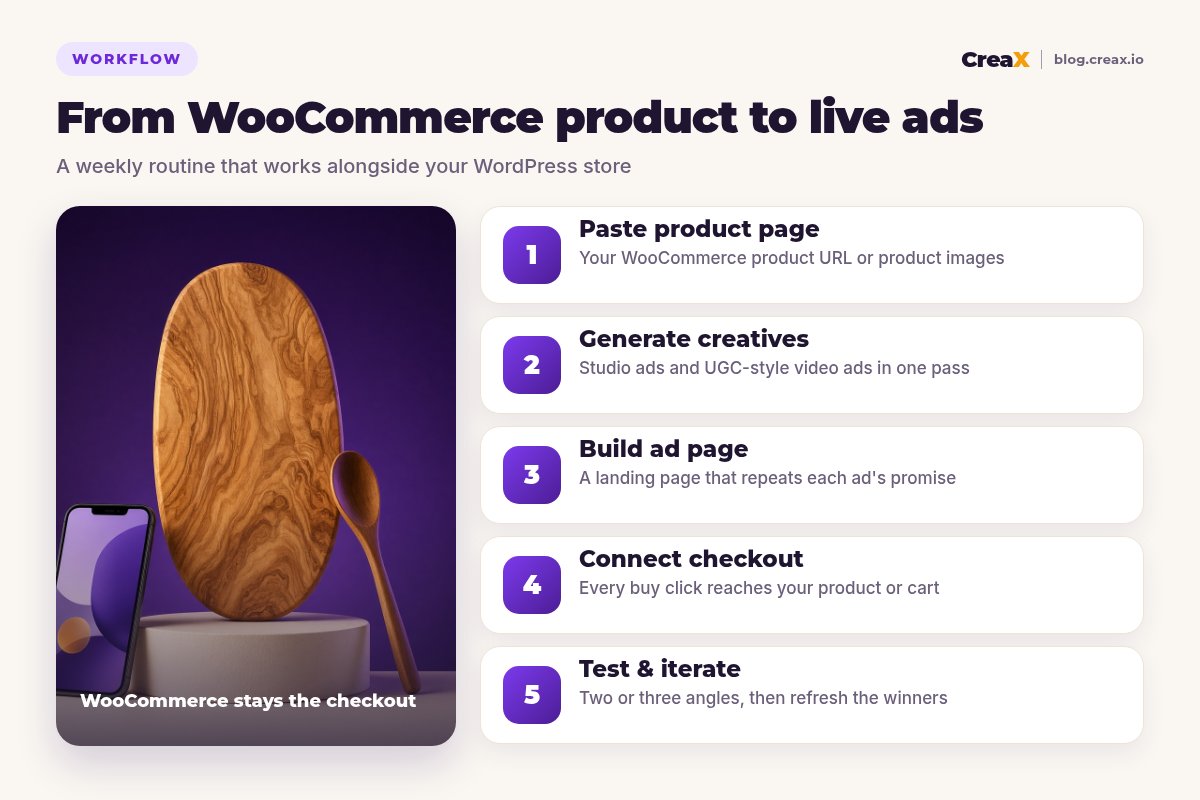
Paste the product page
Generate creatives
Build the ad page
Connect checkout
Test and iterate
Product page or landing page?
Your WooCommerce product page has to serve everyone: browsers, returning customers and search visitors. That's why it carries menus, related products, tabs and reviews. A campaign landing page does one job: continue the story of the ad that was clicked, with one product, one offer and one button.
A simple rule: if you run one main angle to warm audiences, send ads to your product page and spend your effort on the creatives. If you test several angles on cold audiences, give each angle a focused landing page and point all of them at the same WooCommerce checkout. Then let cost per purchase decide which setup stays.
★Use WooCommerce add-to-cart links
ExampleWorked example: a woodworking shop
Picture a small workshop selling handmade olive-wood cutting boards on a WooCommerce store. They want to test Meta and Instagram ads for a new serving board before the holiday season.
| Step | What they do |
|---|---|
| 1. Input | Paste the WooCommerce product URL for the serving board into CreaX |
| 2. Angles | Pick “a gift that lasts for years”, “the board that makes cheese night look good” and “handmade, not mass-produced” |
| 3. Review | Edit headlines, check claims about wood and care, adjust the offer |
| 4. Path | Landing page buttons use an add-to-cart link to the WooCommerce checkout |
| 5. Launch | Three ads, same budget, same page; compare cost per purchase after a fair test |
| 6. Iterate | Generate fresh variations of the winning angle when results fade |
Illustrative workflow, not a performance claim.
Because orders still land in WooCommerce, the shop's existing shipping, emails and accounting don't change. Only the creative work moves to CreaX. If you want to know when to refresh, read the signs of ad creative fatigue.
PricingWhich plan fits (real CreaX prices)
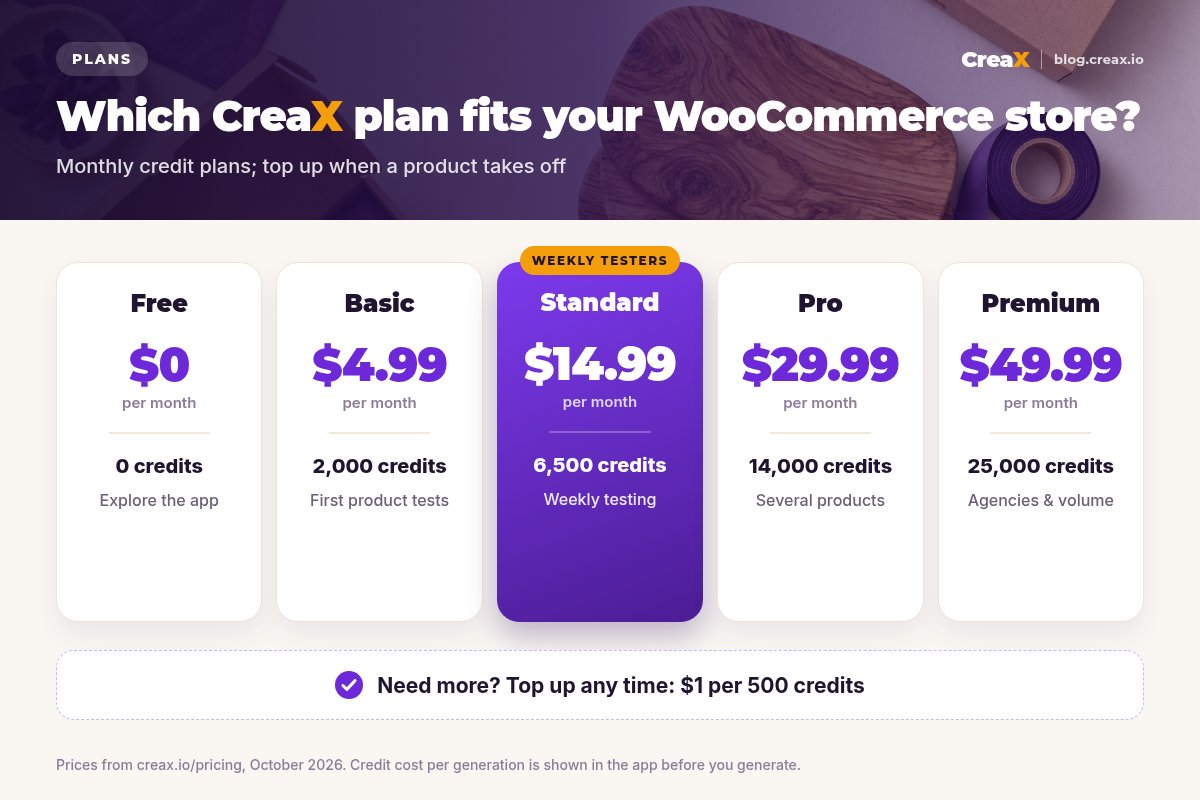
| Plan | Price / month | Credits | Good fit for a WooCommerce store |
|---|---|---|---|
| Free | $0 | 0 | Look around the app before buying credits |
| Basic | $4.99 | 2,000 | Your first product tests |
| Standard | $14.99 | 6,500 | Launching or refreshing products every week |
| Pro | $29.99 | 14,000 | Larger catalogs or several stores |
| Premium | $49.99 | 25,000 | Agencies running many WooCommerce clients |
| Top-up | $1 | 500 | Extra credits when a product takes off |
Current plans on creax.io/pricing. The credit cost of each generation is shown in the app before you generate.
Start your WooCommerce ad tests for $4.99
Generate studio ads, UGC-style video ads and a landing page for your next product, then send buyers to your WooCommerce checkout.
TipsTips for better results
- Start from your best product page. Clear photos and an accurate description give the AI better material.
- One angle per ad. Test angles against each other instead of mixing them in one creative.
- Keep the page and the ad aligned. If the ad leads with “a gift that lasts”, the page should open with it too.
- Check page speed on WordPress. If you send ads to your own product page, heavy themes and plugins can slow it down on mobile.
- Install your tracking. Make sure the Meta pixel or Conversions API setup on your WooCommerce store records purchases, whichever page the click lands on.
For how many variations to make, see how many ad creatives to test per product.
Honest limitsLimits and when to use other tools
⚖What CreaX doesn't do for WooCommerce
- Store design: for your homepage and theme, stick with your WordPress theme or block editor.
- Catalog photos at scale: a dedicated photo editor may suit bulk background removal better.
- Pixel-perfect custom pages: a page builder plugin gives more manual design control.
- Operations: inventory, shipping and fulfillment belong in WooCommerce and its extensions.
If you're comparing creative tools more broadly, our roundup of the best AI ad creative generators for ecommerce covers more options.
FAQFrequently asked questions
Q.Does CreaX work with WooCommerce?
Q.Do I need to install a plugin?
Q.Will orders still go through WooCommerce?
Q.Can I use the landing page on my own domain?
Q.What if my product link doesn't import well?
Q.How much does CreaX cost?
Ready to launch your next WooCommerce product?
One product link or image, about 60–120 seconds: studio creatives, UGC-style video ads and a landing page.
This guide is published by CreaX. WooCommerce details are summarised from WooCommerce's public documentation as of October 2026. We avoid invented statistics and recommend testing with your own store and traffic.