
CreaX for TikTok Shop Sellers: Video Ads From a Product Link
Use case · TikTok Shop sellers
TikTok Shop rewards sellers who post a steady stream of fresh product videos, and that is exactly where most small sellers run out of time, creators or ideas. This guide shows how TikTok Shop sellers use CreaX as their AI tool to turn one product link into UGC-style video ads and product visuals, plus a simple weekly rhythm for testing hooks and keeping winners.
Updated October 2026 · By the CreaX team
Key takeaways
- ✓On TikTok, volume and variety of videos matter: the same product needs several hooks and angles, refreshed often.
- ✓CreaX turns one product link or image into UGC-style video ads, studio product visuals and a landing page in about 60–120 seconds.
- ✓A simple weekly loop works: generate, vary hooks, post, put spend behind the best, remake winners.
- ✓AI videos are a complement to real creators, not a replacement: keep claims provable and follow TikTok's AI-content rules.
In this guide
AudienceWho this is for: TikTok Shop sellers
This guide is for sellers who list physical products on TikTok Shop and need a constant supply of short vertical videos to promote them: dropshippers testing new products, small brands with a handful of SKUs, and sellers who also run TikTok ads to their shop listings. It is especially useful if you:
- Don't want to film yourself for every product or every new angle.
- Work with affiliate creators but need your own videos while you wait for their content.
- Test several products a month and need a first batch of videos fast for each one.
- Want product visuals and video ads that look like one consistent campaign.
WhyThe problem this solves
A product video on TikTok has a short life. Viewers scroll past familiar content, so the same clip tends to lose impact over time, and native-feeling, fresh content tends to fit the For You feed best. A common approach is to post often and test many hooks for the same product.
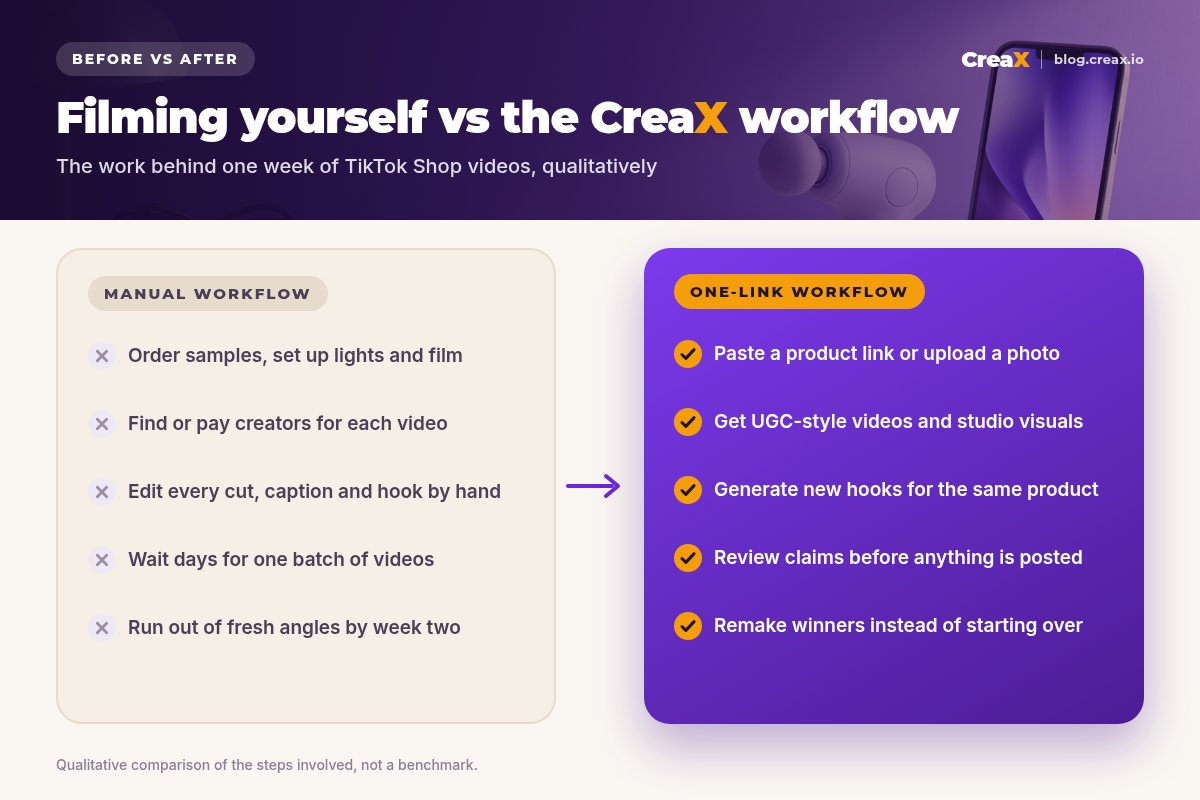
Doing that manually is a lot of work: ordering samples, setting up lights, filming, editing captions and cuts, finding creators, waiting for revisions. By the second week, many sellers have run out of angles. Our post on ad creative fatigue explains why fresh variations matter so much.
OutputsWhat CreaX produces from one product link or image
CreaX is an all-in-one AI ecommerce creative OS. You paste a product link or upload a product image, and in about 60–120 seconds it generates:
| Output | What it is | How TikTok Shop sellers use it |
|---|---|---|
| UGC-style video ads | Short vertical videos in a creator-style format built around your product | Posts, Spark-style boosts, paid ad tests, hook variations |
| Studio ad creatives | Product photos and static ads in studio and lifestyle styles | Listing images, carousel posts, thumbnails, other ad channels |
| Landing page | A publish-ready page for the product | Link-in-bio or off-TikTok traffic, if you sell outside TikTok Shop too |
| Multi-tenant store | Store pages for products and niches | Testing products outside TikTok Shop |
CreaX outputs from one product link or image. Check TikTok Shop's current listing and ad requirements before uploading.
The key advantage for TikTok Shop is speed of variation. Once your product is in CreaX, generating another video with a different hook or angle doesn't mean another shoot. You review each draft, keep the ones that fit your product and brand, and post.
iWho owns the claims
HowStep-by-step workflow
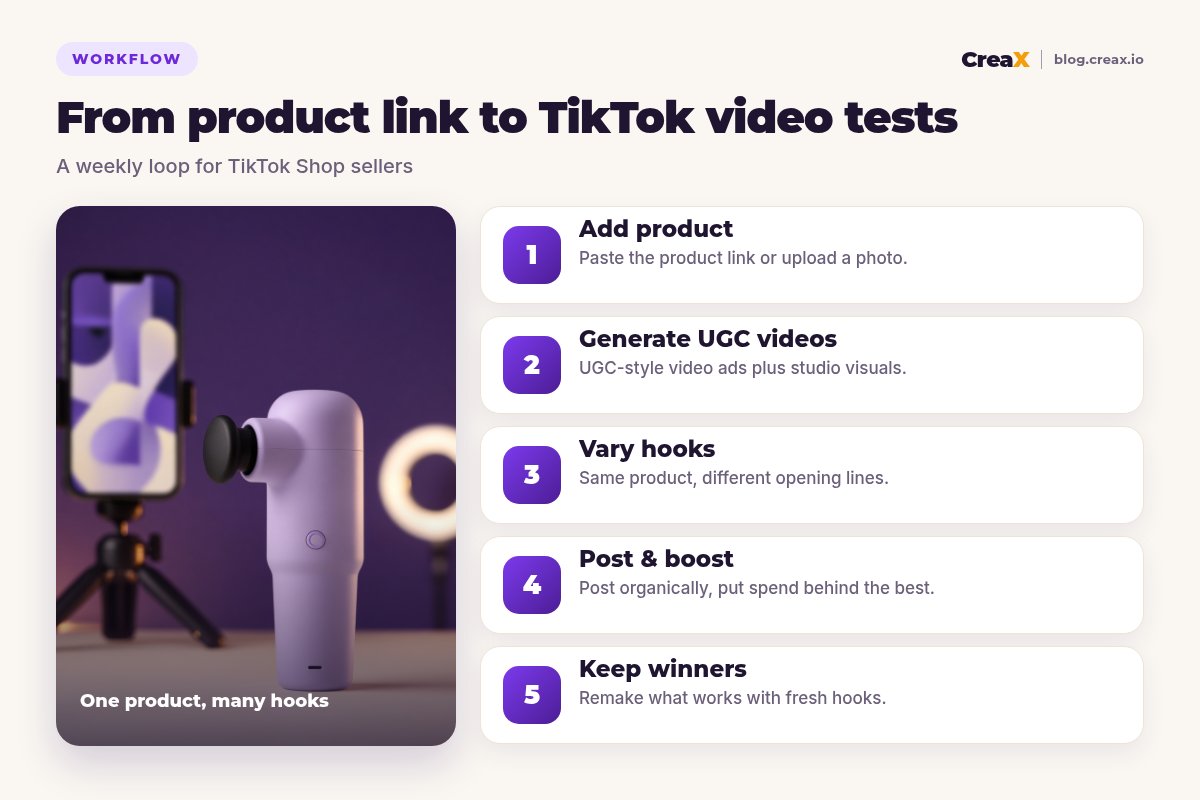
Add the product
Generate UGC-style videos
Vary the hooks
Post and boost
Keep and remake winners
If you're unsure how many variations to make, our guide to how many ad creatives to test per product gives a practical starting range, and our walkthrough on generating a UGC video in under 2 minutes shows the generation step in detail.
Turn your next product into a week of TikTok videos
Paste a product link and get UGC-style video ads, studio visuals and a landing page in about 60–120 seconds.
ExampleWorked example: a mini massage gun
Say you sell a compact mini massage gun on TikTok Shop. Here's one week using the loop:
| Day | What you do | Output |
|---|---|---|
| Monday | Paste the listing link, check the product facts, generate a first batch of videos and studio visuals | A handful of video drafts and listing images |
| Tuesday | Pick the best drafts, create hook variations: “desk-job neck”, “post-gym recovery”, “fits in a gym bag” | Several videos with different openings |
| Wed–Thu | Post one or two videos a day to the shop account; watch retention and product clicks | Early signal on which hook holds attention |
| Friday | Put a small ad budget behind the strongest video | A paid test on a proven organic hook |
| Weekend | Generate new versions of the winning angle; retire the weakest hooks | Next week's batch, already pointed in the right direction |
Illustrative schedule, not a benchmark. Adjust volume to your budget and posting capacity.
Notice what stays constant: the product, the offer and the honest claims. What changes is the hook. If videos get views but not sales, the problem may be the offer, price or listing rather than the video; our guide on TikTok ads with views but no sales walks through the checks.
PricingWhich plan fits (real CreaX prices)
CreaX uses monthly credit plans. Each generation uses credits, and the app shows the credit cost before you generate. You can top up at $1 per 500 credits if you run out mid-month.
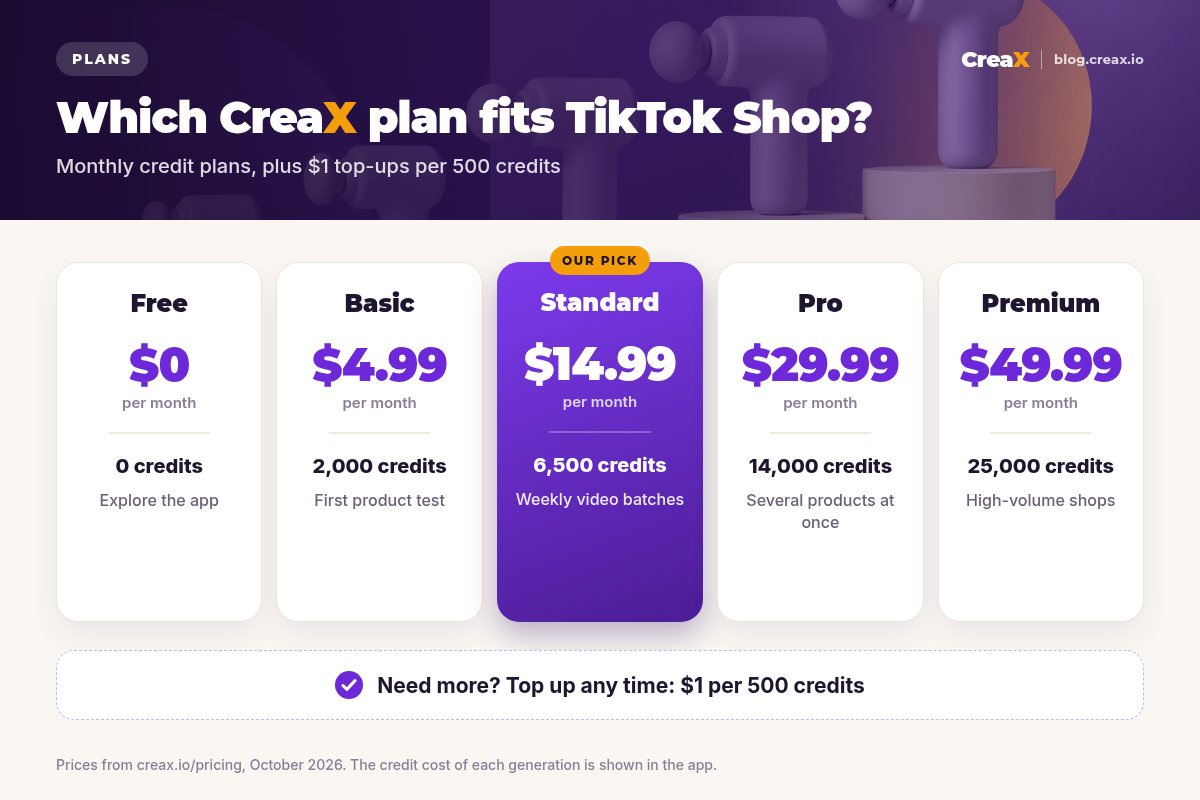
| Plan | Price / month | Credits | Good fit for |
|---|---|---|---|
| Free | $0 | 0 | Exploring the app before you buy credits |
| Basic | $4.99 | 2,000 | Testing your first product |
| Standard | $14.99 | 6,500 | A weekly batch of videos for one or two products |
| Pro | $29.99 | 14,000 | Several products in rotation |
| Premium | $49.99 | 25,000 | High-volume shops and teams |
Prices from creax.io/pricing, October 2026. Top-ups: $1 per 500 credits.
Start your first TikTok Shop video batch
Pick a plan that matches how many products you test, paste a link and review your first drafts in minutes.
TipsTips for better results
- Start from a clean product image or listing. Clear inputs give clearer videos.
- One angle per video. A video that tries to say five things says nothing. Pick one problem or one result.
- Hook in the first seconds. Show the product or the problem immediately; save the explanation for later.
- Match the listing. Price, variants and claims in the video must match your TikTok Shop listing.
- Mix in real footage. A real unboxing or a creator video alongside AI videos makes the feed feel more trustworthy.
- Label AI content. TikTok requires realistic AI-generated content to be labeled; use the AI-generated content setting when you post.
Before you post each batch
- ✓Product facts checked: name, features, what's in the box
- ✓Every claim in the script provable by the supplier or your own testing
- ✓Price and variants match the TikTok Shop listing
- ✓One clear angle and a strong first-second hook per video
- ✓AI-generated content label switched on where required
- ✓Retention and product clicks reviewed before adding spend
- ✓Winning angle noted and next batch generated
HonestLimits and when to use other tools
CreaX is built to produce ecommerce creatives fast. It is not every tool a TikTok Shop seller needs:
- Real creators and affiliates bring authentic reviews, personalities and their own audiences. TikTok Shop's affiliate program is the place for that; AI videos fill the gaps between creator posts.
- Live shopping is a separate format; CreaX doesn't run livestreams.
- Shop operations, such as orders, fulfillment, customer service and inventory, are handled in TikTok Shop Seller Center or your operations tools.
- Detailed video editing: if you want to cut AI clips together with your own footage, a video editor like CapCut is still useful.
⚖Where human content wins
FAQFrequently asked questions
Q.Can I post CreaX videos directly on TikTok Shop?
Q.Do I need to label AI-generated videos on TikTok?
Q.Will AI videos replace my affiliate creators?
Q.How many videos should I post per product?
Q.Can I use the same videos for TikTok ads?
Q.Is there a free plan?
Ready to fill your TikTok Shop feed?
One product link, about 60–120 seconds: UGC-style video ads, studio visuals and a landing page from the same product story.
This guide is published by CreaX. It contains general best practices, not guaranteed results, and no invented statistics. TikTok Shop and TikTok ad rules change; check TikTok's official Seller Center and ad policies before posting.