
CreaX for Agencies: Client Creatives and Stores at Scale
Use case · Agencies
If you run an ecommerce or performance agency, an AI creative tool for agencies has one job: get more client products from brief to live test without adding headcount. CreaX turns one product link or image into a landing page, studio ad creatives, UGC-style video ads and a separate client store in about 60–120 seconds. Here is how agencies fit it into a repeatable delivery workflow, which plan fits, and where other tools are still the better choice.
Updated October 2026 · By the CreaX team
Key takeaways
- ✓Agencies lose most time in hand-offs: designer briefs, shoots, page builds and video vendors for every client product. CreaX produces the whole first-test kit from one input.
- ✓The multi-tenant store lets you keep each client's storefront, products and branding separate while you work from one platform.
- ✓Your team's value moves to strategy, review and reporting: choosing angles, checking claims, launching and refreshing winners.
- ✓Most agencies fit Pro ($29.99, 14,000 credits) or Premium ($49.99, 25,000 credits), with top-ups at $1 per 500 credits for busy months.
In this guide
AudienceWho this is for: agencies
This guide is for teams that produce ecommerce creative for other people's products:
- Performance and media buying agencies that need fresh creatives for client campaigns every week.
- Ecommerce and Shopify agencies that build product pages and stores as part of their service.
- Freelancers and small studios managing several dropshipping or DTC clients at once.
- Agencies serving coaches, affiliates or creators who sell physical products, merch or offers that need a page and ads.
If you are a solo seller testing your own products, the same workflow applies with one client: you. Our guide to launching a dropshipping product test in 24 hours is a better starting point.
Why agencies stallThe problem this solves
Agency margins get eaten by production, not strategy. A new client product usually means a chain like this: brief a designer, wait for photos (or book a shoot), build or adapt a landing page, commission video from a UGC vendor or editor, then assemble everything into a campaign. Each step has its own queue, its own revisions and its own invoice.
The result is predictable. The first test goes live days after the client expected it, the team spends its best hours chasing assets, and when a creative fatigues you go through the whole chain again. Our comparisons of the cost of UGC agencies for ad testing and freelance designers for ecommerce creatives break down where the time and money go.
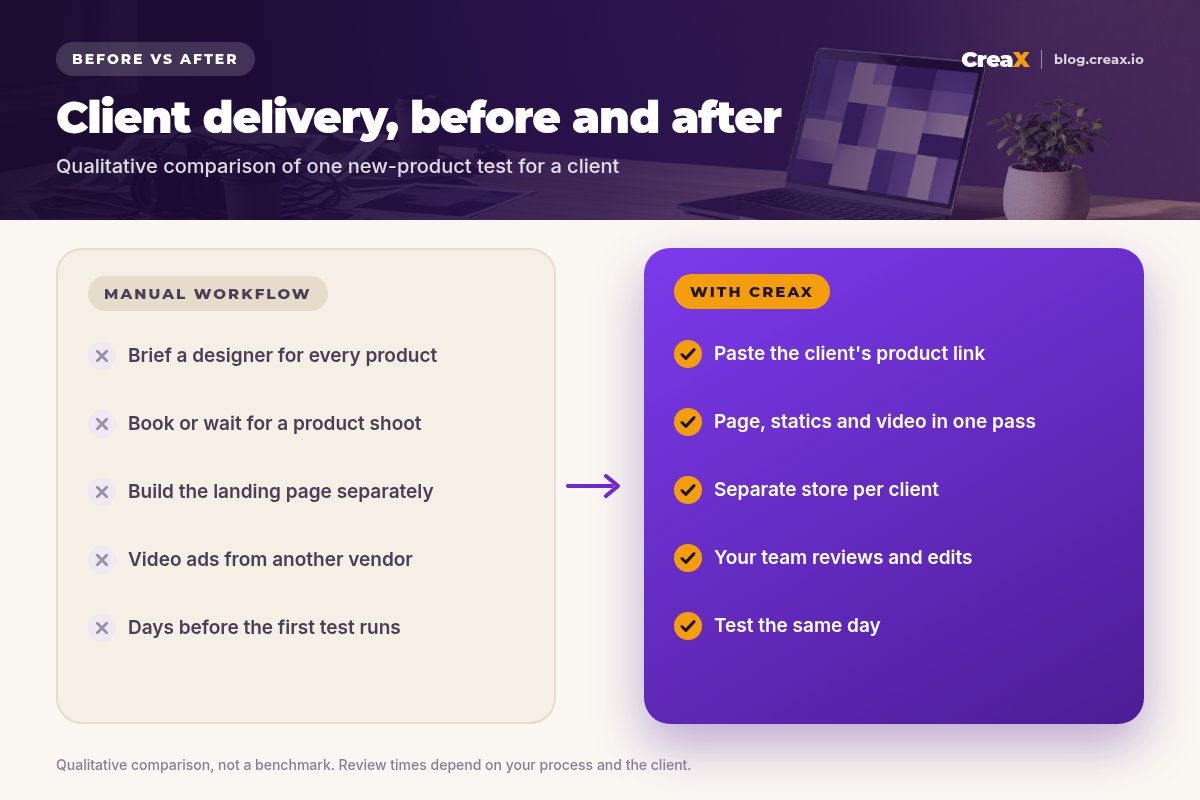
CreaX does not remove the need for judgment. It removes the waiting between steps, so your people spend their time on the parts clients actually pay agencies for: picking the right angle, keeping claims honest, launching well and learning from the results.
The kitWhat CreaX produces from one product link or image
Paste a client's product link or upload a product image. In about 60–120 seconds, CreaX generates four things:
| Output | What it is | How agencies use it |
|---|---|---|
| Landing page | A publish-ready page built around the product and its main promise | Send test traffic to a page that repeats the ad, without a page build ticket |
| Studio ad creatives | Polished product photos and static ads | Feed and story statics for the first round of angles |
| UGC-style video ads | Vertical, social-first videos that show and sell the product | Reels, TikTok and Shorts placements without booking creators for every test |
| Multi-tenant store | A separate storefront on the same platform | One store per client or per niche, each with its own products and branding |
The four outputs CreaX generates from one product link or image.
The store piece is what makes CreaX unusual for agencies. Multi-tenant means several separate storefronts on one platform, so a pet client and a skincare client never share a catalog, and you are not juggling a separate setup for each. Our explainer on the multi-tenant store builder for niche and client stores covers it in depth.
See what CreaX builds from a client product link
Paste one link and get the landing page, studio ads, UGC-style video ads and a store in about 60–120 seconds.
How to run itStep-by-step agency workflow
The generation step takes minutes. The workflow around it is what makes delivery reliable. Here is a five-step loop you can reuse for every client product:
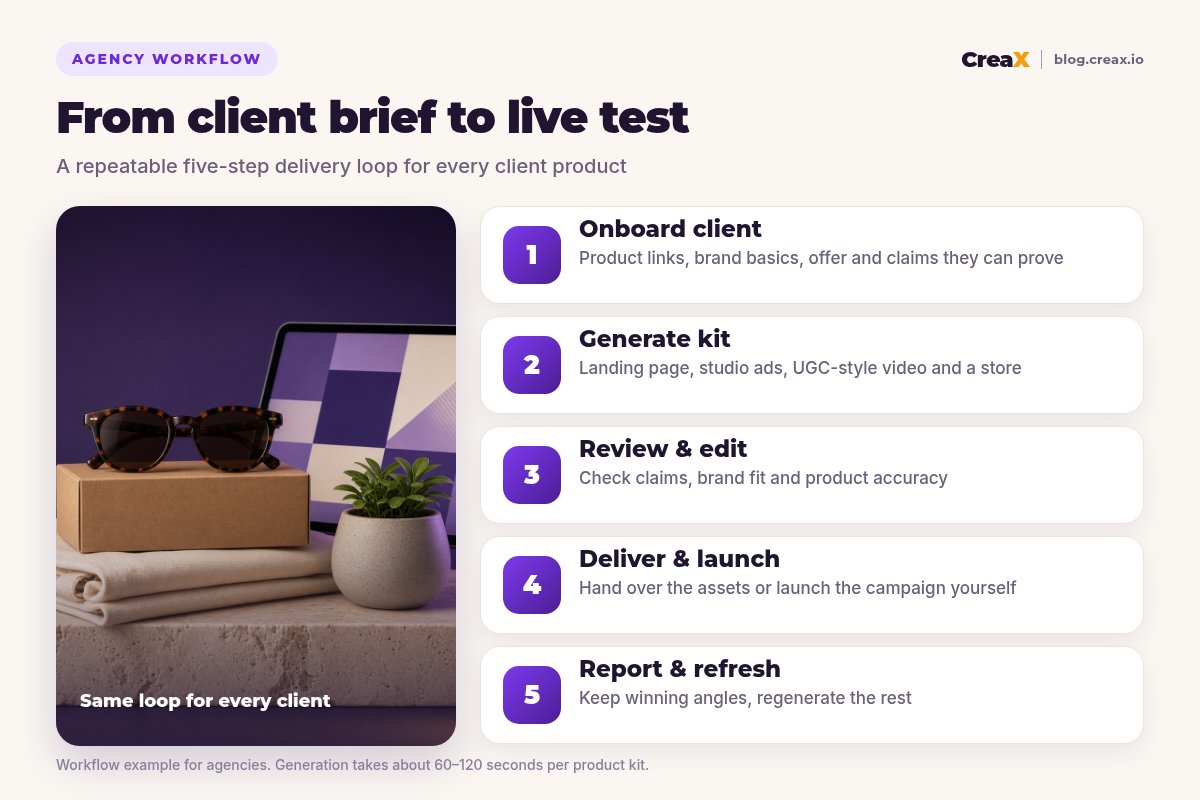
Onboard the client
Generate the kit
Review and edit
Deliver and launch
Report and refresh
★Build a client intake template once
ExampleWorked example: three clients, one week
Imagine a small agency with three ecommerce clients: a sunglasses brand, a home and plant accessories store and a tote bag label. Each wants new products tested this month.
| Day | What the agency does | Where CreaX fits |
|---|---|---|
| Monday | Collects intake forms and product links from all three clients | Nothing yet: inputs first |
| Tuesday | Generates one kit per product and sets up a separate store per client | Landing pages, studio ads, UGC-style videos and stores generated per product |
| Wednesday | Reviews claims, edits headlines, picks 2–3 angles per product, sends for approval | Edits and regenerations where something does not fit the brand |
| Thursday | Launches approved tests with small, equal budgets per angle | Pages and creatives come from the same generation, so the message matches |
| Following week | Reports per angle, refreshes winners, retires losers | New variations generated for the winning angles |
Illustrative schedule. Real timelines depend on client approvals and ad account reviews, not just production.
Notice what the team spends its time on: intake, review, approvals, launch and reporting. That is the work clients value, and it is where an agency differentiates. Production becomes the fast, boring part.
!Client claims are your responsibility
PricingWhich plan fits (real CreaX prices)
CreaX uses simple monthly credit plans. Credits are spent when you generate assets, the cost of each generation is shown in the app before you generate, and you can top up any time.
| Plan | Price / month | Credits | Agency fit |
|---|---|---|---|
| Free | $0 | 0 | Look around the app before committing |
| Basic | $4.99 | 2,000 | Trying the workflow on one client product |
| Standard | $14.99 | 6,500 | A freelancer with one or two active clients |
| Pro | $29.99 | 14,000 | A small agency testing products for several clients |
| Premium | $49.99 | 25,000 | Agencies running weekly tests across many clients |
| Top-up | $1 | 500 | Extra credits during launches and busy months |
Current plans on creax.io/pricing.
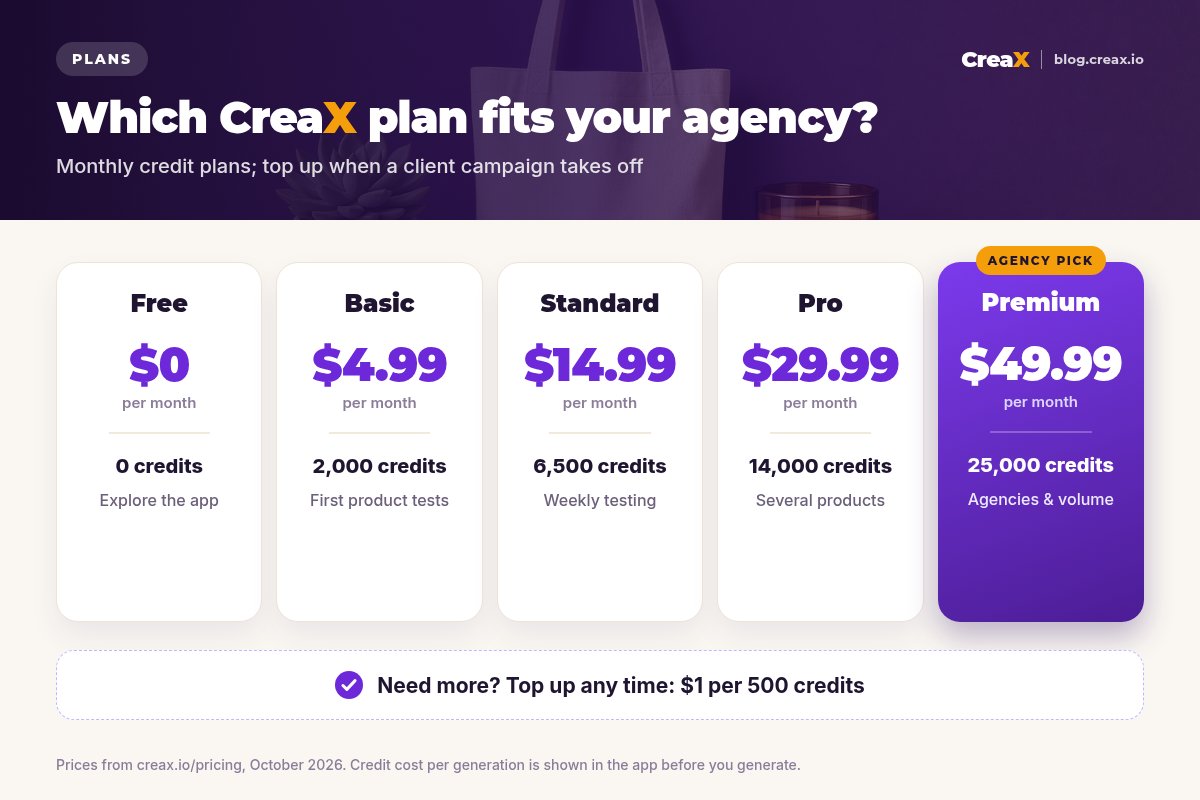
A simple way to choose: estimate how many client products you will generate kits for in a typical month, check the credit cost per generation in the app, and pick the plan that covers a normal month. Use top-ups for spikes rather than paying for a bigger plan all year.
Best practiceTips for better results
- Start from the best input. A clean product page or a sharp product photo gives the AI more to work with than a cluttered supplier listing.
- One angle per creative. Give each test creative one clear reason to buy, so your reports tell you which angle won.
- Keep page and ads together. Send traffic from each angle to the page generated from the same product, so the click lands on the same promise.
- Name everything consistently. Client, product, angle and version in every file and ad name makes reporting much faster.
- Keep one true-to-life photo of the product on every page, so buyers see exactly what they will receive.
- Refresh on a schedule. Agree a refresh rhythm with each client instead of waiting for performance to drop.
Give your team back the production hours
One product link, about 60–120 seconds: a landing page, studio ads, UGC-style video ads and a separate client store, ready for review.
Fair playLimits and when to use other tools
CreaX is built to produce complete first-test kits fast. It is not the right tool for every agency job:
- High-end brand campaigns. For hero campaigns with real talent, locations and art direction, a production crew is still the right call.
- Presenter-led video at volume. If your strategy is many AI avatars and many languages, a dedicated avatar video tool may suit that part better.
- Catalog retouching at scale. For thousands of SKUs needing consistent backgrounds, a batch photo editor with an API is the better fit.
- Ad research and media buying. CreaX makes creatives and pages. Competitor research, campaign management and reporting dashboards live in other tools.
⚖Check agency-specific needs before you promise them
Many agencies end up with a small stack: CreaX for new-product kits and stores, plus one specialist tool where a client needs depth. For the page side specifically, our guide on turning a product link into a landing page without a designer shows what to review before publishing.
FAQFrequently asked questions
Q.Can agencies use CreaX for multiple clients?
Q.What does CreaX generate for each client product?
Q.Which CreaX plan is best for an agency?
Q.Does CreaX replace designers and video vendors?
Q.Do clients need a Shopify store?
Q.Are AI-generated ads safe to run for clients?
Ready to scale client delivery?
Paste a client product link and get the landing page, studio ads, UGC-style video ads and store in one pass.
This guide is published by CreaX. It describes CreaX features and real plan prices as of October 2026, contains no invented statistics or client results, and recommends confirming current features in the app.