
CreaX for Affiliate Marketers: Pre-Sell Pages and Video Ads
Use case · Affiliate marketing
CreaX for affiliate marketers is simple to describe: paste the product link of an offer you promote and get a pre-sell landing page, UGC-style video ads and studio static creatives that tell the same story. This guide shows how affiliates can use it to test more offers, where it fits in a paid-traffic funnel, how to stay on the right side of disclosure rules, and when another tool is the better choice.
Updated October 2026 · By the CreaX team
Key takeaways
- ✓Affiliates lose most clicks in the gap between the ad and the merchant page. A pre-sell page with the same angle as the ad closes that gap.
- ✓CreaX produces the page and the ads from one product link or image in about 60–120 seconds, so each new offer starts with a matched set instead of a blank page.
- ✓Disclosure is your job: a clear affiliate disclosure near your recommendation, AI labels where platforms require them, and only claims the merchant can prove.
- ✓Start on a small plan, test 2–3 angles per offer, and only scale offers whose numbers beat your break-even.
In this guide
AudienceWho this is for
This guide is for affiliates who buy traffic or create content to promote physical products and earn a commission when someone buys through their link. That includes:
- Paid-social affiliates running Meta or TikTok ads to a bridge page before the merchant offer.
- Media buyers who test several affiliate offers a week and need fresh creative for each one.
- Creators and niche site owners who want a short, focused page and a few video ads for a product they already recommend.
- Small affiliate teams who are tired of waiting on a designer, a video editor and a page builder for every new offer.
If you promote software, courses or services rather than physical products, parts of this still apply, but CreaX is built around product links and product images, so it shines most when there is a product to show.
Why affiliates stallThe problem this solves
Affiliate marketing is a volume game with thin margins. You rarely control the merchant's page, the price or the checkout. What you do control is the click: the ad that earns it and the page that warms it up before the offer. That is where most affiliate funnels leak.
- Message mismatch. The ad promises one angle, the merchant page leads with another, and the visitor leaves before reading anything.
- Cold clicks. Sending paid traffic straight to a store page skips the step where you explain why this product solves this buyer's problem.
- Slow creative. Every new offer needs statics, videos and a page. If each one takes days of briefs and revisions, you test fewer offers and learn slower.
- Creative fatigue. Even a winning offer needs fresh angles every few weeks, and the cost of new assets eats the margin.
A pre-sell page (also called a bridge page) fixes the first two problems. A faster way to make the page and the ads together fixes the last two. Our guide to building an affiliate pre-sell page without code covers what belongs on the page itself; this article focuses on running the whole workflow with CreaX.
OutputsWhat CreaX produces from one product link
CreaX is an all-in-one AI ecommerce creative OS. You paste a product link or upload a product image, and in about 60–120 seconds it generates four things. Here is what each one does in an affiliate funnel and what you still need to check:
| Output | Job in an affiliate funnel | What you still check |
|---|---|---|
| Publish-ready landing page | Your pre-sell page: angle, benefits, objections, one path to the offer | Claims, disclosure placement, the button goes to your tracked link |
| Studio ad creatives | Static ads for feeds and retargeting | Product looks accurate; no invented badges or numbers |
| UGC-style video ads | Short vertical videos for TikTok, Reels and Stories | Script claims, AI-content labels, no fake personal experience |
| Multi-tenant store | Separate storefronts if you also sell your own products or run niches | Only relevant if you sell directly, not for pure affiliate offers |
What CreaX generates from one product link or image, and where the human review sits.
The point is not that each asset is magic on its own. It is that they come from the same product understanding, so the hook in the video, the headline on the page and the benefit in the static ad all point in the same direction. For a deeper look at the video side, see our explainer on what a UGC video ad is.
Turn your next affiliate offer into a test kit
Paste the product link and get a pre-sell page, UGC-style video ads and studio creatives that tell the same story.
How to run itStep-by-step affiliate workflow
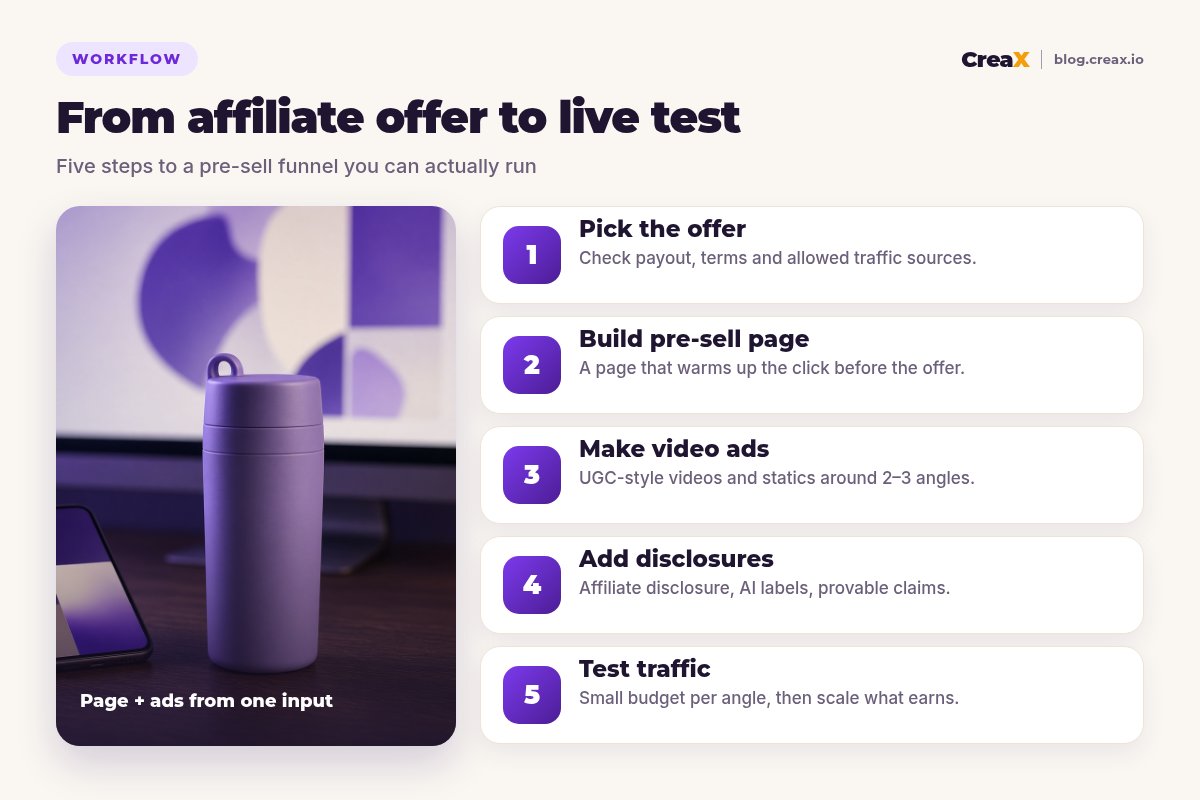
Here is the workflow we recommend for each new offer. It is deliberately small: one offer, one page, a handful of ads, a small budget per angle.
Pick an offer you can actually promote
Write the angle in one sentence
Generate the kit in CreaX
Turn the page into a pre-sell
Edit the ads for 2–3 angles
Launch small, then decide
★How many ads per offer?
Stay safeDisclosure and compliance basics
Affiliate funnels get into trouble for two reasons: hidden commissions and claims nobody can prove. AI makes both easier to get wrong, because it writes persuasive copy fast. The basics below come from the U.S. Federal Trade Commission's Endorsement Guides FAQ; other countries have similar rules, so check the ones that apply to you.
- Disclose the commission clearly. The FTC's example wording is along the lines of “I get commissions for purchases made through links in this post.” It says “affiliate link” on its own may not be understood, and that the closer the disclosure is to your recommendation, the better.
- Disclose inside videos, not just in captions. The FTC says a disclosure in a TikTok or YouTube description is easy to miss; put it in the video itself, ideally both on screen and spoken.
- Don’t fake experience. Endorsements must reflect real experience. An AI presenter can demonstrate and describe a product, but shouldn’t claim to have used it for months or to have achieved results.
- Only use claims the merchant can prove. If the merchant's page doesn't support “lasts all day” or “clinically tested”, it doesn't go on your page or in your ads.
- Follow ad-platform AI rules. TikTok and Meta both have policies on labeling AI-generated content in ads. Check them when you upload.
!Never invent reviews or testimonials
ExampleWorked example: a portable blender offer
Say you promote a portable USB blender bottle through an affiliate program that allows paid social traffic. You want to test it on TikTok and Instagram Reels with three angles:
- Gym bag shakes: protein shakes straight after training, no shaker clumps.
- Desk smoothies: a quick smoothie at work without a full-size blender.
- Travel: blend in a hotel room or on a road trip (only if the merchant confirms it charges over USB and the specs support it).
Here is how the work splits between CreaX and you:
| Stage | What CreaX does | What you do |
|---|---|---|
| Inputs | Reads the product link or image | Confirm specs, charging method and capacity from the merchant |
| Pre-sell page | Generates the page with benefits and sections | Rewrite the headline to match each angle, add disclosure, link the button |
| Video ads | Generates UGC-style vertical videos | Pick the best per angle, check claims, add AI labels |
| Static ads | Generates studio creatives | Choose 1–2 per angle for feeds and retargeting |
| Testing | New angles from the same link when ads tire | Set budgets, track click-outs and commissions, cut losers |
Illustrative example. Use the merchant's verified specs and the program's own rules.
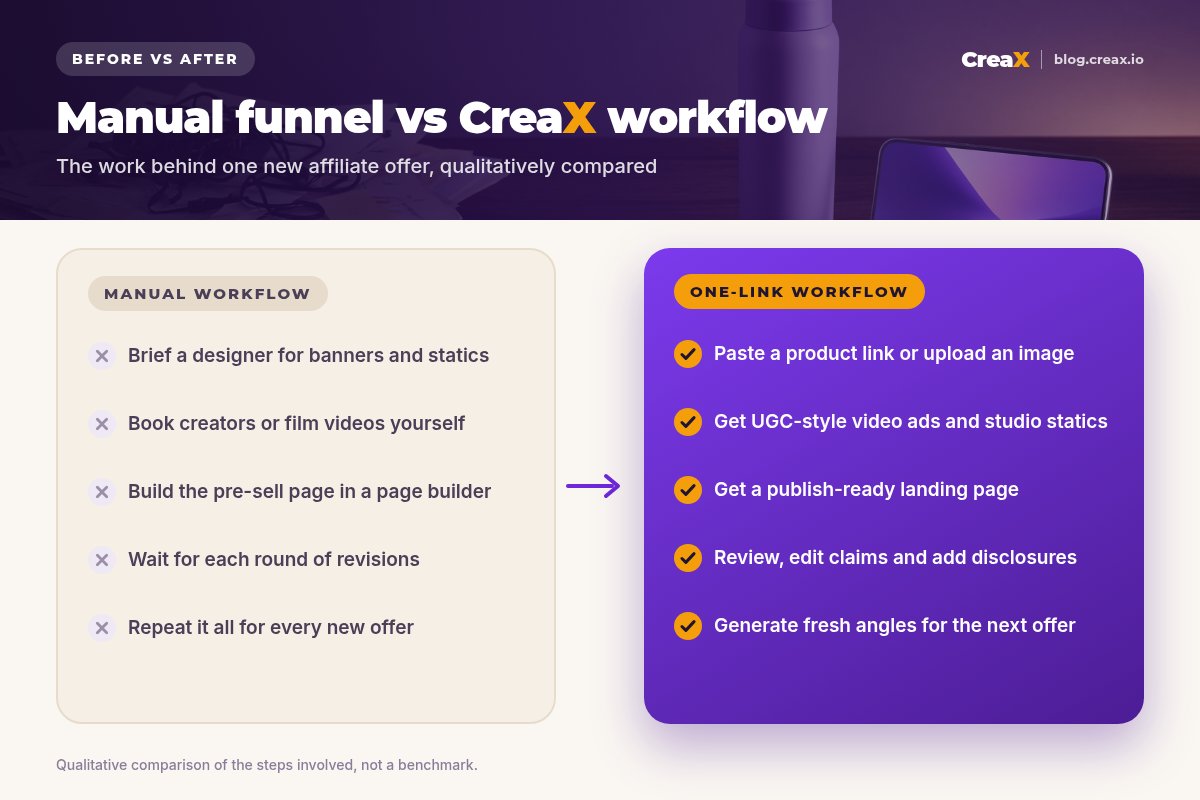
Notice what changed. You didn't skip the thinking: the angle, the claims check and the budget decisions are still yours. What disappeared is the waiting between people. For more on working out whether an offer is worth scaling, our guide to break-even ROAS applies to affiliate commissions too: replace your product margin with your commission per sale.
BudgetWhich plan fits (real CreaX prices)
CreaX uses simple monthly credit plans. Credits are spent when you generate assets, and the cost of each generation is shown in the app before you run it. If you run out mid-test, top-ups cost $1 per 500 credits.
| Plan | Price / month | Credits | Good fit for affiliates who… |
|---|---|---|---|
| Free | $0 | 0 | Want to look around the app first |
| Basic | $4.99 | 2,000 | Are testing a first offer |
| Standard | $14.99 | 6,500 | Launch new offers every week |
| Pro | $29.99 | 14,000 | Run several offers or niches at once |
| Premium | $49.99 | 25,000 | Run high-volume campaigns or a small team |
| Top-up | $1 | 500 | Need extra credits during a busy week |
Current plans on creax.io/pricing, October 2026.
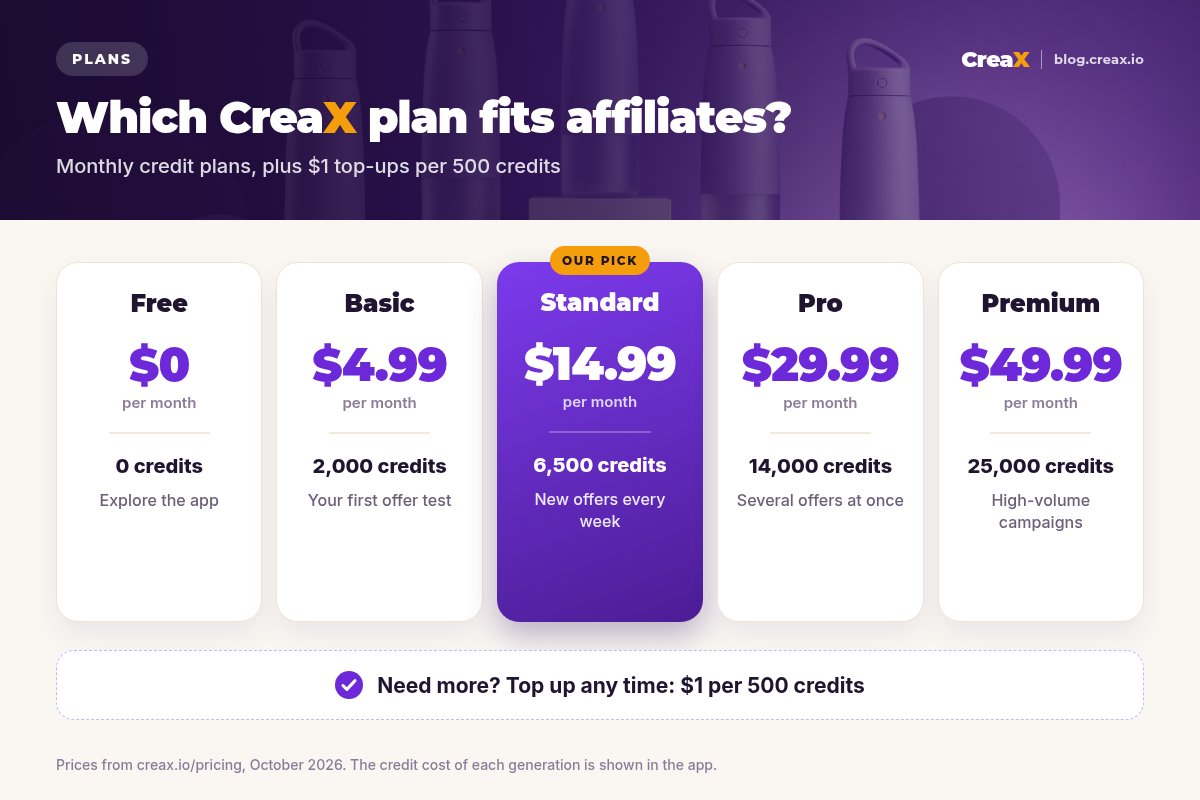
Our suggestion: start on Basic for your first offer to learn the workflow, then move to Standard once you're launching new offers weekly. Compare the plan against what one round of freelance statics and videos costs you today, not against zero.
Launch your next offer with a matched page and ads
One product link, about 60–120 seconds: a pre-sell landing page, studio creatives and UGC-style video ads ready for review.
Get more from itTips for better results
- Use the merchant’s best product image. Clean, accurate inputs lead to more accurate visuals. If the supplier photo is poor, upload a clearer one.
- Lead the page with your angle, not the product name. Visitors clicked on a promise; the headline should repeat it.
- Keep one exit. A pre-sell page has one job: send warm visitors to the offer. Remove competing links.
- Write the disclosure once, reuse it everywhere. Keep a short, plain sentence you add to every page and video.
- Refresh before fatigue sets in. When click-through drops and frequency rises, generate new angles from the same link. Our guide to signs of ad creative fatigue shows what to watch.
- Keep a swipe file of your own winners. Note which hooks and page headlines earned commissions so the next offer starts smarter.
Fair playLimits and when to use other tools
CreaX covers the creative and the page for a product offer. It is not an affiliate network, a tracker or an ad manager, and it won't pick offers for you. Depending on how you work, you may pair it with other tools or choose something else:
CreaX
Strengths
- +Pre-sell page and ads from one product link or image
- +Ad angle stays consistent from video to page
- +Fresh angles for a tired offer in minutes
- +No designer, editor or page builder needed
Trade-offs
- −Offers without a product to show (software, courses) fit less naturally
- −No click or commission tracking
- −Program rules, disclosures and claim checks stay your job
Specialist tools (trackers, editors, writing tools)
Strengths
- +Dedicated trackers handle multi-network attribution
- +Video editors give deep control over footage you filmed
- +Writing tools suit long-form SEO reviews
Trade-offs
- −More hand-offs between tools and people
- −More places for the ad angle to drift
- −Several subscriptions to manage
⚖Honest take
Copy thisPre-launch checklist
Before you send traffic
- ✓Program terms read: traffic source, paid ads and brand bidding allowed
- ✓Angle written in one sentence and repeated in the page headline
- ✓Every claim checked against the merchant's own specs and page
- ✓Affiliate disclosure placed near the recommendation and inside each video
- ✓AI-content labels set where TikTok or Meta ask for them
- ✓No invented reviews, ratings, results or urgency
- ✓Main button sends visitors to your tracked affiliate link
- ✓Page tested on a real phone, one clear exit
- ✓2–3 angles with equal small budgets and a break-even number written down
FAQFrequently asked questions
Q.Can I use CreaX for affiliate offers if I don't own the product?
Q.Is a CreaX landing page a pre-sell page?
Q.Do I need to disclose AI-generated video ads?
Q.How do I disclose affiliate links on a pre-sell page?
Q.Which CreaX plan should an affiliate start on?
Q.Does CreaX track affiliate conversions?
Build your next affiliate funnel from one link
Paste a product link or upload an image and get a pre-sell landing page, studio creatives and UGC-style video ads in about 60–120 seconds.
This guide is published by CreaX. We describe other tools from their own public websites as of October 2026, avoid invented scores or prices, and recommend checking each vendor's site for current features and plans.