
10 Best Budget AI Marketing Tools for New Dropshippers
Top 10 · Budget tools 2026
You don't need a big software budget to start dropshipping. These are the 10 best cheap AI tools for dropshipping and the free research tools that pair with them: what each one does, where it saves money, and a lean starter stack you can run while you look for your first winning product.
Updated October 2026 · By the CreaX team
Key takeaways
- ✓Spend money only where it removes your biggest bottleneck. For most new stores that's creatives: ads, videos and a page for each product test.
- ✓CreaX is our top pick for that job: one product link gives a landing page, studio ad creatives and UGC-style video ads, with plans from $4.99 a month.
- ✓Several tools here are free or have free plans: Meta Ad Library, TikTok Creative Center, Google Trends, Canva, CapCut, ChatGPT, Photoroom and Klaviyo.
- ✓Free tiers have limits. Check each tool's current plan before you build your workflow around it.
In this guide
TL;DRQuick picks: the best tool for each situation
- Best overall for creatives on a budget: CreaX. Page, statics and UGC-style video ads from one product link.
- Best for quick design edits: Canva. Templates and AI design tools, with a free plan.
- Best free video editor: CapCut. Trims, templates and automatic captions.
- Best for copy and brainstorming: ChatGPT. Hooks, product descriptions and email drafts.
- Best for clean product photos: Photoroom. Background removal and AI product shots.
- Best free ad research: Meta Ad Library and TikTok Creative Center.
- Best free demand check: Google Trends.
- Best store platform to start: Shopify.
- Best email and SMS to start free: Klaviyo.
MethodHow we chose (and what we didn't do)
We picked tools a new dropshipper can start with cheaply or for free, and compared them on:
- Cost to start: free, free plan, or a low monthly entry price.
- Time saved per product: how much work each tool removes from a product test.
- Output: ads, videos, pages, research data or emails.
- Fit for beginners: how quickly you get a usable result.
iNo invented scores or prices
Comparison tableAll 10 at a glance
| Tool | Job | Cost to start |
|---|---|---|
| CreaX | Landing page, studio ads, UGC-style video from a link | Free plan to explore; paid from $4.99/month |
| Canva | Templates and quick design | Free plan; paid plans available |
| CapCut | Video editing, captions, templates | Free; paid plan for extra features |
| ChatGPT | Copy, scripts, brainstorming | Free tier; paid plans available |
| Photoroom | Background removal, product shots | Free tier; paid plans available |
| Meta Ad Library | Research ads running on Meta | Free |
| TikTok Creative Center | Top ads and trends on TikTok | Free |
| Google Trends | Demand and seasonality | Free |
| Shopify | Store and checkout | Paid plans; check current trial |
| Klaviyo | Email and SMS flows | Free plan with limits |
Based on each company's public website, October 2026. Free tiers and trials change; check before you rely on them.
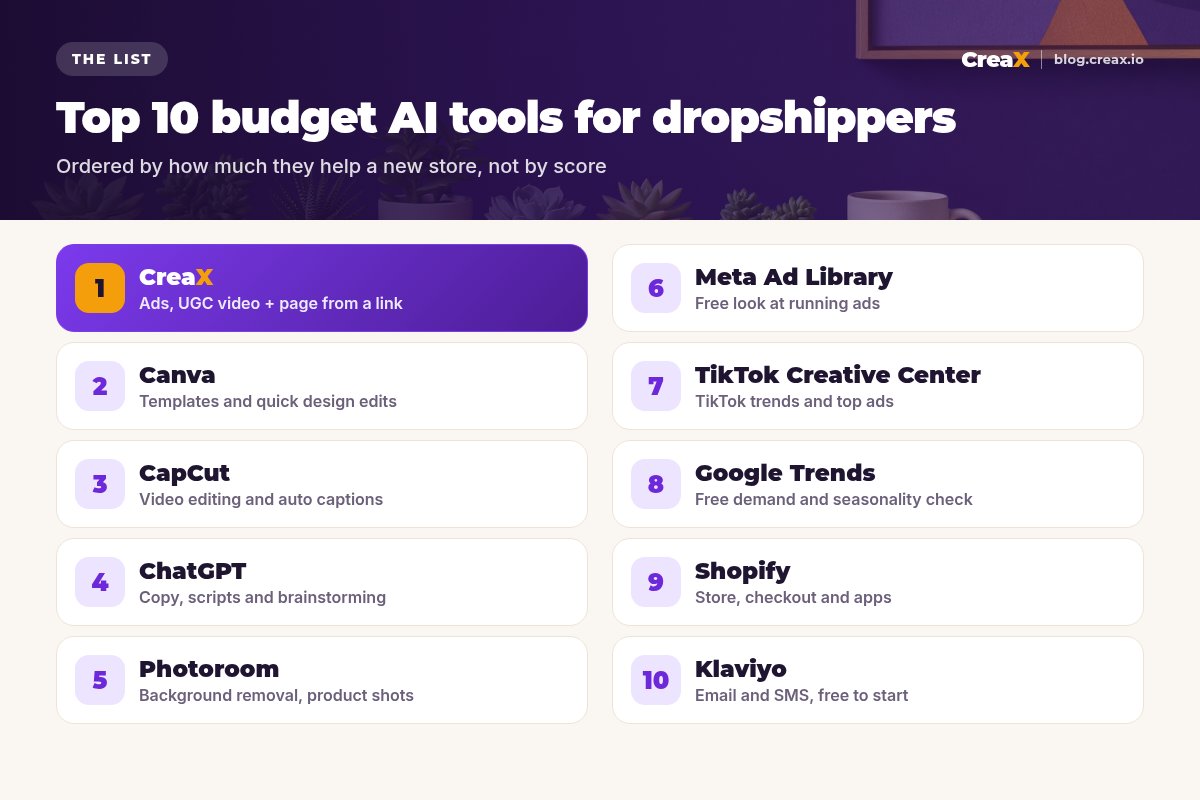
The listThe 10 best budget AI tools for new dropshippers
CreaX
Best for: ads, UGC-style video and a page for every product test
CreaX is an all-in-one AI ecommerce creative OS. Paste a product link or upload a product image and, in about 60–120 seconds, it generates a publish-ready landing page, studio ad creatives (product photos and static ads), UGC-style video ads and a multi-tenant store. For a new dropshipper it replaces the most expensive parts of a test: a designer, creator videos and a page build.
Plans: Free ($0, 0 credits), Basic $4.99 (2,000 credits), Standard $14.99 (6,500), Pro $29.99 (14,000), Premium $49.99 (25,000), with top-ups at $1 per 500 credits. See CreaX for dropshippers for the full workflow.
Good for
- Page, statics and video from one input
- Low entry price, credit-based
- Same product story across ads and page
Keep in mind
- Doesn't find products or fulfill orders
- AI presenters, not real customers
Your first product test, without a designer
Paste a product link and get a landing page, studio creatives and UGC-style video ads in about 60–120 seconds. Plans from $4.99 a month.
Canva
Best for: templates and quick design edits
Canva is a design platform with templates, drag-and-drop editing and AI tools (Magic Studio) for writing and generating visuals. Its free plan includes limited use of the AI tools; paid plans raise limits and add brand kits. It's great for quick edits, thumbnails and social graphics. We compare it with CreaX in CreaX vs Canva for ecommerce ad creatives.
Good for
- Huge template library
- Free plan
- Easy for non-designers
Keep in mind
- You still design each ad yourself
- No landing pages or UGC-style videos from a link
Website: www.canva.com
CapCut
Best for: free video editing and captions
CapCut is a video and photo editor with AI tools. Its site lists an online video editor, automatic subtitles in multiple languages, background removal, text to speech, and templates for Reels and TikTok. It's the go-to tool for trimming clips, adding captions and making quick variations of a video you already have.
Good for
- Free to start
- Auto captions and templates
- Built for short-form video
Keep in mind
- You need footage or a video to edit
- Time per edit adds up across many products
Website: www.capcut.com
ChatGPT
Best for: copy, scripts and brainstorming
ChatGPT is a general AI assistant. For dropshippers it's useful for brainstorming angles and hooks, drafting product descriptions, writing email flows and summarizing reviews into buyer language. It has a free tier and paid plans. Always check facts: it can write confident claims that aren't true for your product.
Good for
- Free tier
- Fast drafts for any copy
- Good for brainstorming angles
Keep in mind
- Text only for most store tasks
- Needs careful fact-checking
Website: chatgpt.com
Photoroom
Best for: background removal and product shots
Photoroom is an AI photo editor for ecommerce. Its site highlights background removal, AI product photography, brand kits, batch editing and video templates for Reels and TikTok. It has a free tier for core tools. See CreaX vs Photoroom for how it differs from an ad-creative tool.
Good for
- Clean cutouts fast
- AI product scenes
- Batch editing as you grow
Keep in mind
- Focused on images
- No landing pages
Website: www.photoroom.com
Meta Ad Library
Best for: a free look at ads running on Facebook and Instagram
Meta's Ad Library is a free, public search of ads running across Meta's apps. You can look up a brand or keyword and see the active ads. It's a free way to study angles, formats and how long competitors keep ads running. Use it for inspiration, not for copying.
Good for
- Free and public
- See real ads in your niche
- No account needed to browse
Keep in mind
- No performance data for most ads
- Easy to copy what everyone else is doing
Website: www.facebook.com/ads/library
TikTok Creative Center
Best for: TikTok trends and top ads
TikTok's Creative Center lets you browse top-performing ads and creative trends on TikTok, and TikTok now presents it alongside its Symphony AI creative tools. It's free to explore and helpful for understanding hooks, pacing and formats that feel native on TikTok.
Good for
- Free
- Shows TikTok-native ad styles
- Trend and hook ideas
Keep in mind
- Inspiration, not production
- Trends move fast
Google Trends
Best for: a free demand and seasonality check
Google Trends shows how search interest for a term changes over time and by region. Before testing a product, check whether interest is growing, flat or seasonal. It's free and takes a minute. For more research tools, see the best tools to find and test winning products.
Good for
- Free
- Spots seasonality early
- Compare regions
Keep in mind
- Relative interest, not sales
- Weak signal for very new products
Website: trends.google.com
Shopify
Best for: store, checkout and apps
Shopify is a hosted store platform with checkout, payments, themes and an app store, plus built-in AI features. Most dropshipping tools integrate with it. It's a paid platform, so check the current trial and plan options. Not sure you need it? See do you need a Shopify store to start dropshipping?
Good for
- Reliable checkout and hosting
- Huge app ecosystem
- Works with most tools here
Keep in mind
- Monthly cost plus apps
- Ads and creatives are separate work
Website: www.shopify.com
Klaviyo
Best for: email and SMS, free to start
Klaviyo is an email and SMS marketing platform for ecommerce. Its free plan lets you build automations, sign-up forms and segments within limits on contacts and sends, and it integrates with Shopify and other platforms. Set up abandoned cart and welcome flows once you have traffic.
Good for
- Free plan to start
- Ecommerce automations
- Integrates with major store platforms
Keep in mind
- Free plan limits on contacts and sends
- Only pays off once you have traffic
Website: www.klaviyo.com
Spend your budget on tests, not tools
CreaX gives you the page, statics and UGC-style videos for every product test from one link, so more of your budget goes to ads.
Buyer's checklistHow to choose: 6 checks before you pay
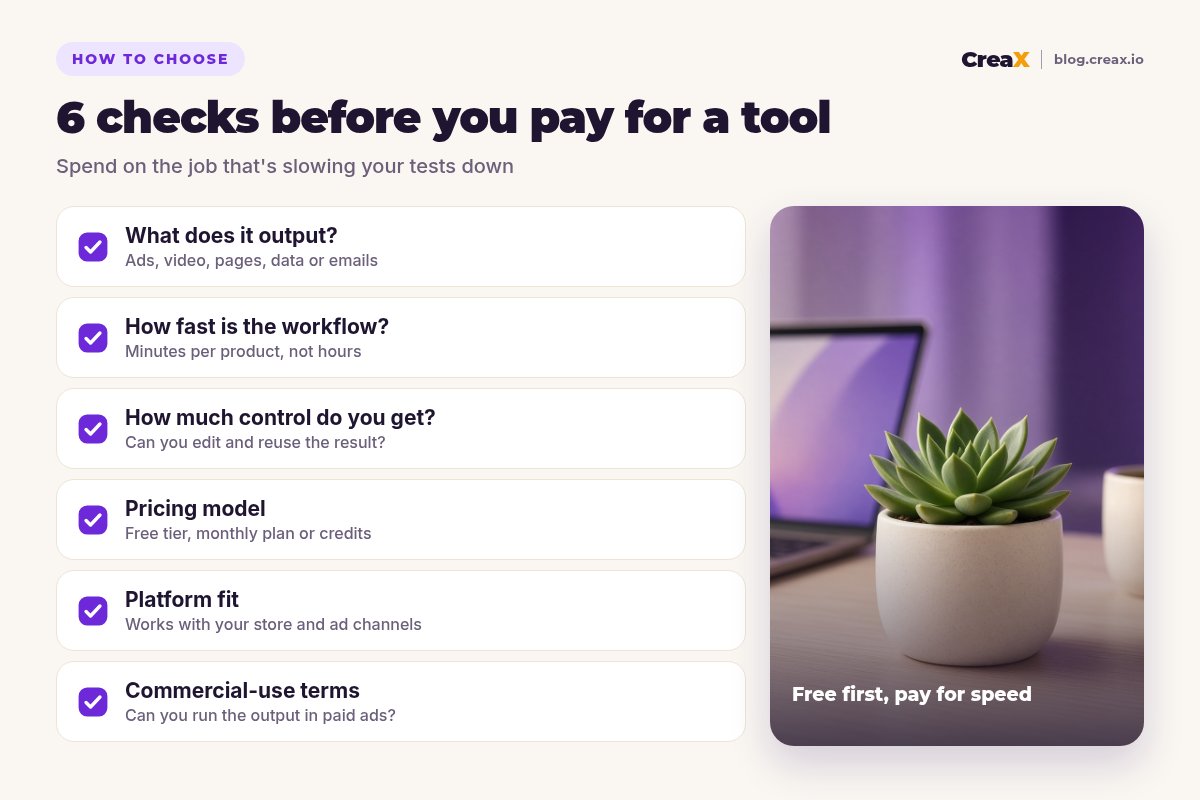
- What does it output? Know which job it does: ads, video, pages, data or emails. Avoid two tools for the same job.
- How fast is the workflow? Count minutes per product. A tool that saves an hour per test pays for itself quickly.
- How much control do you get? Can you reuse and adjust the result, or start over each time?
- Pricing model: free tier, monthly plan or credits. Credits suit irregular testing; flat plans suit steady volume.
- Platform fit: works with your store and the ad channels you use.
- Commercial-use terms: make sure you can run the output in paid ads.
Then match spending to your stage. Before your first sale, money is better spent on ad tests than on extra apps; our guide to break-even ROAS helps you work out how much a test can cost.
ExampleWorked example: a small-budget stack
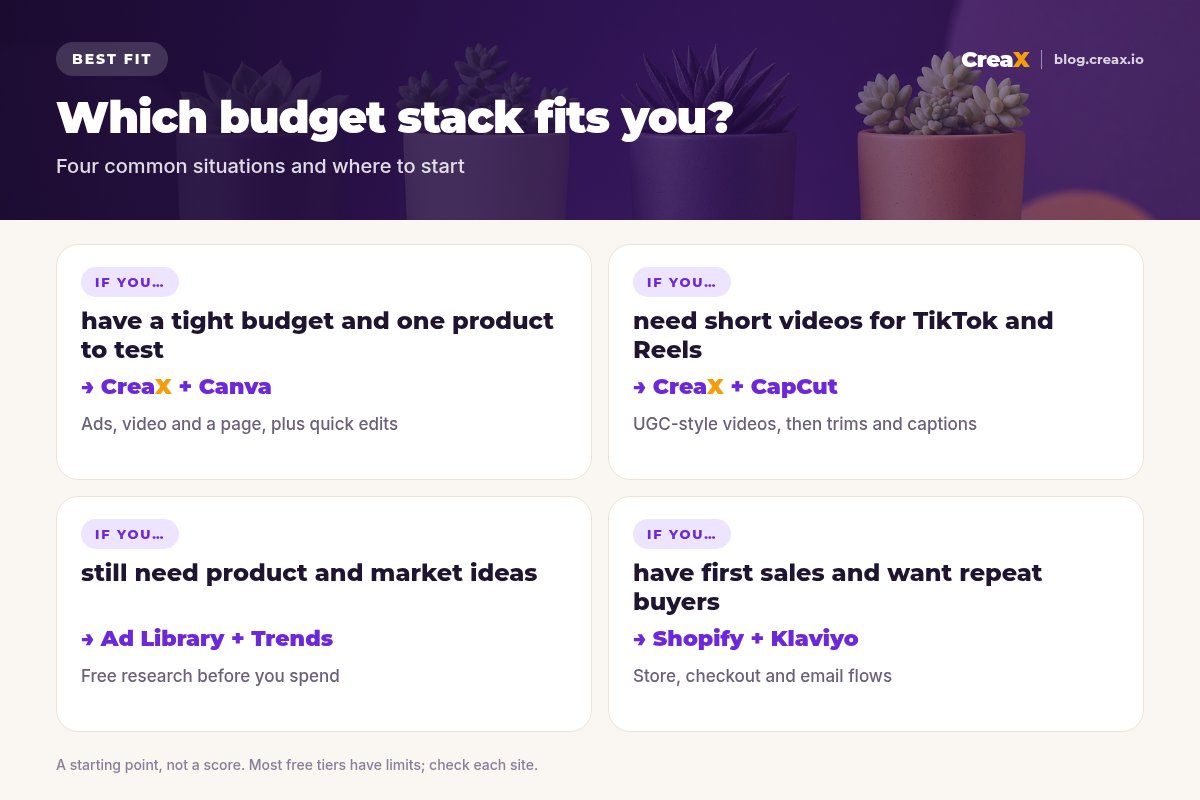
Say you're testing a ceramic plant pot with a succulent as your first product. A lean setup:
Research for free
Produce the test kit
Quick edits
Launch and judge
Add email later
For the launch timeline, see how to launch a dropshipping product test in 24 hours.
Save moneyBudget mistakes to avoid
- Paying for tools before you have a product. Research is mostly free; save money for tests.
- Overlapping subscriptions. Two design tools or two video editors rarely double your results.
- Forgetting free-tier limits. Watermarks, export limits or send caps can surprise you mid-launch.
- Copying competitor ads. Free ad libraries are for inspiration; original creatives perform better long term and avoid copyright problems.
- Skipping the landing page. Sending ad traffic to a supplier-style page wastes the budget you saved on tools.
FAQFrequently asked questions
Q.What is the cheapest way to start dropshipping with AI?
Q.Are free AI tools good enough for dropshipping?
Q.Do I need ChatGPT if I use CreaX?
Q.Is CapCut free for commercial use?
Q.Which tool should I pay for first?
Q.Can I dropship without Shopify?
Ready to launch your first test on a budget?
One product link, about 60–120 seconds: a landing page, studio creatives and UGC-style video ads from the same product story.
This guide is published by CreaX. We describe other tools from their own public websites as of October 2026, avoid invented scores or prices, and recommend checking each vendor's site for current features and plans.