
10 Best AI Tools for Ecommerce Agencies in 2026
Top 10 · Tools for agencies
An ecommerce agency lives or dies by its creative throughput. Every client wants fresh ads every week, clear reports on what's working, and fast feedback rounds, while margins depend on how few hours each deliverable takes. These are the 10 best AI tools for ecommerce agencies in 2026, grouped by the job they do, with an honest view of where each one fits in a lean agency stack.
Updated October 2026 · By the CreaX team
Key takeaways
- ✓Agency work splits into four jobs: creating assets, researching what to make, reporting on results and running feedback and approvals.
- ✓Pick CreaX to turn a client's product link into a landing page, studio ads and UGC-style video ads in about 60–120 seconds, with a multi-tenant store for client or niche stores.
- ✓Pair Foreplay for research and briefs with Motion and Triple Whale for creative analytics and attribution.
- ✓Use Frame.io and Notion to keep reviews, briefs and status out of scattered chats, and Canva, Adobe Express, HeyGen or Photoroom for specific creative tasks.
In this guide
TL;DRQuick picks: the best tool for each agency job
| If you need… | Start with | Why |
|---|---|---|
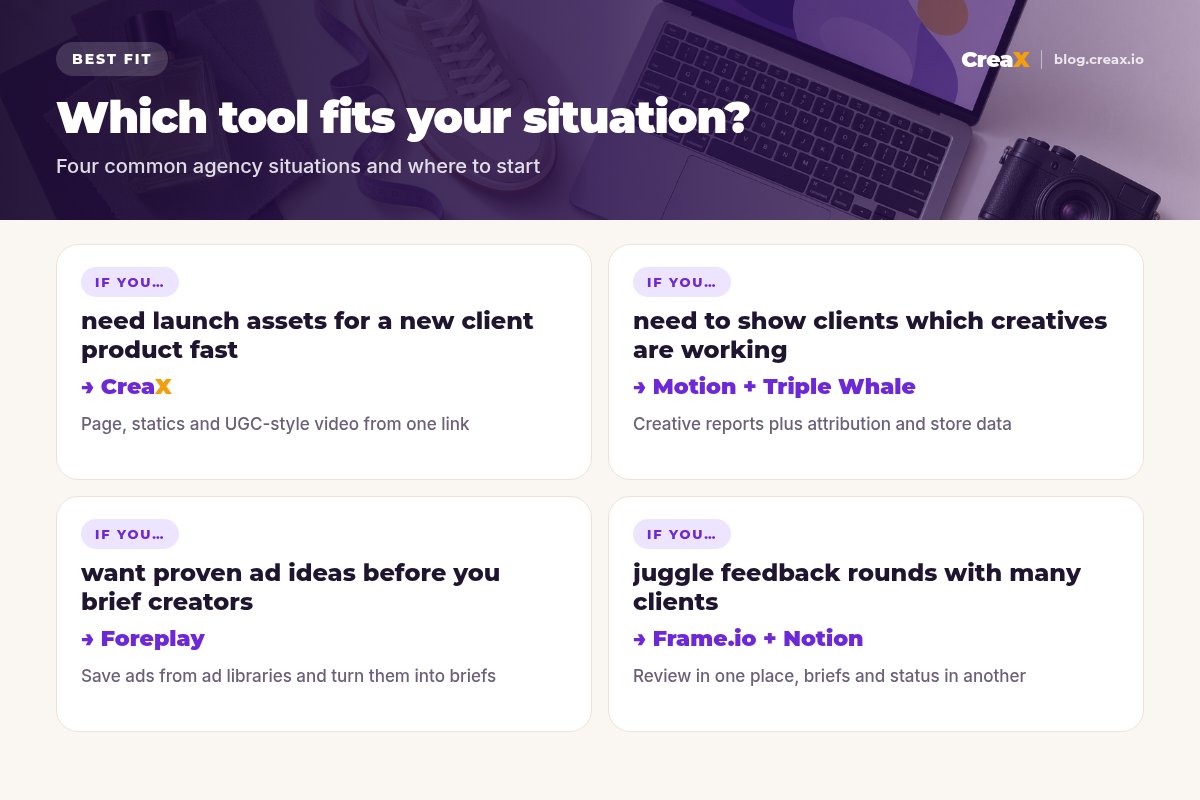
| Launch assets for a new client product | CreaX | Page, studio ads and UGC-style video from one link |
| Ad research, swipe files and creator briefs | Foreplay | Save ads from ad libraries and turn them into briefs |
| Creative performance reports for clients | Motion | Visual reports with creatives next to their metrics |
| Attribution and store-level data | Triple Whale | Unified ecommerce data with an AI analyst |
| Client review and approval of videos | Frame.io | Frame-accurate comments and branded shares |
| Briefs, SOPs and client hubs | Notion | Docs, wikis and project databases with AI |
MethodHow we chose (and what we didn't do)
We looked at the tools ecommerce and performance agencies use to deliver creative for clients, and judged each one on five questions:
- Agency job: does it clearly solve creation, research, reporting or approvals?
- Multi-client fit: can you run several brands without mixing them up?
- Client-facing: can clients view, comment on or approve work inside it?
- Throughput: does it reduce the hours per deliverable, not just move them around?
- Overlap: does it add something the rest of the stack doesn't already cover?
⚖No fake scores, and a clear bias disclosure
Comparison tableAll 10 at a glance
| Tool | Agency job | What you get | Who uses it |
|---|---|---|---|
| CreaX | Create | Landing page, studio ads, UGC-style video ads, multi-tenant store | Media buyers, creative leads |
| Foreplay | Research | Ad library swipe files, boards, transcripts, briefs | Creative strategists |
| Motion | Report | AI creative analytics and shareable reports | Media buyers, strategists, clients |
| Canva | Create | Templates, Brand Kit, resizing, AI design tools | Designers, account managers |
| Adobe Express | Create | Templates, Firefly generative AI, quick actions | Designers in Adobe teams |
| Triple Whale | Report | Attribution, MMM, incrementality, Moby AI | Media buyers, client leads |
| Frame.io | Approve | Asset review, frame-accurate comments, shares | Editors, clients |
| Notion | Organize | Docs, wikis, project databases, Notion AI | Whole team |
| HeyGen | Create | AI avatar videos and video translation | Video team |
| Photoroom | Create | Background removal and product photo editing | Designers, junior staff |
Summarised from each tool's public website, October 2026. Check vendor sites for current plans and features.
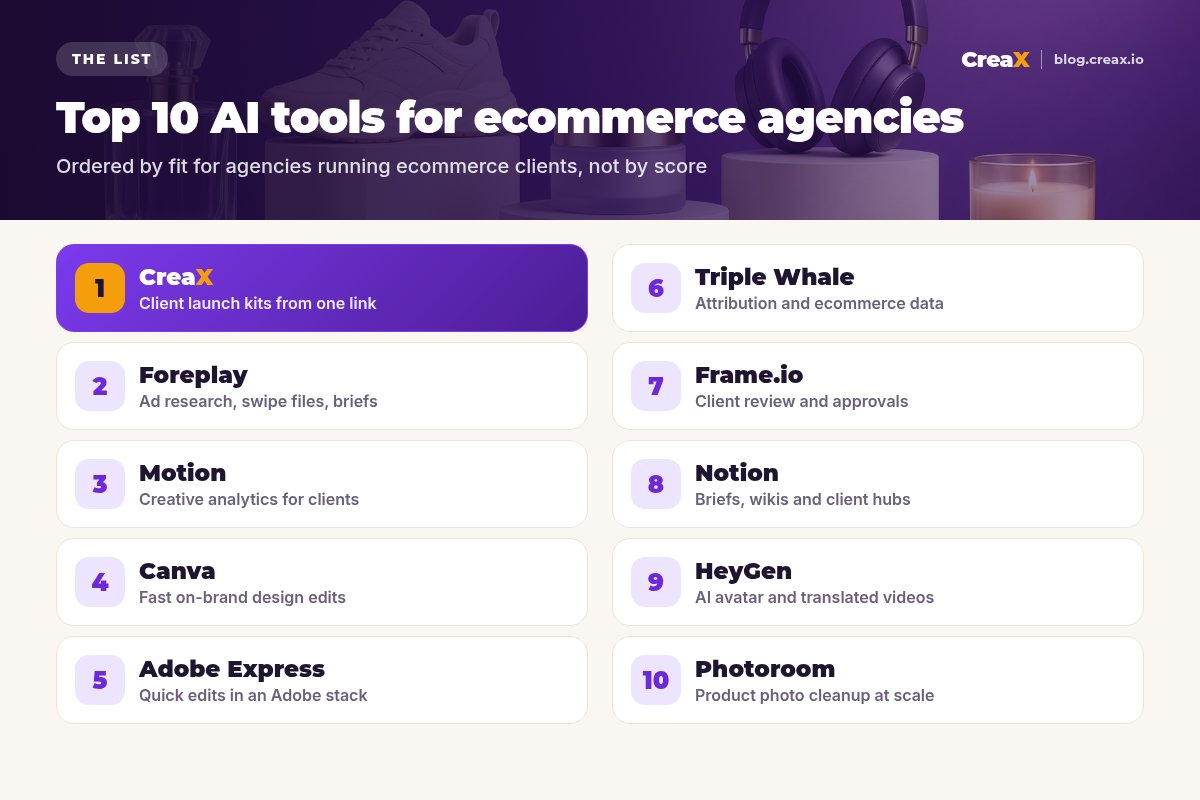
The listThe 10 best AI tools for ecommerce agencies
CreaX
Best for: client launch kits from one product link
CreaX is an all-in-one AI ecommerce creative OS, and agencies are one of the audiences it's built for. Paste a client's product link or upload a product image, and in about 60–120 seconds you get a publish-ready landing page, studio ad creatives and UGC-style video ads. Its multi-tenant store lets you run several client or niche stores from one account, which keeps brands separate as your roster grows.
For an agency, the value is throughput: a first round of statics, videos and a matching page for a new client product without booking a shoot or briefing three freelancers. Your team still owns strategy, editing and claim checks. Plans range from Free to Premium at $49.99 a month for 25,000 credits, with top-ups at $1 per 500 credits. Our guide to CreaX for agencies shows the full workflow.
Good for
- Page, statics and video from one input
- Multi-tenant store for client or niche stores
- Credit plans scale with client volume
Keep in mind
- Not an analytics or approval tool
- Less design control than a dedicated editor
Deliver a client's first ad round in minutes
Paste a product link: landing page, studio creatives and UGC-style video ads, ready for your team to review.
Foreplay
Best for: ad research, swipe files and briefs
Foreplay helps creative strategists save ads from the Meta, TikTok and LinkedIn ad libraries into boards, with automated transcription so you can study hooks and scripts. Its brief builder turns research into creative direction, and you can send one brief to several creators and collect their work in one place. Agencies also use it to share inspiration boards and performance reports with clients. There's a mobile app and an API.
Good for
- Built for creative research and briefs
- Easy to share boards with clients
- Collect creator deliverables in one place
Keep in mind
- Doesn't generate the ads themselves
- Most useful with a dedicated strategist
Website: www.foreplay.co
Motion
Best for: creative analytics for client accounts
Motion builds visual reports for Meta, TikTok, YouTube and LinkedIn ads, showing each creative next to its metrics. It groups similar creatives, auto-tags them with AI by elements such as hook, angle and format, and its AI suggests what to make next. Reports update automatically and can be shared with clients, with the option to hide sensitive data. Integrations with Northbeam and GA4 add attribution data.
Good for
- Creative-first reports clients understand
- AI tagging to spot winning patterns
- Shareable live reports
Keep in mind
- Analyzes ads; doesn't make them
- Needs enough ad volume to show patterns
Website: motionapp.com
Canva
Best for: fast, on-brand design edits
Canva is the everyday design tool for many agency teams: ad variations, social posts, pitch decks and simple videos, with AI design tools built in. Brand Kits keep each client's fonts, colors and logos at hand, and paid plans add resizing and background removal. It's ideal when account managers need to make small edits without waiting for a designer.
Good for
- Huge template library
- Brand Kits for each client
- Easy for non-designers
Keep in mind
- Each asset is still built by hand
- Video ads take more manual work
Website: www.canva.com
Adobe Express
Best for: quick edits inside an Adobe workflow
Adobe Express offers templates, generative AI features powered by Adobe Firefly, and quick actions like background removal and resizing. For agencies whose designers already work in Photoshop, Illustrator or Premiere, it gives the wider team a lighter tool that connects to the same Adobe ecosystem.
Good for
- Fits teams already on Adobe
- Firefly generative features
- Quick actions for common edits
Keep in mind
- Overlaps with Canva for many teams
- Ad creative and video at scale still need work
Website: www.adobe.com/express/
Triple Whale
Best for: attribution and ecommerce data
Triple Whale describes itself as an AI operating system for commerce. It unifies data from stores, ad platforms and other channels, measures performance with attribution, marketing mix modeling and incrementality, and its AI, Moby, turns the data into recommendations. Moby can also take actions in connected ad accounts, such as adjusting budgets or pausing ads, with your team approving them. For agencies, it helps answer the client's real question: is the spend growing the business?
Good for
- Store-level view beyond platform ROAS
- Attribution, MMM and incrementality
- AI recommendations and Slack reports
Keep in mind
- Not a creative tool
- Most valuable for clients with real spend
Website: www.triplewhale.com
Frame.io
Best for: client review and approvals
Frame.io is a platform for uploading, reviewing and sharing creative work. Clients and teammates leave precise comments on videos, images and documents, editors see frame-accurate notes inside Premiere, and you can share branded presentations with permission controls. It also generates transcripts and captions. Higher plans add separate workspaces per client, plus watermarking and secure sharing.
Good for
- Frame-accurate video feedback
- Branded client presentations
- Free plan to start
Keep in mind
- Doesn't create or analyze ads
- Advanced security features need higher plans
Website: frame.io
Notion
Best for: briefs, SOPs and client hubs
Notion combines docs, wikis and project databases, with Notion AI for drafting, summarizing and searching across your workspace. Agencies use it for creative briefs, standard operating procedures, content calendars and client portals that show what's in progress. It doesn't make creative itself, but it keeps the process repeatable as you add clients and people.
Good for
- Flexible docs and databases
- Good for SOPs and client hubs
- AI to draft and summarize
Keep in mind
- Needs setup and discipline
- Not built for asset review
Website: www.notion.com
Spend your team's hours on strategy, not first drafts
CreaX creates studio ads, UGC-style video ads and a matching landing page for each client product, so your team starts from a full kit.
HeyGen
Best for: AI avatar videos and translation
HeyGen creates videos with AI avatars from a script, and can translate existing videos with lip-sync into other languages. Agencies use it for explainer videos, product walkthroughs and localized versions of a winning ad for clients selling in several markets.
Good for
- Video without a shoot
- Translation for new markets
- Fast script changes
Keep in mind
- Avatar videos don't suit every brand
- Disclose AI presenters where rules require it
Website: www.heygen.com
Photoroom
Best for: product photo cleanup at scale
Photoroom removes backgrounds, places products in AI-generated scenes and edits photos in batches, with an API for larger volumes. For agencies with catalog clients, it handles the repetitive product photo work. We compare it with our own tool in CreaX vs Photoroom.
Good for
- Fast background removal
- Batch editing for catalogs
- API for volume work
Keep in mind
- Focused on photos, not video ads
- No landing pages
Website: www.photoroom.com
Buyer's checklistHow to choose tools for your agency
Every tool adds seats, logins and client training. Before you add one, pick a real client and a real deliverable, such as “eight new ads for next week”, and check the tool against it.
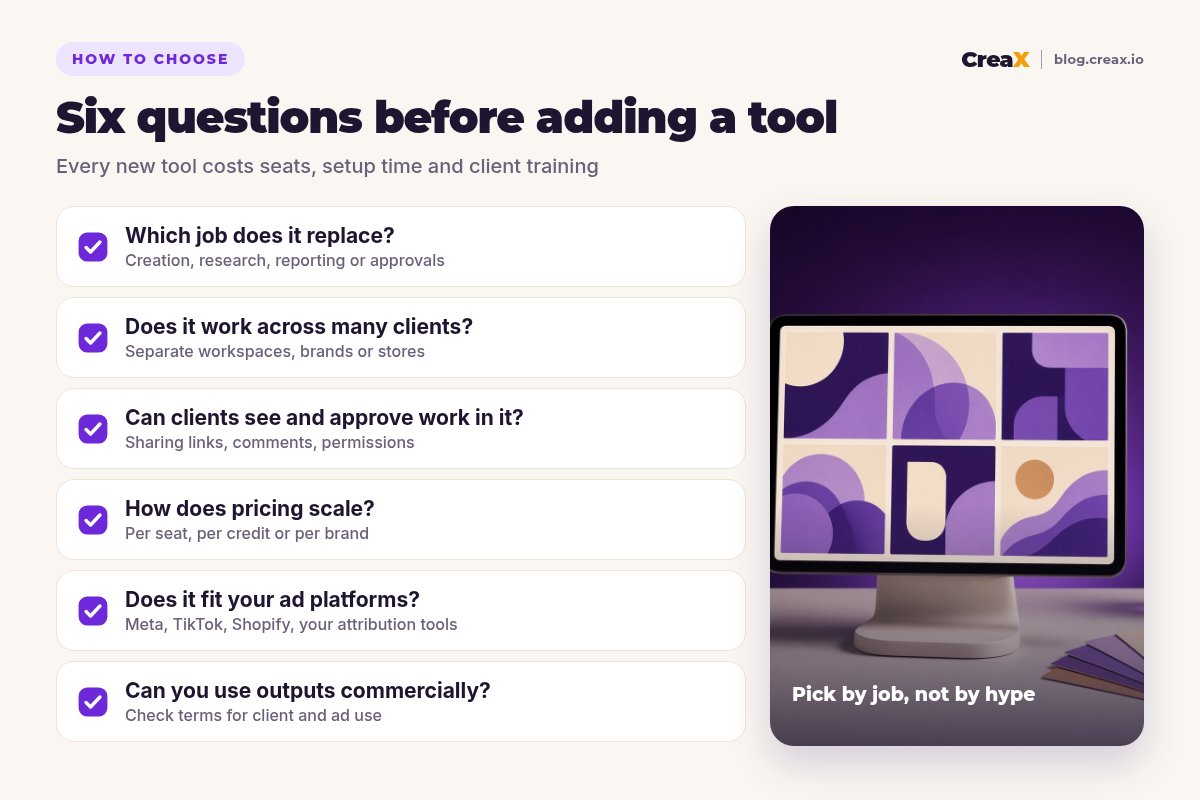
Test every tool against these six points
- ✓Job: which of the four jobs does it take off your team: creating, researching, reporting or approving?
- ✓Clients: can you keep each client's brand, data and assets separate?
- ✓Visibility: can clients see and approve work without extra calls?
- ✓Cost model: does it charge per seat, per credit or per brand, and how does that scale with your roster?
- ✓Platforms: does it fit your clients' ad platforms, store and attribution tools?
- ✓Terms: can generated assets be used commercially in client ads?
★Fix the bottleneck that costs you clients
ExampleWorked example: one client, one week
Imagine an agency onboarding a skincare brand launching a new night serum. The client wants fresh ads in a week and a clear report after the first test.
Research
Create
Approve
Launch and report
Document
The rule: one tool per job, and nothing that duplicates another. If you run your own niche stores alongside client work, read multi-tenant store builders for niche and client stores, and compare creation tools in our list of the best AI ad creative generators for ecommerce.
!Check claims before clients see them
FAQFrequently asked questions
Q.What is the best AI tool for ecommerce agencies?
Q.Can AI replace an agency's creative team?
Q.How many tools does an agency need?
Q.Can I use AI-generated ads for clients?
Q.Which tools are free to start?
Q.How much does CreaX cost?
Ready to deliver more client creative with the same team?
One product link, about 60–120 seconds: a landing page, studio creatives and UGC-style video ads for every client launch.
This guide is published by CreaX. We describe other tools from their own public websites as of October 2026, avoid invented scores or prices, and recommend checking each vendor's site for current features and plans.