

10 Best AI Product Photo Generators for Ecommerce (2026)
Top 10 · AI product photography
AI product photo generators can turn one plain product shot into clean listing photos, lifestyle scenes and ad-ready creatives. But they are built for very different jobs. Here are the 10 best options for ecommerce in 2026, what each one is genuinely good at, and how to pick the right one for your store.
Updated October 2026 · By the CreaX team
Key takeaways
- ✓There is no single “best” tool: editors (Photoroom, Picsart, Canva) clean up and design around photos, scene generators (Pebblely, Flair.ai, Claid.ai, Pic Copilot) place your product in new settings, and creative kits like CreaX go from photo to finished ads.
- ✓Pick CreaX when you need ad-ready studio creatives plus video ads and a landing page from one product link or image.
- ✓Pick Photoroom or Claid.ai for catalog-scale cleanup and consistent backgrounds; Flair.ai for art-directed scenes; Pic Copilot for try-on.
- ✓Always check product accuracy: an AI photo that changes your product's shape, color or label can mislead buyers and trigger returns.
In this guide
TL;DRQuick picks: the best tool for each situation
| If you need… | Start with | Why |
|---|---|---|
| Ad-ready product creatives, plus video ads and a landing page | CreaX | One product link or image produces the whole test kit |
| Fast background removal and clean listing photos | Photoroom | Known for cutouts, AI backgrounds and batch editing |
| Hundreds of catalog images with consistent quality | Claid.ai | Product-photography focus with an API for bulk work |
| Pretty lifestyle backgrounds in a few clicks | Pebblely | Simple themed scenes from a product photo |
| Full creative control over the scene | Flair.ai | Drag-and-drop canvas with props and templates |
| On-model or try-on photos for fashion | Pic Copilot | Virtual try-on and marketplace-focused tools |
| Designing ads and social posts around photos | Canva | Templates plus AI editing in one design tool |
MethodHow we chose (and what we didn't do)
We looked at tools ecommerce sellers actually use for product imagery and judged them on five practical questions:
- Product fidelity: does the tool keep your real product (shape, color, label, logo) intact?
- Output fit: does it produce what sellers need: marketplace-ready backgrounds, lifestyle scenes, ad formats?
- Workflow speed: how many steps from a raw photo to a usable image?
- Scale: can it handle one product test and a full catalog?
- Beyond the photo: does it help with the ads, video or page the photo ends up in?
⚖No fake scores
Comparison tableAll 10 at a glance
| Tool | Best for | Main output | Goes beyond photos? |
|---|---|---|---|
| CreaX | Ad-ready creatives for product tests | Studio ad creatives from a link or image | Yes: UGC video ads, landing page, store |
| Photoroom | Background removal, batch edits | Cutouts, AI backgrounds, edited photos | Mostly photo-focused |
| Claid.ai | Catalog-scale product photography | AI photoshoots, backgrounds, upscaling | API for automation |
| Pebblely | Quick lifestyle backgrounds | Themed product scenes | Photo-focused |
| Flair.ai | Art-directed scenes | Staged scenes, on-model images, ads | Some ad generation |
| Pic Copilot | Try-on and marketplace visuals | Backgrounds, try-on, ad images | Some video and social content |
| Canva | Designing around photos | Ads, social posts, banners | Broad design platform |
| Adobe Firefly | Precise generative edits | Generative fill, expand, new images | Adobe ecosystem |
| Shopify Magic | Edits inside Shopify admin | Product image background edits, copy | Shopify-only |
| Picsart | Mobile editing for social | Edited photos, AI effects, cutouts | Broad editing app |
Summarised from each tool's public website, October 2026.
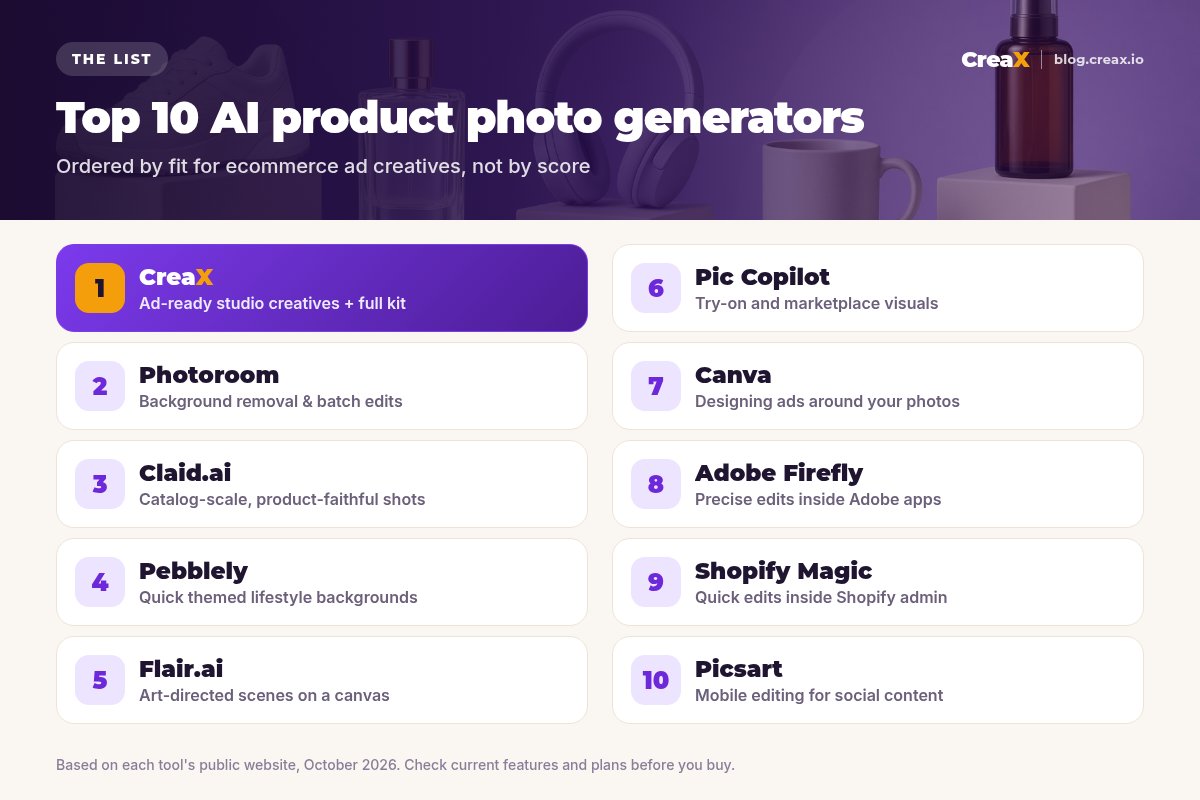
The listThe 10 best AI product photo generators for ecommerce
CreaX
Best for: ad-ready studio creatives plus the rest of the test kit
CreaX is an all-in-one AI ecommerce creative OS. Paste a product link or upload a product image and, in about 60–120 seconds, it generates studio ad creatives (polished product photos and static ads), UGC-style video ads, a publish-ready landing page and a multi-tenant store. For product imagery, the difference is that you get finished, ad-shaped creatives rather than a single edited photo you still have to design around.
It suits dropshippers, media buyers and brands that test products often. Plans start at $4.99 a month (2,000 credits), with top-ups at $1 per 500 credits. Our guide to studio ad creatives from one product photo shows the workflow.
Good for
- Ad-ready statics, not just edited photos
- Video ads, landing page and store from the same input
- Low entry price, credit-based
Keep in mind
- Less manual, pixel-level control than a design editor
- Not built for bulk catalog retouching
Turn one product photo into a week of ads
Upload a product image or paste a link and get studio creatives, UGC video ads and a landing page in one pass.
Photoroom
Best for: background removal and batch photo editing
Photoroom is one of the best-known AI photo editors for sellers. It is famous for fast, clean background removal, and it adds AI backgrounds, shadows, resizing and batch editing on web and mobile, plus an API. If your main problem is turning phone photos into consistent, marketplace-ready images, it is a strong first stop.
Good for
- Fast, clean cutouts
- Batch editing for many products
- Mobile and web apps
Keep in mind
- You still design ads and pages elsewhere
- Generated scenes are a means to an end, not full ad layouts
Website: www.photoroom.com
Claid.ai
Best for: catalog-scale, product-faithful photography
Claid.ai focuses only on product photography. Its AI Photoshoot places products in lifestyle and editorial scenes, with a precise mode that keeps the product's exact shape and angle and a creative mode for new compositions. It also offers AI backgrounds, fashion models, upscaling and an API for processing large catalogs.
Good for
- Strong emphasis on preserving product details
- API and bulk workflows
- Fashion model tools
Keep in mind
- More than a solo seller testing one product may need
- Photos only; ads and pages are separate work
Website: claid.ai
Pebblely
Best for: quick themed lifestyle backgrounds
Pebblely keeps it simple: upload a product photo, remove the background, pick a theme or describe a scene, and get lifestyle-style product images. For small catalogs and sellers who want attractive backgrounds without learning a complex tool, that simplicity is the point.
Good for
- Very easy to learn
- Good for quick lifestyle variations
Keep in mind
- Limited art direction compared with canvas tools
- No video, ads or pages
Website: pebblely.com
Flair.ai
Best for: art-directed product scenes
Flair.ai gives you a drag-and-drop canvas to stage product scenes with props and templates, then uses AI to render them. It also offers AI fashion models, reusable templates and ad generation. Choose it when you care about the exact composition of the shot and want a designer-like level of control.
Good for
- Canvas-based control over composition
- On-model fashion imagery
- Reusable templates
Keep in mind
- More hands-on per image
- Steeper learning curve than one-click tools
Website: flair.ai
Pic Copilot
Best for: virtual try-on and marketplace visuals
Pic Copilot is Alibaba International's AI design tool for ecommerce sellers. It bundles background swaps, AI shadows, image enhancement, virtual try-on with AI models and ad image generation, aimed at small and mid-size sellers on marketplaces and social channels.
Good for
- Virtual try-on for apparel
- Many one-click tools in one place
Keep in mind
- Breadth over depth on each tool
- Ads and landing pages still need separate work
Website: www.piccopilot.com
Canva
Best for: designing ads and social posts around your photos
Canva isn't a product-photo generator first, but many sellers use it as one. Its background remover and AI editing tools sit inside a huge template library, which makes it easy to turn a product photo into an ad, a story or a banner. It works best when you already have decent product shots and want to design around them.
Good for
- Huge template library
- Easy for non-designers
- Good for social and ad layouts
Keep in mind
- Manual design time per creative
- Not a product-to-ad generator (see CreaX vs Canva)
Website: www.canva.com
Adobe Firefly
Best for: precise generative edits inside Adobe apps
Adobe Firefly is Adobe's family of generative AI models, available on the web and inside apps like Photoshop through features such as Generative Fill and Generative Expand. For brands with designers already in Adobe, it adds powerful AI editing without leaving familiar tools.
Good for
- Fine control with layers and masks
- Fits existing Adobe workflows
Keep in mind
- Requires design skills to get the most out of it
- Slower path from photo to finished ad
Website: www.adobe.com/products/firefly.html
Shopify Magic
Best for: quick image edits inside Shopify admin
Shopify Magic is the set of AI features built into Shopify. For images, it lets merchants edit product photo backgrounds directly in the admin's media editor; it also helps with product descriptions and other text. It's convenient if you live in Shopify and want small edits without another app.
Good for
- Built into Shopify admin
- No extra tool to learn
Keep in mind
- Shopify-only
- Basic compared with dedicated tools (see CreaX vs Shopify Magic)
Website: www.shopify.com/magic
Picsart
Best for: mobile editing for social content
Picsart is a popular creative editing app with AI tools for background removal, replacement and effects, on mobile and web. It's a flexible choice for sellers who make a lot of social content from their phone and want quick edits in one app.
Good for
- Strong mobile app
- Lots of creative effects
Keep in mind
- General-purpose, not ecommerce-specific
- Ads and pages are separate work
Website: picsart.com
Buyer's checklistHow to choose the right AI product photo tool
Demos always look great. Your own product is the real test. Take one honest product photo (the kind you actually have) and run it through your top three tools with the same goal, for example “a lifestyle ad for Instagram” or “a white-background marketplace image”.
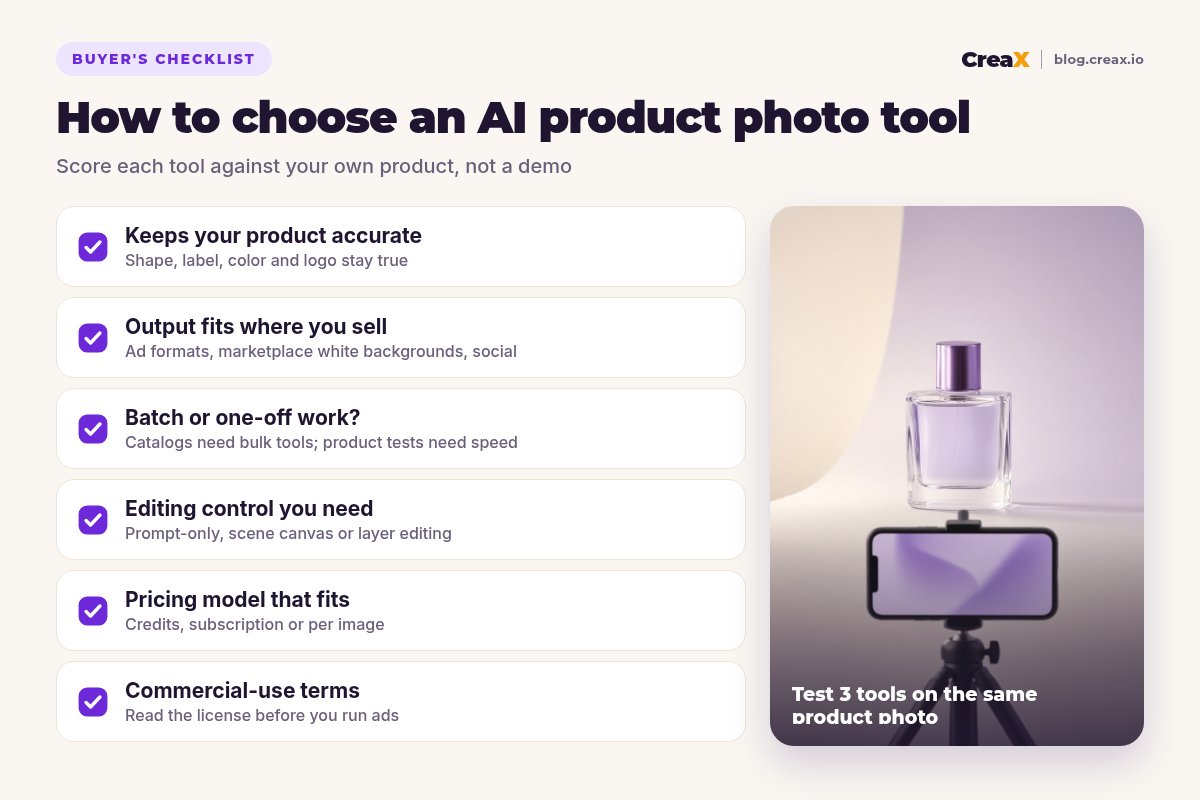
Test every tool against these six points
- ✓Accuracy: zoom in. Are the label, logo, color and proportions still correct?
- ✓Output: do you get the format you need (1:1, 4:5, 9:16 ads; white-background listings)?
- ✓Speed: how many clicks from upload to a file you'd actually publish?
- ✓Scale: can it batch-process your catalog, or is it one image at a time?
- ✓Next step: after the photo, do you still need a designer for the ad, or a builder for the page?
- ✓Terms: read the commercial-use and content policy before running paid ads.
★Score the whole job, not the photo
ExampleWorked example: a small-budget stack
Imagine a new store testing a glass perfume bottle on Meta and TikTok, with a small monthly tool budget and no designer. A sensible setup could look like this:
Start with one creative tool
Add an editor only if needed
Launch 3 angles on one page
Upgrade when you have a winner
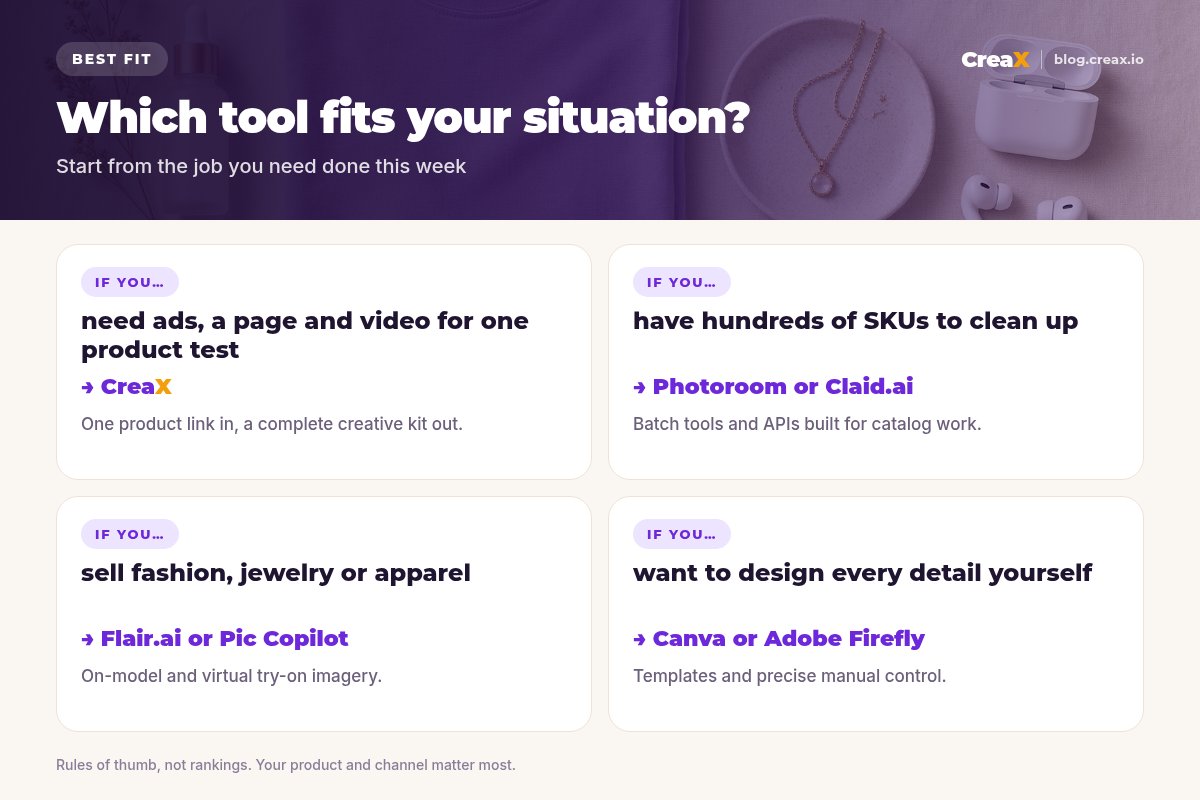
A larger brand with a big catalog might pair Claid.ai or Photoroom for catalog images with CreaX for new-product ad tests. A fashion label might add Flair.ai or Pic Copilot for on-model shots. The pattern is the same: one tool for the job you do most, plus a specialist only where it pays for itself.
Build your first ad kit in about two minutes
Paste a product link and get studio creatives, UGC video ads and a matching landing page, ready for your first test.
Avoid returns and rejected adsKeep AI product photos honest
AI imagery is powerful, but the product in the image has to be the product the customer receives. A few rules keep you safe:
- Never change the product itself. Backgrounds, props and lighting can change; size, color, materials and included parts cannot.
- Keep at least one true-to-life photo on your product page, ideally an unedited angle, so buyers can see exactly what they get.
- Avoid implied claims. A scene that suggests results (a glowing face, a fitter body) can count as a claim on ad platforms.
- Label AI content where platforms require it and follow Meta and TikTok rules on AI-generated media.
!A quick accuracy check before every launch
FAQFrequently asked questions
Q.What is the best AI product photo generator for ecommerce?
Q.Can AI product photos replace a photoshoot?
Q.Are AI product photos allowed in ads?
Q.Do I need a designer if I use an AI photo tool?
Q.How much does CreaX cost?
Q.Which tool is best for Shopify sellers?
Ready to make product photos that sell?
One product link or image, about 60–120 seconds: studio creatives, UGC video ads and a landing page for your next test.
This guide is published by CreaX. We describe other tools from their own public websites as of October 2026, avoid invented scores or prices, and recommend checking each vendor's site for current features and plans.