
How to Organize Ad Creative Naming and Tracking
How to · Creative tracking
After a few weeks of testing, most sellers have dozens of ads called things like “final_v3”, “new video 2” and “Untitled”. Nobody remembers which angle each one tested, and the lessons from last month disappear. A simple naming convention and a tracking sheet fix that. This guide shows how to set up both in an afternoon, with a worked example you can copy.
Updated October 2026 · By the CreaX team
Key takeaways
- ✓Define a few naming fields (date, product, angle, format, hook, version) and always use them in the same order.
- ✓Name every asset the same way in your files, your ad platform and your sheet, so one name links everything.
- ✓Log each test in a sheet: one row per ad, with spend, results and a verdict.
- ✓Review weekly and monthly to spot which angles, hooks and formats win, and turn that into your next brief.
In this guide
The goalWhat you'll have at the end
By the end you'll have a naming convention that tells you what every ad tested just by reading its name, a tracking sheet with one row per ad, and a weekly and monthly routine that turns results into decisions. When a product wins, you'll know exactly which angle, hook and format did it, and you can brief the next round from evidence instead of memory.
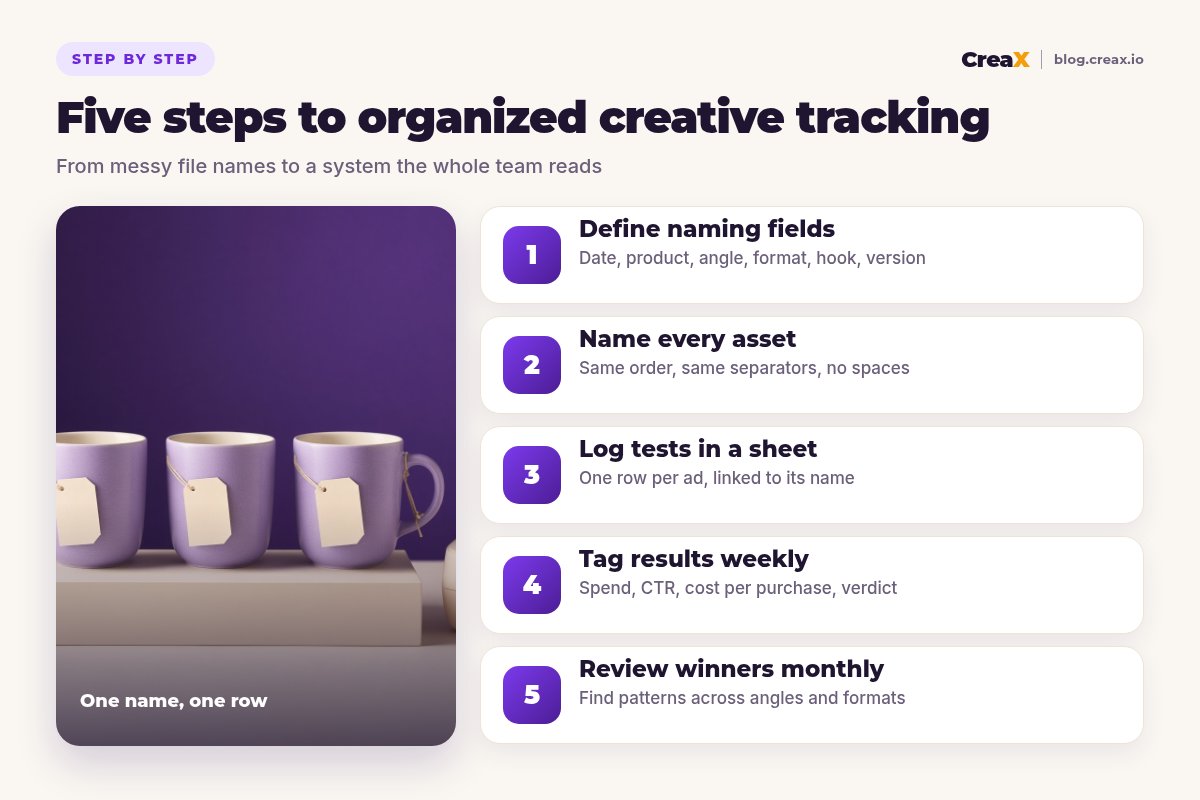
PrepWhat you need before you start
- A spreadsheet: Google Sheets, Excel or any tool your team already uses.
- Access to your ad accounts, such as Meta Ads Manager and TikTok Ads Manager, to export results.
- A shared folder for creatives, organized by product.
- A list of your current tests, even if they're messy. You'll rename and log them as you go.
iStart small
FieldsStep 1: Define your naming fields
Pick the information you'll want to filter by later. For most ecommerce sellers, six fields are enough:
| Field | What it captures | Example codes |
|---|---|---|
| Date | Launch date, so names sort in order | 2026-10-06 |
| Product | A short product code | mug, lamp, serum |
| Angle | The promise or reason to buy | gift, cozy, problem, price |
| Format | The creative type | ugc, static, carousel, demo |
| Hook | Which opening or headline variant | h1, h2, h3 |
| Version | Edits of the same idea | v1, v2 |
A starting set. Add fields like placement or creator only if you'll actually filter by them.
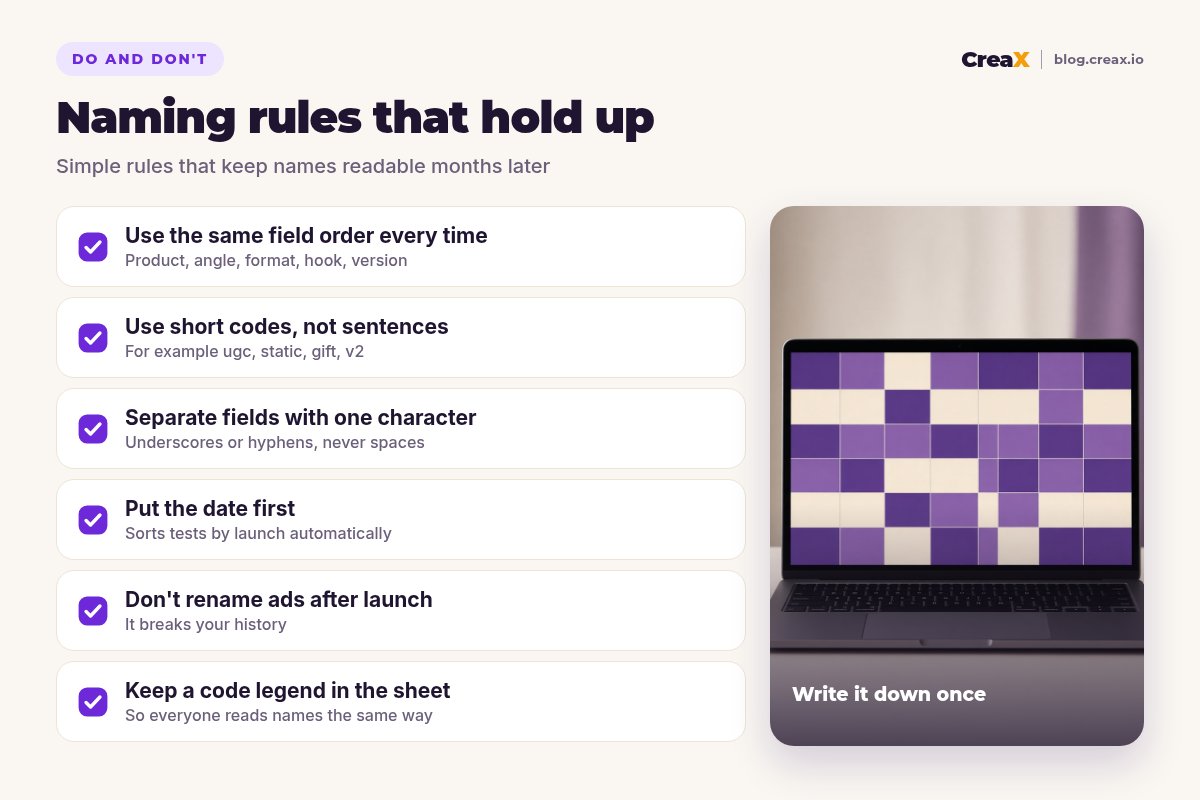
Use short, lowercase codes and one separator, such as underscores between fields and hyphens inside the date. Write the full list of codes in a legend tab in your sheet so everyone uses the same words. For angle ideas worth coding, see how to test ad angles for a new product.
NamingStep 2: Name every asset the same way
Apply the convention everywhere the ad lives:
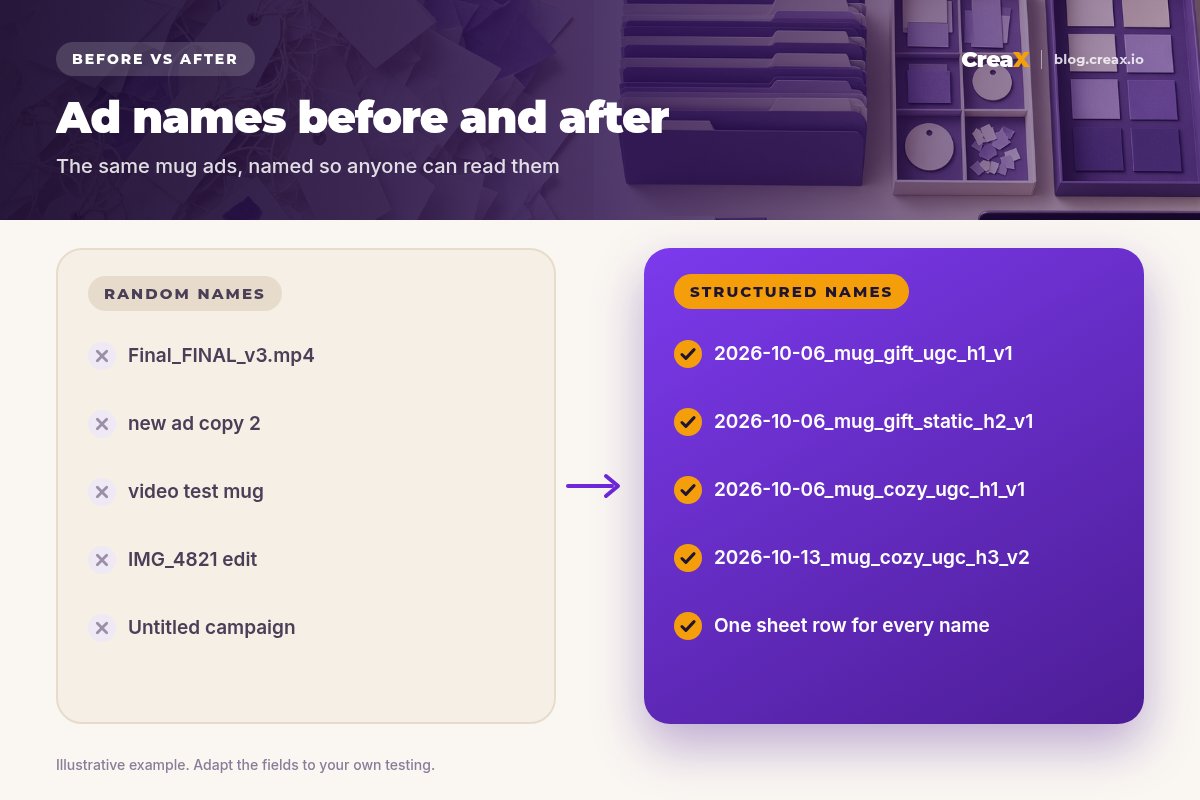
- Creative files: rename the video or image file before uploading, for example 2026-10-06_mug_gift_ugc_h1_v1.mp4.
- Ads in your ad platform: use the same name as the file, so results export with the name you can read.
- Campaigns and ad sets: use a simpler version for the test level, such as 2026-10_mug_angle-test.
- Your tracking sheet: the ad name is the key column that links everything together.
If a creative is edited, create a new version rather than overwriting it. That way your results always point to the exact file that ran.
★Use a name builder
Naming with a team or freelancers
If several people make or upload ads, share the legend and the name builder with everyone before the first file arrives. Ask creators and editors to deliver files already named, or rename them yourself the moment they land in the shared folder, before anything is uploaded. Add a creator or source field only if you actually compare creators, for example when you want to know whether in-house videos beat freelance ones. A single person owning the sheet each week keeps it honest.
SheetStep 3: Log every test in a sheet
Create one row per ad with these columns:
| Column | Why it matters |
|---|---|
| Ad name | Links the row to the file and the ad |
| Product, angle, format, hook | Split from the name so you can filter |
| Launch date and platform | Context for comparing tests |
| Spend | How much the ad has had to prove itself |
| Click-through rate | Did the ad earn attention? |
| Purchases and cost per purchase | Did it make money? |
| Hook rate (video) | Did the opening stop the scroll? |
| Verdict and notes | Winner, loser, needs more data, and why |
Keep the sheet simple enough that you'll update it every week.
Your break-even cost per purchase belongs at the top of each product's section, so every result is read against it. Our guide to break-even ROAS shows how to calculate it.
WeeklyStep 4: Tag results weekly
Once a week, export results by ad name from each platform and update the sheet. Then give each ad a verdict:
- Winner: below break-even with enough spend to trust.
- Promising: good early signals, needs more data.
- Loser: spent its share with no sales or a cost well above break-even.
- Fatigued: a former winner whose results are slipping.
Add one line of notes for anything surprising, such as “strong clicks, weak page conversion” or “hook 2 beat hook 1 on the same body”. For when to call a result, see how many ad creatives to test per product, and for fading ads, the signs of creative fatigue.
What to do with each verdict
A verdict is only useful if it triggers an action. Winners get more budget in steps and new variations of the same angle. Promising ads keep running until they've spent enough to judge. Losers are paused, with a note on what you think went wrong. Fatigued winners get fresh hooks or formats on the same angle. Write the action next to the verdict so the next person who opens the sheet knows what happened and why.
MonthlyStep 5: Review winners monthly
Once a month, filter the sheet by field and look for patterns across products:
- Which angles win most often for your products?
- Do UGC-style videos or statics win for your category and platforms?
- Which hooks or opening styles keep showing up in winners?
- Which products earned their spend, and which should you stop?
Write three to five learnings at the top of the sheet and use them as the brief for next month's creatives. That's the real payoff of naming: each round of testing makes the next one smarter.
ExampleWorked example: a ceramic mug brand
Say you sell lavender ceramic mugs and test two angles, “a cozy gift” and “your calm morning”, across UGC-style videos and statics:
| Ad name | Angle | Format | Verdict |
|---|---|---|---|
| 2026-10-06_mug_gift_ugc_h1_v1 | Gift | UGC video | Promising |
| 2026-10-06_mug_gift_static_h2_v1 | Gift | Static | Loser |
| 2026-10-06_mug_cozy_ugc_h1_v1 | Cozy morning | UGC video | Winner |
| 2026-10-13_mug_cozy_ugc_h3_v2 | Cozy morning | UGC video | Testing |
Illustrative example. Verdicts depend on your own break-even numbers.
A month later, a filter on the sheet shows that the cozy-morning angle wins in video while the gift angle does better closer to holidays. The next brief writes itself: more cozy-morning videos with new hooks, and a gift-angle test saved for the season.
Producing enough variations to test this way is where many sellers stall. CreaX turns one product link or image into UGC-style video ads, studio ad creatives and a landing page in about 60–120 seconds, so you can generate new hooks and formats for a winning angle quickly. Name each download with your convention before uploading, and your sheet stays clean.
Make more variations to test
Paste a product link: UGC-style video ads, studio creatives and a landing page, ready to name, upload and track.
MistakesMistakes to avoid
- Renaming ads after launch. Exports stop matching your sheet and history breaks.
- Too many fields. If names are too long to read, people stop using them.
- Inconsistent codes. “ugc”, “UGC” and “creator” for the same thing ruin filters. Use the legend.
- Logging only winners. Losers teach you as much; record them too.
- No verdicts. Numbers without a decision don't change your next brief.
- Skipping the monthly review. The patterns only appear when you look across tests.
Copy thisChecklist
Set up once, use every week
- ✓Naming fields chosen and written in a legend tab
- ✓Short lowercase codes with one separator
- ✓Same name on the file, the ad and the sheet row
- ✓One row per ad with spend, CTR, purchases and cost per purchase
- ✓Break-even cost per purchase at the top of each product
- ✓Weekly verdicts: winner, promising, loser, fatigued
- ✓Monthly review with three to five written learnings
⚖When a tool helps
FAQFrequently asked questions
Q.What is a creative naming convention?
Q.Should the file name and ad name match?
Q.How long should an ad name be?
Q.What should I track for each ad?
Q.How often should I review results?
Q.How much does CreaX cost?
Ready to test with a system?
One product link, about 60–120 seconds: UGC-style video ads, studio creatives and a landing page for your next named, tracked test.
This guide is published by CreaX. We describe other tools from their own public websites as of October 2026, avoid invented scores or prices, and recommend checking each vendor's site for current features and plans.